Let's be direct: asking "what's the best firewall for my small business?" is a bit like asking what the best vehicle is. The answer always depends on your specific needs. Are you hauling supplies for a manufacturing plant in Erie, or are you running a professional services firm in Pittsburgh? The "best" choice is the one that fits your unique situation.
There’s no single "best" firewall, but there is a best fit for your unique situation, whether that’s a hardware box, a virtual appliance, or a cloud-based service.
Choosing Your First Line of Cyber Defense
If you’re a small business owner here in Western Pennsylvania or Eastern Ohio, we understand. Cybersecurity can feel like a complicated and expensive headache. You know you need to protect your company's data—and your customers' data—but the sheer number of options can be paralyzing.
At its core, a firewall is your digital gatekeeper. It stands guard over your business network, inspecting every bit of traffic coming in and going out, and it’s ruthless about blocking anything that looks malicious.
Think of it as the security guard at the entrance to your office building. It checks IDs (data packets) and only lets authorized people (safe traffic) through the door. Anyone without the right credentials—hackers, ransomware, you name it—gets turned away. Without that guard on duty, your network is an open invitation for trouble, exposing you to financial loss and reputational damage.
Mapping Your Business to the Right Firewall
The very first step is to take a hard look at how your business actually operates. Are most of your people in one central office? Are they spread out, working from home across the region? Or is it a mix of both? This single factor will heavily influence which type of firewall makes the most sense.
This flowchart can help you visualize how your company's structure points toward the right firewall model.
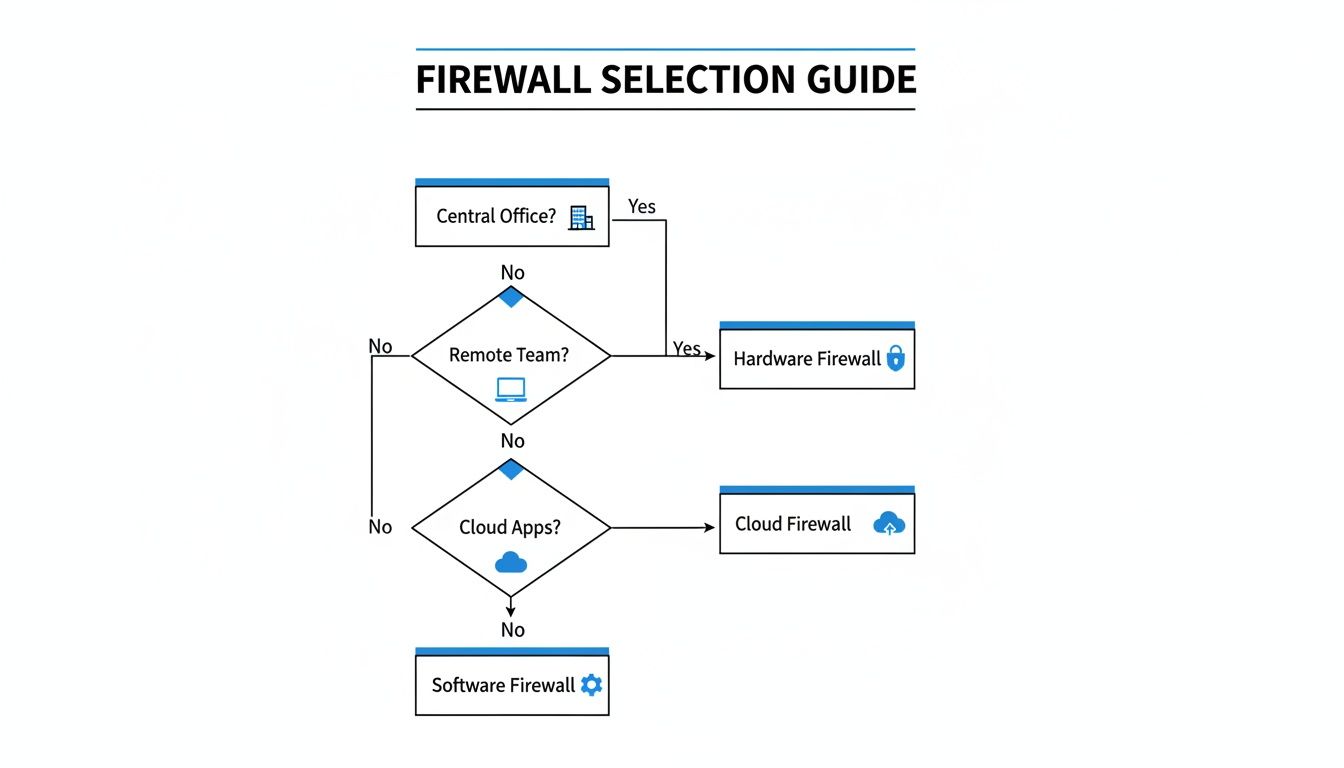
As you can see, a business with a primary office often gets the most value from a physical hardware firewall. On the other hand, a company with a remote workforce or that relies heavily on cloud applications is usually a better candidate for a cloud-based solution.
To help you quickly get your bearings, here’s a high-level summary of the main deployment models and where they shine for SMBs.
Quick Firewall Comparison for Small Business Needs
| Firewall Type | Best For | Key Consideration |
|---|---|---|
| Hardware Firewall | Businesses with a central office (like a manufacturing plant or professional services firm) where most employees are on-site. | Delivers high-speed protection for your local network but needs on-site management and can be a single point of failure if not configured for redundancy. |
| Virtual Firewall | Companies running their own servers or a private cloud that requires segmenting internal network traffic. | Great for securing server-to-server communication and virtual machines, but it requires specialized IT knowledge to set up and maintain correctly. |
| Cloud-Based Firewall | Organizations with a remote or hybrid team, heavy reliance on cloud apps (like Microsoft 365 or Salesforce), or multiple small locations. | Offers fantastic flexibility and scalability, protecting users anywhere they work. However, it’s a subscription service and depends on internet connectivity. |
Setting up that first line of defense means defining the rules of engagement for your network. For a deeper dive, it’s worth understanding the process of building a robust network security policy that your firewall will ultimately enforce.
Of course, all of this starts with appreciating why a firewall is so fundamental in the first place. To learn more, check out our guide on why a firewall is crucial for your business.
Hardware vs. Virtual vs. Cloud Firewalls Explained
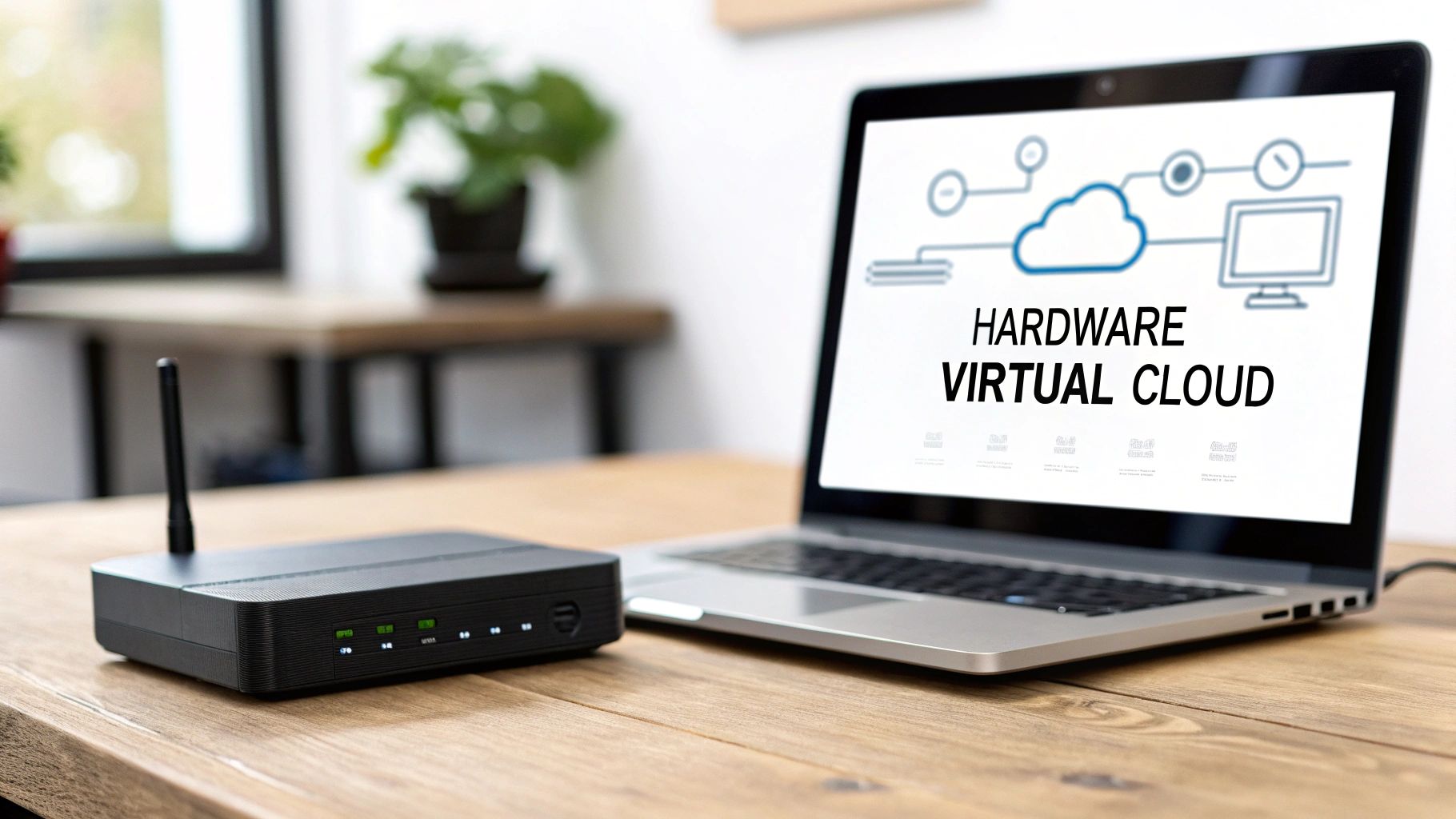
Getting the right firewall for your business starts with understanding the fundamental differences between the main types. When we talk about firewalls, we’re really looking at three distinct deployment models: a physical box, a piece of software, or a cloud service. Each one serves a different purpose and fits best in different business environments.
Choosing the best firewall means matching the technology to your day-to-day operations. A manufacturer in Erie, PA, with all its machinery on-site has completely different security needs than a Pittsburgh-based consulting firm where everyone works from home.
Let’s break them down with some real-world scenarios in mind.
The Traditional Guardian: Hardware Firewalls
A hardware firewall is a physical appliance that sits between your internal network and the outside world, usually right where your internet connection comes into the building. Think of it as the single, heavily fortified entrance to your office. It inspects every bit of traffic before it gets inside.
These devices are the go-to for any business with a central office. For a manufacturing facility or a local healthcare practice, a hardware firewall delivers high-speed, dedicated security right at the network's edge. Because it’s a standalone piece of equipment, it doesn’t bog down your other servers or computers with its security tasks.
The trade-off? The responsibility for managing it—updates, rule changes, and monitoring—falls squarely on you or your IT team. It’s a powerful but very hands-on approach.
The Internal Protector: Virtual Firewalls
A virtual firewall is software that runs on a server you already have in your network. Its main job isn't guarding the front door but acting as an internal security guard, creating secure zones inside your network. This is what we call network segmentation.
Imagine a healthcare practice that stores sensitive patient data on one server and runs its public website on another. A virtual firewall can sit between them, ensuring that even if the website gets compromised, an attacker can't just cross over to the patient records.
This type of firewall is essential for businesses with on-premise servers, especially those that need to meet compliance standards like HIPAA. It provides a critical layer of internal security that a hardware firewall at the edge simply can't offer on its own.
The Modern Defender: Cloud-Based Firewalls
A cloud-based firewall, also known as Firewall-as-a-Service (FWaaS), doesn't live in your office at all—it operates in the cloud. Instead of one central gatekeeper, it protects each of your users no matter where they are, routing their internet traffic through a secure inspection point before it ever reaches their device.
This model is a perfect fit for businesses with remote or hybrid teams, or companies that rely heavily on cloud apps like Microsoft 365. It ensures an employee working from a coffee shop in Youngstown, Ohio, gets the exact same level of protection as someone sitting in the main office.
Key Insight: The biggest advantage of a cloud firewall is its flexibility. It shifts security from protecting a physical location to protecting individual users, which is exactly what the modern, distributed workforce needs.
This move toward more flexible security is driving serious market growth. The global market for small-business firewalls was pegged at $2.5 billion in 2025 and is expected to climb by about 12% each year into the early 2030s. This trend shows how vendors are increasingly building features that cater directly to small and midsize businesses.
Ultimately, each firewall type serves a different strategic purpose. Hardware secures your physical perimeter, virtual protects your internal assets, and cloud extends that protection to your people, wherever they connect from. For many businesses, the strongest defense comes from a hybrid approach that combines elements of each. A comprehensive overview of available cybersecurity solutions for businesses can help you see how these pieces fit together into a larger security puzzle.
Essential Firewall Features for SMB Security
When you start shopping for a firewall, the marketing jargon can feel like a tidal wave of acronyms and technical specs. It’s tough to cut through the noise and figure out what actually matters for your business. For a small business, though, you can get the most protective value by focusing on just a handful of core features.
Zeroing in on these capabilities ensures your investment delivers a real security ROI, protecting you from the threats that SMBs in our region face every day. Think of this as your non-negotiable checklist when you’re looking at any firewall solution.
Intrusion Prevention System (IPS)
A basic firewall is like a bouncer checking IDs at the door—it filters traffic based on where it's from and where it's going. An Intrusion Prevention System (IPS) is much smarter. It's more like a seasoned security guard who can spot suspicious behavior, even if the person has a valid ID.
IPS technology actively inspects the content of the data coming into your network. It’s looking for the signatures of known attacks, malware, and exploits. If it spots a threat, it doesn't just raise an alarm; it shuts it down in real-time before any damage is done.
This is absolutely critical for stopping the more sophisticated threats that easily bypass simple filters.
Secure Remote Access via VPN
In today's world, your team is everywhere—connecting from home offices, client sites, and coffee shops. Securing that traffic is non-negotiable. This is where a Virtual Private Network (VPN) comes in. It creates a private, encrypted tunnel over the public internet.
This means one of your team members in Youngstown, OH, can securely pull files from your main office server in Pittsburgh as if they were right there at their desk. A solid VPN is a must-have for any business with a remote or hybrid workforce. It’s how you keep sensitive company data protected while it's in transit.
A firewall’s VPN capability is the gateway that keeps your distributed team connected and secure. It turns the entire internet into your private, protected network.
Application Control and Web Filtering
You can't secure what you can't control. Your employees might accidentally visit risky websites or use unauthorized apps that punch holes in your security. That's where these control features become your best friends.
- Application Control: Lets you create policies to block or limit specific apps, like high-risk file-sharing programs or social media platforms, on the company network.
- Web Filtering: Prevents employees from reaching known malicious websites, phishing pages, or categories of content (like gambling or adult sites) that violate company policy and often host malware.
This isn't about micromanaging people. It’s about shrinking your company's attack surface by cutting down on risky online activities. This proactive approach is a cornerstone of modern security.
Gateway Antivirus and Anti-Malware
Antivirus software on individual computers is essential, but a firewall with gateway antivirus adds a powerful, second layer of defense. It scans all incoming data for viruses, spyware, and other malware before it ever gets to an employee's machine.
Think of it as a collective shield for your entire office. This network-level scanning can catch threats that might slip past a single computer's defenses, especially if its software is out of date. For any business handling payments, this is a foundational security element. To get a better handle on this, understanding the 12 core PCI compliance requirements shows just how directly a firewall's configuration impacts your ability to protect customer data.
Comparing Top Firewall Solutions for Small Business
Choosing a firewall vendor is a big deal. You're not just buying a box or a subscription; you're picking a security partner whose technology will be the gatekeeper for your business for years. For most small and mid-sized businesses we work with, the choice boils down to a handful of key players known for delivering serious security without the enterprise-level complexity.

This field is pretty concentrated. Market research consistently shows that a few established names—like Cisco, Fortinet, WatchGuard, and Sophos—make up the lion's share of global SMB firewall shipments, often somewhere between 50% and 70%. This concentration actually makes life easier for business owners and MSPs, streamlining support and purchasing. You can dig into the numbers in the full research about the small business firewall market.
Instead of just running down a feature list, let's compare these top solutions based on what really matters to a business owner: ease of management, threat protection effectiveness, total cost of ownership, and how they fit into a partnership with a managed services provider.
Fortinet FortiGate
Fortinet is an absolute powerhouse in the cybersecurity world, and for good reason. They are known for rock-solid performance and a massive suite of integrated security tools. Their FortiGate series is a go-to for SMBs that need top-tier protection but don't have a dedicated security team to manage an overly complex system.
- Key Strength for SMBs: Fortinet’s biggest advantage is its Security Fabric. This isn't just marketing fluff; it allows their different security products (firewall, switches, wireless access points) to talk to each other and work as a single, cohesive unit.
- Management Style: The FortiOS operating system is incredibly powerful, but that power comes with a steeper learning curve. It's really best managed by a seasoned IT pro or a partner like Eagle Point.
- Best Fit Scenario: We often recommend FortiGate for growing professional services firms or small manufacturing plants in our area that need high-performance threat protection and plan to build out a more connected security system down the road.
Cisco Meraki
Cisco has been a leader in networking forever, and their Meraki line was built from the ground up for one thing: simplicity through cloud management. This makes it an incredibly compelling option for businesses with little to no on-site IT staff.
The entire Meraki ecosystem—firewalls, switches, cameras, and more—is managed from a single, clean web dashboard. It’s a genuine game-changer for businesses that need to run lean.
Key Differentiator: The Meraki dashboard is, without a doubt, one of the most user-friendly interfaces in the industry. It enables "zero-touch provisioning," which means we can ship a device to your office, you plug it in, and it automatically pulls its configuration from the cloud. It just works.
- Key Strength for SMBs: Unbeatable simplicity in both deployment and day-to-day management.
- Management Style: It's 100% cloud-based management. This is perfect for businesses with multiple locations or a skeleton IT crew.
- Best Fit Scenario: Think of a retail business with several stores or a healthcare clinic with satellite offices. Meraki is ideal for anyone needing centralized control and dead-simple deployment at each location.
Sophos XGS Series
What makes Sophos special is how they integrate their firewall technology directly with their endpoint protection (the security software on your computers). This creates a "synchronized security" environment where the firewall and your endpoints are in constant communication, sharing threat intelligence in real time.
If an employee's laptop gets infected, the endpoint software can instantly signal the Sophos firewall to isolate that device from the network, containing the threat before it can spread. For a small team, that kind of automated response is a massive advantage.
- Key Strength for SMBs: The Synchronized Security feature delivers a level of automated threat response that is very hard for others to match.
- Management Style: Sophos Central provides a slick, cloud-based dashboard for managing the firewall right alongside all your other Sophos products.
- Best Fit Scenario: Any business that wants a deeply integrated security system where all the pieces work together. It’s a no-brainer for companies already using or considering Sophos for their endpoint protection.
WatchGuard Firebox
WatchGuard has built its reputation on providing robust, all-in-one security appliances specifically designed for the SMB market. Their strategy is to pack a comprehensive set of security services into their Firebox devices, offering tremendous value for the price.
They really focus on making advanced security features accessible. Their reporting and visualization tools are fantastic for helping business owners actually understand what's happening on their network without needing a degree in cybersecurity.
- Key Strength for SMBs: WatchGuard delivers an incredibly strong feature set for the money, making it a high-value choice.
- Management Style: You get flexibility here. It can be managed via the cloud through WatchGuard Cloud or through a traditional local web interface.
- Best Fit Scenario: A budget-conscious business, like a local distribution center, that needs a full suite of security services—IPS, gateway antivirus, application control—all bundled into a single, cost-effective package.
Here’s a quick qualitative comparison to help you see how these vendors stack up based on what matters most for a small business.
Vendor Profile Comparison for SMB Decision-Making
| Vendor | Key Strength for SMBs | Management Style | Best Fit Scenario |
|---|---|---|---|
| Fortinet | Integrated Security Fabric & high performance | Powerful but complex; best for IT pros | Growing businesses needing scalable, high-speed protection |
| Cisco Meraki | Unmatched simplicity & cloud management | 100% cloud-based, intuitive dashboard | Multi-site businesses or those with no on-site IT |
| Sophos | Synchronized security with endpoint protection | Clean, integrated cloud dashboard | Businesses seeking automated, holistic threat response |
| WatchGuard | High value; comprehensive features for the price | Flexible (cloud or local management) | Budget-conscious businesses needing an all-in-one solution |
Ultimately, the "best" firewall depends entirely on your specific situation—your team's technical skills, your budget, and your growth plans. Each of these vendors offers a fantastic product, but the right fit is the one that aligns with your business reality.
Managed Firewall Services vs. In-House Management
Once you've landed on the right firewall technology, you're faced with another critical decision: who's actually going to manage it? This isn't just a technical footnote; it's a strategic business choice between handling it yourself or bringing in a specialist. The best firewall for a small business is one that’s configured perfectly, monitored constantly, and updated relentlessly—and those tasks demand significant time and expertise.
Let's be realistic about what each path means. For many SMB leaders here in Western Pennsylvania and Eastern Ohio, the first instinct is to keep things in-house to save money. But the true cost of DIY firewall management often shows up later in lost productivity, overlooked threats, and the massive pressure it puts on an already swamped team.
The Realities of the In-House Approach
Managing a firewall internally means your team is on the hook for every single aspect of its operation, and that goes way beyond just plugging it in.
- Deep Technical Expertise: Setting up firewall rules requires a surgical understanding of network protocols. One tiny mistake—like a rule that’s a little too permissive—can accidentally swing the door wide open for an attacker.
- Constant Maintenance: Security is never "set it and forget it." Your team has to stay on top of regular firmware updates, patch vulnerabilities the second they're announced, and sift through mountains of log data trying to spot anything unusual.
- The Time Sink: Responding to security alerts, tweaking policies for new software, and just keeping up with the latest threats is a full-time job. For a small IT team or a business owner wearing the IT hat, it’s a distraction from activities that actually grow the business.
The DIY route might work for a 100-employee company with a dedicated, experienced IT pro on staff. But for a 25-person firm with no dedicated IT, the risk and workload just aren't sustainable.
The Strategic Value of Managed Firewall Services
Partnering with a Managed Service Provider (MSP) for your firewall means you offload this entire responsibility to a team of dedicated security experts. This move transforms your firewall from a complicated box in the server closet into a hands-off security service that just works.
An MSP handles the 24/7/365 monitoring, making sure threats are spotted and stopped at any hour of the day or night. They manage all the updates, use global threat intelligence to proactively block brand-new attacks, and provide clear reports for compliance or just for your own peace of mind.
The real benefit of a managed firewall is that you can finally stop worrying about it. You’re not just buying a piece of tech; you’re bringing on a dedicated security team that’s always watching your network’s front door.
This strategic shift is why so many SMBs are moving toward managed security. Analysts expect small and medium businesses to be the fastest-growing buyers of firewall solutions, with growth rates hitting around 10–13%. Studies consistently show that smaller organizations with layered, professionally managed security can dramatically lower the average cost of a data breach. You can dig into more insights on enterprise firewall market trends to see just how popular this approach has become.
For a business owner, this means your team can get back to focusing on innovation, customer service, and growth, all while knowing your network's primary defense is in expert hands. You can learn more about how Eagle Point delivers this value through our comprehensive managed IT services.
A Quick Comparison: In-House vs. Managed
| Aspect | In-House Management | Managed Firewall Service |
|---|---|---|
| Expertise | Relies on existing staff's knowledge, which may be limited or spread thin across many other duties. | Access to a dedicated team of certified cybersecurity professionals who live and breathe this stuff. |
| Monitoring | Typically limited to business hours, leaving you vulnerable overnight, on weekends, and during holidays. | 24/7/365 real-time monitoring and threat response. Attacks don't stick to a 9-to-5 schedule. |
| Cost Structure | High upfront hardware costs plus unpredictable internal labor hours for maintenance and emergencies. | A predictable, fixed monthly fee that covers the hardware, software, and the expert team managing it. |
| Focus | Your internal team gets pulled away from revenue-generating projects to fight fires and manage security. | Your team stays focused on core business goals, not security minutiae. |
Your Firewall Implementation and Selection Checklist
Choosing and deploying the right firewall for your business can feel like a massive undertaking. To cut through the complexity, we've put together a straightforward, actionable checklist that breaks the whole process down.
Think of this as your roadmap, guiding you from the initial discovery phase all the way to a successful launch. If you find yourself getting stuck on any of these steps, that’s usually a good sign that bringing in a security partner can make the journey smoother and deliver a much better result in the end.
Phase 1: Initial Assessment and Discovery
Before you can even think about picking out a firewall, you have to know exactly what you're protecting. This first phase is all about mapping out your unique business environment and security needs. It's the foundation for everything else.
-
Identify All Network Assets: First things first, make a simple inventory of every single device connected to your network. This means servers, computers, and printers, but don't forget the specialized equipment unique to your industry—think manufacturing machinery on the factory floor or sensitive medical devices in a clinic.
-
Map User Access Needs: Next, document who needs to get to what. You'll want to clearly separate the needs of your on-site employees in the Western PA office from your remote team dialing in from Eastern Ohio. Don't forget about any third-party vendors who may need limited access.
-
Define Compliance and Data Sensitivity: Are you handling protected health information and need to be HIPAA compliant? Or are you a defense contractor navigating the complexities of CMMC? Pinpoint these regulatory must-haves and identify exactly where your most sensitive data—like client financial records or patient charts—lives on your network.
Phase 2: Evaluation and Selection
Now that you have a clear picture of your needs, you can start looking at solutions and partners with real confidence. This stage is less about the tech specs and more about making a smart business decision.
- Request Targeted Demos: Don't just sit through a generic sales pitch. Ask vendors to show you exactly how their firewall will solve your specific problems, like securing remote workers or segmenting your internal network to protect sensitive data.
- Compare Total Cost of Ownership (TCO): Look past the sticker price of the box. You need to factor in the real costs over a three-year span, including annual security subscriptions, support renewals, and the hours your own team will spend managing it.
- Evaluate Potential Partners: If you’re leaning toward a managed service, put potential partners under the microscope. Look at their expertise, ask about their response times, and check out what their current clients are saying. The right partner is just as critical as the technology itself.
Key Takeaway: A successful firewall project is built on thorough planning. The single biggest mistake we see businesses make is rushing this assessment phase, which almost always leads to buying a solution that doesn't actually fit their needs.
Phase 3: Deployment and Ongoing Management
With your choice made, it's time to put it into action and create a routine to keep it effective long-term.
- Define and Implement Access Rules: This is where the rubber meets the road. Start with a baseline of "deny all" traffic. From there, you can poke holes in that wall, but only for traffic that is absolutely essential for your business to run.
- Configure Secure Remote Access (VPN): Get your VPN set up for every remote employee. This ensures that their connection back to the company network is encrypted and secure from prying eyes.
- Schedule Regular Policy Reviews: Your business isn't static, and neither are the threats you face. Make a plan to review and tweak your firewall rules at least quarterly. This keeps your security posture relevant and strong as things change.
Frequently Asked Questions About Small Business Firewalls
Over the years, we've heard just about every question imaginable from business owners across Western Pennsylvania and Eastern Ohio. Here are a few of the most common ones we get, with some straight-to-the-point answers from our experience on the front lines.

How Much Should a Small Business Budget for a Firewall?
This is the big one, and the honest answer is: it depends. The cost isn't just about the hardware; it's about the type of firewall, how many people it needs to protect, and the security services you activate on it.
A basic hardware appliance might only run a few hundred dollars upfront, but a managed service rolls everything into a predictable monthly fee—the hardware, the software, the updates, and the expert watching over it. You have to think in terms of Total Cost of Ownership (TCO) over three years, not just the initial purchase price. For many SMBs, the predictable operational expense of a managed service is far more budget-friendly than the large capital expense and hidden labor costs of a DIY approach.
Can a Firewall Stop All Cyberattacks?
No, and any provider who tells you otherwise isn't being straight with you. A firewall is an absolutely critical, non-negotiable part of your security setup, but it’s just one piece of a much larger puzzle.
Think of your firewall as the strong, locked front door to your business. It's essential, but you still need locks on the windows (endpoint protection), a good alarm system (email security), and smart employees who don't let strangers in (security awareness training).
For a firewall to do its job properly, it needs to be part of a complete, layered security strategy.
Do We Still Need a Firewall if Our Team Works Remotely?
Yes, absolutely. In fact, a firewall becomes even more critical when you have a remote or hybrid team. It's the secure anchor for your entire business.
That firewall protects your core network and servers from threats that could otherwise sneak in from a less-secure home Wi-Fi network. It also serves as the secure gateway for employees connecting back to company resources through a VPN, ensuring every bit of that traffic is encrypted and shielded from prying eyes. For fully remote teams, a cloud firewall is often the best fit, extending that same protection to every employee, no matter where they connect from.
Choosing the best firewall for your small business is one of the most important decisions you'll make to protect everything you've worked so hard to build. If you need a hand sorting through the options or just want an expert partner to manage your security, Eagle Point Technology Solutions is here to help.
Reach out for a no-obligation consultation to make sure your first line of defense is strong, reliable, and the perfect fit for your business.