A cybersecurity risk assessment isn't just another document—it's your strategic game plan for digital defense. It’s a structured framework that guides your business in systematically identifying, evaluating, and prioritizing the cyber threats you actually face, turning abstract fears into a concrete action plan.
Think of it as a repeatable process that ensures you spend your limited budget on fixing the most critical vulnerabilities first. This guide, along with a practical template, will walk you through exactly how to put it to work for your small or medium-sized business.
Moving Beyond Basic Cybersecurity For Your SMB
If you're an SMB owner in Western Pennsylvania or Eastern Ohio, you’re constantly hearing about ransomware, phishing, and other digital threats. The problem is, most of the advice you find feels like it was written for a Fortune 500 company with a massive security team and an even bigger budget to match.
It’s easy to feel overwhelmed, wondering where to even start. You probably have antivirus software and a firewall, but you're asking the right question: Is that truly enough? The honest answer is usually no.
This is where a cybersecurity risk assessment becomes your most practical tool. It's not some complex, expensive audit. It's a strategic map that shows you exactly where your real vulnerabilities are hiding. It helps you answer the crucial question so many business leaders face: "How do I spend my limited security budget wisely?"
By identifying your biggest risks, you can prioritize the fixes that deliver the most protection for your investment. This guide, built around a practical template, is designed to give you that clarity and control. We'll show you how to move from a reactive, "hope for the best" stance to a proactive, informed security posture.
The Real Cost Of Security Blind Spots
For many small and midsize businesses, the potential impact of a cyber incident feels vague and distant. It's not until you connect a specific vulnerability to a tangible business outcome that the need for a structured assessment really clicks. Without this process, you could be spending time and money defending against the wrong threats while leaving your most valuable assets exposed.
If you want a primer on the fundamentals, our guide on the introduction to cybersecurity for small businesses offers some valuable context.
A thorough risk assessment is the single most effective way to cut long-term costs by preventing security incidents before they happen. It makes sure your security resources—money, time, and people—are strategically aimed at protecting your most critical business assets.
Let’s look at some common blind spots we see every day with businesses in manufacturing, healthcare, and professional services, and what they can actually cost you.
Common SMB Security Blind Spots And Their True Cost
Many business owners don't realize how a simple oversight can cascade into a major operational or financial disaster. The table below connects those dots, showing how a risk assessment brings these hidden risks into the light.
| Security Blind Spot | Potential Business Impact | How An Assessment Provides Clarity |
|---|---|---|
| No Employee Security Training | An employee clicks a phishing link, leading to a ransomware attack that halts production for three days, costing tens of thousands in lost revenue and recovery fees. | The assessment identifies "human error" as a high-likelihood threat and prioritizes low-cost, high-impact security awareness training as a primary control. |
| Unmanaged Personal Devices | A team member accesses company data on a personal laptop that gets infected with malware, leading to a breach of sensitive client information and significant reputational damage. | It highlights the risk from unmanaged endpoints and helps you create a Bring-Your-Own-Device (BYOD) policy to secure company data, no matter where it's accessed. |
| No Vendor Vetting Process | A key software vendor suffers a breach, exposing your sensitive customer data. You're now dealing with legal liabilities and a loss of client trust. | The process forces you to evaluate third-party risk, adding vendor security questionnaires to your procurement process to ensure your partners take security as seriously as you do. |
Seeing these connections makes it clear: a risk assessment isn't just an IT exercise. It's a critical business planning tool that protects your bottom line, your operations, and your reputation.
Deconstructing the Risk Assessment Template
Our downloadable cybersecurity risk assessment template might look complex at first, but it's designed for clarity, not complication. Think of it less like a highly technical audit and more like a structured business tool to help you make smarter, faster security decisions.
Let's walk through what each part does and how they all fit together. The whole point is to turn those abstract fears about cyber threats into a concrete action plan, moving your business from a state of confusion to one of confident clarity.
This visual flow shows exactly how a structured assessment gets you there.
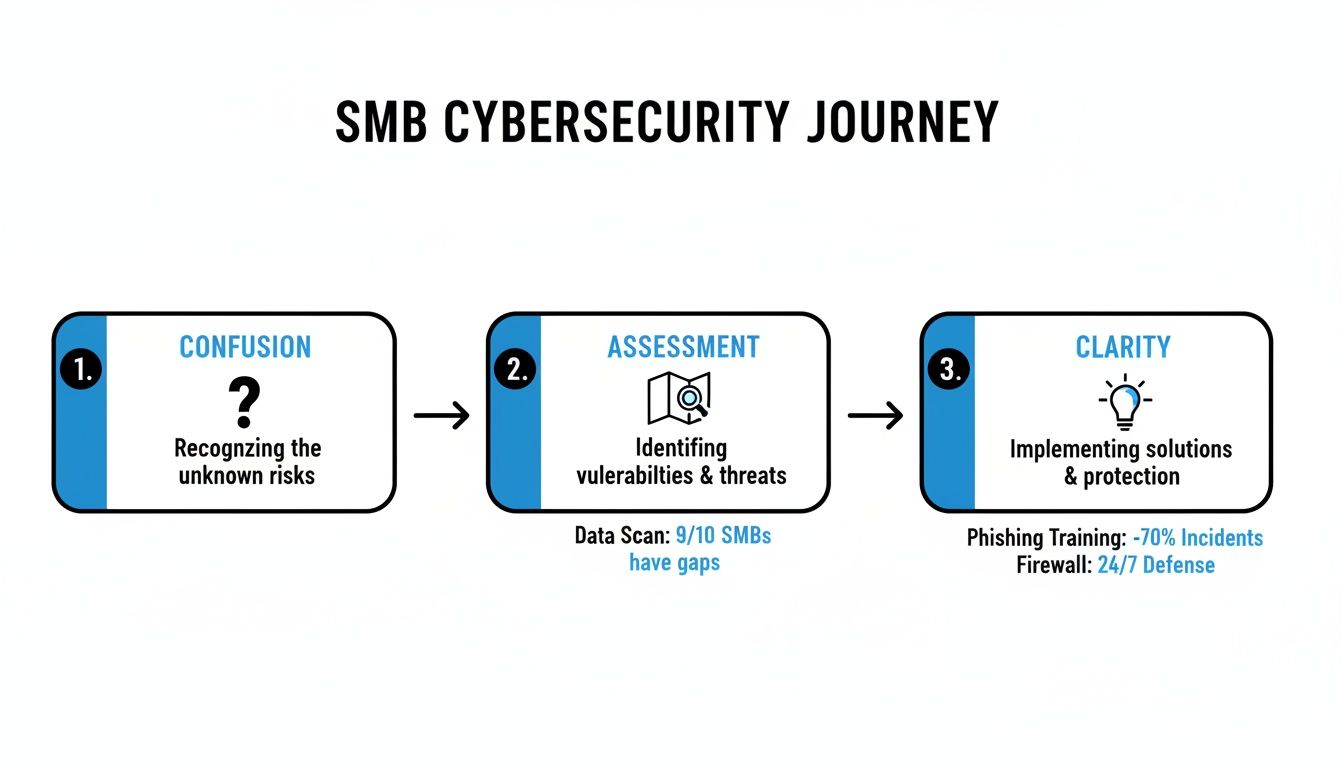
Ultimately, we're taking vague security worries and transforming them into a prioritized to-do list that protects what truly matters to your business.
Asset Inventory: What Do You Need To Protect?
The first step is the Asset Inventory. To be clear: this isn't about listing every single computer in your office. It’s about pinpointing what is most valuable to your day-to-day operations and your company's success.
Ask yourself this: What would cause the most damage if it were lost, stolen, or taken offline? This inventory becomes the foundation for everything else.
- Physical Hardware: Think beyond laptops and desktops. This includes the main server in your back room, critical manufacturing equipment like CNC machines, and the network switches that tie it all together.
- Software Systems: List the applications your business cannot run without. We're talking about your ERP system for managing inventory, QuickBooks for financials, or the CRM platform that holds all your customer data.
- Sensitive Data: This is often your most valuable—and most targeted—asset. It includes your customer database, proprietary product schematics, employee personally identifiable information (PII), and all financial records.
By starting here, you immediately focus the entire assessment on what keeps the lights on and the revenue coming in.
Threat Identification and Vulnerability Analysis
Next, the template guides you through Threat Identification and Vulnerability Analysis. This is where you put yourself in an attacker’s shoes.
A threat is what could cause harm (e.g., ransomware), while a vulnerability is the weakness that lets the threat in (e.g., an unpatched server).
It’s a common point of confusion, but getting this right is critical. A vulnerability scan tells you there's an unlocked window. The risk assessment asks, "What's the likelihood a burglar notices that window, and what would they steal if they got inside?"
To get you started, our template lists common threats we see hitting SMBs all the time:
- Human Error: An employee accidentally clicking a phishing link. It happens more than you think.
- System Failure: An aging server finally giving up during a critical production run.
- Malicious Attacks: A targeted ransomware attack encrypting all your shared files and demanding a hefty payment.
- Third-Party Risk: A key software vendor suffering a data breach that exposes your client data, making it your problem.
This section helps you connect potential real-world disasters to the critical assets you just inventoried.
The Impact and Likelihood Matrix
This is where the magic happens. The Impact & Likelihood Matrix is where you stop guessing and start quantifying risk with a simple 1-5 scoring system. You’ll ask two key questions for each threat-asset pair you've identified:
- Likelihood: How likely is this to actually happen? (1 = Very Unlikely, 5 = Almost Certain)
- Impact: If it did happen, how bad would it be for the business? (1 = Minor Inconvenience, 5 = Catastrophic Damage)
Multiplying these two numbers gives you a risk score. Suddenly, that long list of worries is a prioritized, numerical ranking. It’s no longer about what feels scary; it's about what the data shows is the biggest, most immediate danger to your operations.
The Risk Register: Your Action Plan
Finally, all this information flows directly into the Risk Register. This is the summary output of your entire assessment—a color-coded dashboard showing your highest-priority risks at a glance.
A risk with a score of 25 (High Impact, High Likelihood) is a red-flag item that demands immediate attention. On the other hand, a risk scoring a 4 is something you can probably just monitor or accept for now. This register becomes the foundation for your security roadmap and, just as importantly, your budget discussions with leadership.
To help formalize your findings into actionable guidelines for your whole team, consider using resources like a well-structured network security policy template. It's a great way to turn your assessment results into enforceable company-wide rules.
Your First Risk Assessment: A Practical Walkthrough
Theory is great, but the real value comes from putting the cybersecurity risk assessment template into practice. Let's walk through a realistic scenario to see how this process actually works from start to finish. This isn't about just filling out a spreadsheet; it's about building a real defensive strategy rooted in your day-to-day operations.
Imagine you run a successful manufacturing firm here in Eastern Ohio. Your days are slammed with managing production schedules, client relationships, and supply chain logistics. Cybersecurity feels like a problem for another day—until a competitor gets hit with a major ransomware attack that shuts them down for a week. Suddenly, it’s a top priority.

This is exactly where the template becomes your practical guide. Let's start with the first tab: the Asset Inventory.
Populating the Asset Inventory
First things first, you need to identify and list the critical assets that keep your manufacturing business running. Don't get bogged down trying to list every single device. Instead, focus on what would cause the most damage if it were compromised or taken offline.
For our Ohio-based manufacturer, that list might look something like this:
- CNC Machine Software: The proprietary software that controls your most expensive production machinery. If it goes down, your main revenue stream stops cold.
- Client Schematics Server: This server holds all your sensitive customer blueprints and designs. A breach here would be a catastrophic blow to your reputation and competitive edge.
- Employee Laptops and Desktops: These are the daily drivers for your team and the main entry points for many cyber threats. Effective endpoint security management is non-negotiable for these devices.
- ERP System: The brain of your operation, managing inventory, scheduling, and billing. If it goes down, everything grinds to a halt.
By defining these assets first, you create a focused scope for the rest of the assessment. You're no longer trying to protect "everything"; you're protecting the specific systems that truly matter.
Identifying Relevant Threats and Vulnerabilities
Now, let's put on our hacker hat. With your critical assets listed, you can start pinpointing the specific threats that could target them. This isn't about vague, generic fears but about plausible scenarios relevant to your business.
A ransomware attack, for instance, isn't just a single threat; it’s the result of a vulnerability being exploited.
Threat: A ransomware attack encrypts your server.
Vulnerability: An employee, who has never been trained to spot phishing emails, clicks a malicious link and unknowingly downloads malware.
In this part of the process, you’ll list potential threat-vulnerability pairs for each asset you identified. For our manufacturing firm, another example could be a data breach. The threat is an external attacker stealing your client schematics. The vulnerability? An unpatched, internet-facing server that provides an easy backdoor.
Scoring the Risk: How Likely and How Bad?
This is where the abstract becomes concrete. Using the template's Impact & Likelihood Matrix, you’ll assign a score from 1 (Low) to 5 (High) for each risk you've identified.
Let's score that phishing-induced ransomware scenario:
- Likelihood: Your team has never had formal security awareness training. Phishing emails are getting more sophisticated by the day, making it highly probable someone will eventually click a malicious link. You score this a 4 (High Likelihood).
- Impact: If your CNC software and ERP system are encrypted, production stops completely. You're facing downtime costs, potential ransom payments, and severe reputational damage. The impact would be devastating. You score this a 5 (Catastrophic Impact).
Multiplying these gives you a risk score: 4 x 5 = 20. That high number immediately flags this risk as a critical priority.
Now, let's consider the risk of a data breach from that unpatched server. Let’s say the server is old but doesn’t house your most critical data. The likelihood might be a 3, and the impact might also be a 3, resulting in a risk score of 9. It's still a concern, but it's clearly less urgent than the ransomware threat. When building out these scenarios, referencing a structured guide like an ultimate SOC 2 readiness assessment checklist can be a huge help in making sure you're considering all your core operational areas.
Visualizing Priorities with the Risk Register
As you finish scoring each risk, the template's Risk Register automatically populates. This is the final, color-coded output that translates all your hard work into a simple, visual action plan.
Your ransomware risk, with its score of 20, will show up bright red—an undeniable signal that it requires immediate attention. The server data breach risk, scoring a 9, might appear in yellow, marking it as a moderate priority that can be addressed after the red items are handled.
This quick walkthrough shows how the cybersecurity risk assessment template transforms a complex, overwhelming problem into a clear, manageable process. You’ve gone from a vague sense of unease to a prioritized list of actions, empowering you to make smart, data-driven decisions about where to invest your limited security budget for the greatest possible impact.
Turning Your Assessment into a Smart Security Plan
So you've completed the cybersecurity risk assessment template. That's a huge first step, but its real power comes from what you do next. Think of the color-coded Risk Register not as a final report card, but as a strategic guide for building a practical, budget-conscious remediation plan. This is where you shift from just identifying risks to making smart decisions that actively strengthen your security.
For a small or medium-sized business, this isn't about trying to eliminate every single risk—that’s a recipe for draining your budget and burning out your team. The goal is to make calculated choices that address the most significant threats your business actually faces.
This process is all about creating a phased security roadmap that beefs up your defenses over time, without causing unnecessary disruption.
Choosing Your Risk Response Strategy
Once your Risk Register is filled out, you’ll see a clear hierarchy of threats. But not every risk needs a complex technical fix. As a trusted advisor to SMBs, we always counsel clients to consider four primary responses for each risk they've identified. This framework turns your assessment into a powerful decision-making tool.
The four common strategies are:
- Accept: For those low-impact, low-likelihood risks, the cost to fix them might honestly be more than the potential damage. Formally accepting a risk means you’ve acknowledged it and decided no immediate action is necessary.
- Mitigate: This is your go-to for high-priority risks. Mitigation means putting controls in place—like new tools, updated policies, or better procedures—to reduce a threat’s likelihood or impact.
- Transfer: Sometimes, it’s more cost-effective to shift the financial burden of a risk to someone else. The most common way to do this? A comprehensive cyber insurance policy.
- Avoid: If a risk tied to a specific activity is simply too high, you might just stop doing that activity. It's the most decisive option, but sometimes it's the right one.
Choosing the right strategy is a business decision, not just a technical one. It requires balancing the cost of the solution against the potential cost of the incident—a classic risk-versus-reward calculation.
Practical Mitigation For High-Priority SMB Risks
Let's make this real. Imagine your assessment flags Business Email Compromise (BEC) as a "red" item on your Risk Register—a high-likelihood, high-impact threat. You've wisely decided to mitigate it.
This doesn't mean you need to rush out and buy an expensive, enterprise-grade email security platform tomorrow. For an SMB, effective mitigation is often a layered approach of affordable, high-impact actions.
Here’s a practical, phased plan to tackle a BEC risk:
- Implement Security Awareness Training: This is your highest-ROI first step. Train your people to spot phishing attempts, recognize suspicious wire transfer requests, and understand the tactics attackers use. A sharp team is your best first line of defense.
- Enforce Multi-Factor Authentication (MFA): MFA is the single most effective technical control against account compromise. Even if an attacker steals a password, they can't get in without that second factor. This should be non-negotiable for email and any critical system access.
- Deploy Email Authentication Protocols: Work with your IT partner to configure SPF, DKIM, and DMARC. These are technical standards that help prevent attackers from spoofing your company's domain, making it much harder for them to impersonate your executives in phishing emails.
This layered approach systematically reduces your exposure to BEC without a huge upfront investment.
Creating A Phased Security Roadmap
Your risk assessment shouldn't result in a single, overwhelming project. A much smarter approach is to use your prioritized Risk Register to build a phased security roadmap for the next 6-12 months.
Start by grouping your high-priority ("red") risks. For each one, outline the mitigation steps, assign an owner, and set a realistic timeline.
For example:
- Quarter 1: Address the Business Email Compromise risk. Complete employee security training and roll out MFA across the entire organization.
- Quarter 2: Tackle the moderate ("yellow") risk of unpatched servers. Implement a formal patch management policy and schedule regular maintenance windows.
- Quarter 3: Review and mitigate third-party vendor risks by sending security questionnaires to your critical suppliers.
This method transforms a daunting list of vulnerabilities into a manageable, step-by-step plan. It lets you demonstrate continuous improvement, manage your budget effectively, and build a genuinely stronger security posture over time. The cybersecurity risk assessment template is your starting point, but this roadmap is what drives real, lasting change.
Using Pro Frameworks for a Smarter Risk Strategy
When you're mapping out your company's cybersecurity plan, you don’t have to start from scratch. Thankfully, experts have already created proven blueprints for this exact challenge. Our own cybersecurity risk assessment template is built on the same principles found in established frameworks like NIST and CIS—think of them as the official "building codes" for a strong security program.
These frameworks are a collection of best practices, tested and refined over years by security pros across thousands of organizations. They give you a repeatable, defensible, and structured way to manage digital risks. For a small or midsize business, leaning on these principles provides massive advantages.
Why SMBs Should Bother with Frameworks
At first glance, big-name frameworks like the NIST Cybersecurity Framework (CSF) or the CIS Controls might seem like overkill for a smaller business. But they were actually designed to be scalable. Using a template that’s grounded in these professional standards gives you a pro-grade methodology tailored to the reality of your business's size and resources.
This approach helps you confidently answer client security questionnaires, tackle compliance requirements like HIPAA or CMMC, and build a more resilient business overall. It’s a clear signal that you’re taking security seriously and following an industry-recognized playbook. You can learn more about the effectiveness of these frameworks and templates from Netwrix.
NIST CSF: The Gold Standard for Managing Risk
The National Institute of Standards and Technology (NIST) Cybersecurity Framework is one of the most respected guides in the industry. It’s not a rigid set of rules you have to follow blindly. Instead, it’s a flexible structure organized around five core functions that make perfect sense for any business.
- Identify: Know what you're protecting. This means understanding your assets, business environment, and existing risks. This is the foundation.
- Protect: Implement safeguards to keep your critical services running. This covers everything from access control to employee security training.
- Detect: Develop ways to spot a cybersecurity event quickly. You can't stop what you can't see.
- Respond: Have a plan ready to go once a security incident is detected. Who does what? What are the immediate steps?
- Recover: Create plans for resilience. How do you restore any capabilities that were knocked offline during an incident?
Our template is designed to walk you through these functions in a way that’s practical for an SMB, helping you focus your efforts where they’ll deliver the most bang for your buck.
Adopting a framework isn't about achieving security perfection overnight. It’s about making continuous, measurable improvements to your security posture based on a proven methodology. It replaces guesswork with a clear, strategic direction.
CIS Controls: Your Prioritized Action Plan
If NIST provides the "what," then the Center for Internet Security (CIS) Controls provide the "how." The CIS Controls are a prioritized list of specific, actionable things you can do to protect your organization from the most common and damaging cyberattacks seen today.
What makes them so useful for SMBs is that they are broken down into Implementation Groups (IGs) based on an organization's size and resources. IG1, for example, defines "basic cyber hygiene" and represents a set of foundational safeguards every single business should have in place.
By aligning your risk assessment findings with the CIS Controls, you get an instant action plan. Let’s say your assessment flags weak access controls as a major risk. The CIS framework immediately points you to specific safeguards, like enforcing multi-factor authentication and tightening up how you manage user credentials. This also extends to managing third-party access, a critical step we cover in our guide on IT vendor management best practices.
Using a template grounded in these professional standards means you aren’t just running a one-off check. You’re adopting a professional methodology that helps you build a more secure, compliant, and resilient business for the long haul.
Common Questions About Cybersecurity Risk Assessments
Even with a solid template in hand, it's normal to have questions. As a trusted advisor to SMBs across Western Pennsylvania and Ohio, we've heard just about all of them. Let's tackle the most common ones we hear from business leaders so you can move forward with confidence.
How Often Should I Conduct a Risk Assessment?
This is the question we get asked most often. The straightforward answer is that a full, deep-dive assessment should be an annual strategic review. Think of it like a yearly physical for your company’s digital health—a chance to examine your security posture from top to bottom.
But that annual review is just the starting point. A risk assessment isn’t a "one and done" task to check off a list. It's a living document.
You should perform a fresh assessment anytime your business goes through a major change, such as:
- Migrating to a new cloud platform like Microsoft 365.
- Launching a major new software system, like an ERP or CRM.
- Acquiring another company and merging your IT operations.
- Making a significant shift to a remote or hybrid work model.
Each of these events introduces new assets, new potential threats, and new vulnerabilities. Keeping your assessment current ensures your security strategy keeps pace with how your business is growing.
Can I Use This Template Without Being a Cybersecurity Expert?
Yes, absolutely. This cybersecurity risk assessment template wasn't built for security gurus. It was designed for business owners, operations leaders, and IT managers at SMBs.
Your deep knowledge of what makes your business tick is the most critical ingredient.
You're the expert on questions like:
- What data is absolutely critical to our day-to-day operations?
- Which systems would shut us down completely if they went offline?
- Where are our biggest operational bottlenecks?
The template simply provides a framework to translate that essential business knowledge into a clear, actionable security plan. While an IT partner can help validate the technical details, you are more than equipped to lead the process.
What Is the Difference Between a Vulnerability Scan and a Risk Assessment?
This is an excellent question and a common point of confusion. They sound similar, but they serve two very different functions.
A vulnerability scan is a technical, automated tool. It scans your network and systems to find specific, known flaws—like an unpatched server or out-of-date software.
A vulnerability scan tells you, "There is an unlocked window on the first floor." A risk assessment provides the crucial business context.
A risk assessment, on the other hand, is a strategic business process. It takes the output from that scan and asks the bigger, more important questions: "What's the likelihood a burglar even notices that unlocked window? What's inside that room that they might steal? What would the financial and reputational damage be if they got in?"
The assessment provides the business context you need to prioritize which fixes actually matter most.
How Can a Risk Assessment Save My Business Money?
Without a formal assessment, security spending often becomes a guessing game. We've seen it time and again: businesses overspend on a fancy new tool they don't really need while leaving a simple but critical vulnerability wide open. It’s an easy trap to fall into when you're just reacting to the latest scary headline.
A proper risk assessment gets rid of that guesswork.
It gives you a prioritized, data-driven action plan. This ensures every dollar you spend on security is aimed at knocking down your most significant and probable threats first. It’s the single most effective way to maximize your security ROI, stop wasting money on the wrong things, and build a defense that truly protects your bottom line.
Navigating the complexities of a risk assessment can feel daunting, but you don't have to do it alone. The experts at Eagle Point Technology Solutions are here to help you turn your assessment findings into a practical, affordable security roadmap that protects your business.
Schedule a free consultation with our cybersecurity specialists today.