Think of a data retention policy as the official rulebook for your company’s information. It’s a simple but powerful document that outlines what data you keep, how long you keep it, and when (and how) you get rid of it for good. Without one, your digital files can quickly become a disorganized, costly, and high-risk mess. For many small and medium-sized businesses, this isn't just about spring cleaning; it's a critical part of your cybersecurity and operational strategy.
What a Data Retention Policy Actually Is

For many business owners I talk to in Western Pennsylvania and Eastern Ohio, the term "data retention policy" sounds like something reserved for massive corporations with teams of lawyers. The reality is much simpler. It's a practical business tool that shifts you from a chaotic "keep everything forever" mindset—a common pain point for SMBs—to a structured, intentional approach to managing your information.
Let's use a real-world analogy. Picture the stockroom of a busy manufacturing facility or retail shop. If you just kept throwing everything in there—valuable inventory, seasonal items, and pure junk—it would become a disaster. You'd waste money on storage space, struggle to find what you need, and all that clutter would become a serious hazard.
Your data retention policy is the inventory management system for that digital stockroom. It brings order to the chaos.
The Three Core Functions of Data Management
A good policy boils down your data management into three logical actions, just like a warehouse manager would think about their inventory:
-
KEEP: This is your active, high-value inventory—the data you need for day-to-day business. Think current client contracts, active project files, and recent financial records. Your policy makes sure this information is protected and easy for your team to find.
-
STORE (Archive): This is like your seasonal stock. It’s data you don’t need right now but have to hang onto for legal, compliance, or future business reasons. Old tax records or completed project files from a healthcare client fit perfectly here. Archiving moves them to a secure, lower-cost long-term storage solution.
-
DELETE: This is all the junk cluttering up the warehouse. Your policy gives you clear, consistent rules for securely destroying data that has served its purpose and is no longer required by law. This isn't just about saving space; it's a huge security win.
Here's a key takeaway: By not keeping data forever, you actively shrink your company's "attack surface." In a data breach, thieves can't steal what you don't have. This one principle dramatically lowers your cybersecurity risk.
Ultimately, a data retention policy changes your relationship with your data. Information stops being a passive byproduct of your work and becomes a managed asset. This structured approach helps you slash unnecessary storage costs, makes your team more efficient by keeping important files accessible, and massively boosts your cybersecurity posture. It's a fundamental part of running a smart, modern business.
Why Your Business Needs Data Retention Rules
For a lot of small and midsize business owners I talk to in Western PA and Eastern OH, creating a data retention policy sounds like another tedious IT chore to add to an already long list. It feels like digital housekeeping, not a core business strategy. But that view misses the bigger picture entirely.
A data retention policy isn't just about deleting old files. It's a fundamental game plan driven by some powerful, unavoidable forces. Ignoring it is like driving without insurance. Everything seems fine until something goes wrong—and when it does, the consequences for an SMB can be devastating.
Let's break down the three biggest reasons your business simply can't afford to wing it without clear data retention rules.
Meet Your Legal and Compliance Obligations
The single most compelling reason to have a data retention policy is dead simple: the law demands it. Just about every industry, from local healthcare providers to manufacturers in the defense supply chain, has specific regulations dictating how long you must keep certain types of information.
And these aren't friendly suggestions. They are non-negotiable requirements with serious teeth, carrying hefty financial and legal penalties if you fail to comply.
- For Healthcare Providers: The Health Insurance Portability and Accountability Act (HIPAA) mandates that you hang onto specific health records for at least six years.
- For Defense Contractors: If your company is part of the Department of Defense supply chain, Cybersecurity Maturity Model Certification (CMMC) imposes strict rules on data handling and its entire lifecycle.
- For All Businesses: Even something as universal as financial records, like your tax documents, must be retained for several years according to IRS guidelines.
The trend here is crystal clear. Over the last decade, privacy laws have exploded globally, creating concrete retention duties for businesses everywhere. This directly impacts SMBs who might do business online or have clients in other states or countries. A well-defined policy is your best defense against accidental non-compliance.
Support Your Daily Business Operations
Beyond just staying on the right side of the law, a data retention policy is vital for the health of your day-to-day operations. When you keep the right data for the right amount of time, you empower your team to work more efficiently and make smarter decisions.
Think about it in practical terms. Your sales team needs access to past customer conversations and purchase histories to spot trends and build relationships. Your HR department has to keep employee records for a set period to manage payroll, benefits, and handle any potential disputes down the road.
Without a formal policy, you risk two problems. Critical data might get deleted too soon, or—more likely—useless, outdated information clogs up your systems, making it a nightmare for your team to find what they actually need.
A well-structured data retention policy acts like a guide, ensuring critical business intelligence is preserved while low-value data is cleared away, improving both efficiency and security.
This is especially critical when it comes to staying privacy compliant with GDPR and CCPA laws, which have become foundational to modern data management.
Protect Your Business in Legal Situations
Finally, think of a formal data retention policy as a powerful shield during legal disputes. If your company ever finds itself in litigation, you may be required to produce specific electronic records as evidence. This process is called eDiscovery.
If you've been "data hoarding"—keeping everything forever—you could be forced to sift through terabytes of irrelevant data, costing you a fortune in time and legal fees. Even worse, that old, forgotten data might contain something that actively harms your case. On the flip side, if you've deleted crucial evidence you were legally required to keep, you could face severe penalties for destroying evidence.
A consistently enforced policy shows that your data management is routine, reasonable, and done in good faith. It prevents you from making these costly mistakes by defining exactly what to keep and what to destroy, turning a potential liability into a procedural strength.
Building the Core of Your Data Policy

Now that we’ve covered why this is so important, let’s get into the what. A solid data retention policy doesn't have to be a fifty-page legal tome. For a small or midsize business right here in Western Pennsylvania or Eastern Ohio, it’s about creating a clear, practical framework built on a few core components.
Think of it as the blueprint for how you manage information. Each piece plays a critical role, and getting them right ensures your policy is effective and easy for your team to actually follow. Let's walk through the pillars that will support your entire data strategy.
Scope and Purpose
First things first, you need to set the ground rules. This part of your policy is a simple, straightforward statement answering two basic questions: What data are we talking about, and why are we doing this?
The scope should be broad, covering all company data—whether it’s sitting on your server, floating in the cloud with a service like Microsoft 365, saved on an employee's laptop, or tucked away inside your CRM. The purpose sets the tone, explaining that this policy exists to meet legal rules, tighten up security, and make the business run smoother. Getting this clarity upfront prevents confusion down the road.
Data Classification
Let's be honest: not all data is created equal. Trying to apply the same rules to a public marketing flyer and a file full of employee health records is a recipe for disaster. That’s where data classification comes in. It’s about sorting your information into logical buckets based on its sensitivity.
For most SMBs, a simple three-tier system is plenty to get started:
- Public Data: Information that’s already out there and carries no risk if it’s seen (e.g., marketing brochures, press releases).
- Internal Data: Business info that isn't for public eyes but wouldn't cause a catastrophe if it leaked (e.g., internal memos, procedural documents).
- Confidential Data: The sensitive stuff. If this gets out, it could cause serious financial or reputational damage (e.g., employee PII, client financial data, proprietary manufacturing designs).
Sorting your data this way helps you focus your security efforts where they matter most and assign sensible retention periods. Understanding what you have is ground zero for managing risk. To get a feel for what this looks like, you can download our free cybersecurity risk assessment template and see how a basic data inventory is structured.
Sample SMB Data Retention Schedule
To make this more concrete, here’s a simplified table showing how you might structure retention periods based on data classification. This isn't a one-size-fits-all solution, but it’s a great starting point for thinking about your own data.
| Data Category | Data Type Examples | Retention Period | Reasoning |
|---|---|---|---|
| Financial Records | Invoices, receipts, tax filings, payroll records | 7 years | IRS regulations and standard accounting best practices. |
| Employee Records | Applications, performance reviews, termination records | 7 years after termination | Meets EEOC and state labor law requirements. |
| Contracts & Agreements | Client contracts, vendor agreements, NDAs | 7 years after contract termination | Protects against potential legal disputes. |
| Operational Data | Internal communications, project files, operational reports | 3 years | Retains relevant business context without keeping clutter. |
| Marketing Materials | Public brochures, website content, social media posts | 1 year after last use | Keeps marketing assets current and relevant. |
This schedule provides a clear, defensible logic for why you keep certain data for specific lengths of time, which is exactly what auditors and regulators want to see.
Clear Roles and Responsibilities
A policy without someone in charge is just a piece of paper that collects dust. To bring it to life, you have to assign clear roles. You don't need a massive committee; for most SMBs, a few key people can handle it, especially when facing limited IT staff.
Figure out who is responsible for:
- Policy Oversight: Usually a business owner or a manager. This person is the ultimate owner of the policy.
- IT Implementation: The person or team—like your MSP—who handles the technical side, like setting up automated deletion rules in your cloud services.
- Departmental Compliance: The managers who make sure their own teams are following the rules for the data they create every day.
Defining these roles solves the classic "I thought someone else was handling that" problem. It creates a simple line of accountability that’s absolutely essential for making the policy stick.
Secure Deletion Methods
Just dragging a file to the recycling bin doesn't cut it. That data is often easily recoverable. Your policy needs to spell out what "secure deletion" actually means for your company. This section should detail the approved ways to destroy data once its time is up.
This could mean using special software to digitally "shred" files or outlining the process for physically destroying old hard drives and backup tapes. The goal is to make sure that when data is gone, it's really gone and unrecoverable. This protects you from a potential breach involving old, forgotten information and is the final, crucial step in the data lifecycle.
Crafting Your Data Retention Schedule
If your policy is the "why," the retention schedule is the "how" and "when." This is where the rubber meets the road. It's the practical, hands-on document that assigns a concrete "expiration date" to every single type of data your business handles. Without a schedule, your policy is just a collection of good intentions. With one, it becomes an actionable plan.
For a professional services firm in Pittsburgh or a manufacturing company over in Youngstown, this doesn't need to be a monumental, complex task. It really just comes down to a straightforward, three-step process. We'll move from discovery to decision-making, building a schedule that's not only compliant but also perfectly aligned with how you actually do business.
Step 1: Take Inventory of Your Data
You can't manage what you don't know you have. The first move is always a data inventory—a thorough look at all the information your company collects, creates, and stores. The goal here is simple: figure out what data you have and where it all lives.
This is a team sport. Pull in your department heads. Talk to your sales team about what’s in the CRM. Ask HR about employee files and payroll records. Check in with your operations crew about project documents and design files.
Your inventory should answer a few basic questions for each type of data:
- What is it? (e.g., Client invoices, employee performance reviews, CAD design files)
- Where is it stored? (e.g., On-site server, Microsoft 365, a specific manager’s laptop)
- Who owns it and who can access it? (e.g., The accounting department, project managers)
Creating this map is the foundation for everything else. It ensures you don't overlook critical information tucked away in some forgotten corner of your network.
Step 2: Figure Out the Legal and Regulatory Minimums
Okay, now that you know what data you're holding, you need to find out the legal baseline for how long you must keep it. This step isn't about what you want to do; it’s about compliance. Different rules and regulations slap different minimum retention periods on your data.
For a small manufacturer near Pittsburgh, this might involve a few different areas:
- IRS Regulations: The IRS expects you to keep tax-related documents, like payroll records and expense receipts, for up to seven years.
- OSHA Requirements: For workplace safety, OSHA mandates that records of job-related injuries and illnesses be kept for five years.
- Contractual Obligations: Maybe a big client contract specifies that all project data, like quality control reports or CAD files, must be held for a set period after the project is finished.
This research sets your floor—the absolute shortest amount of time you are legally or contractually required to hang onto each category of data.
Think of this as the "must-keep-until" date. Getting rid of data before this time is up can open you up to serious fines and legal trouble. It's non-negotiable.
Step 3: Decide What Your Business Actually Needs
The legal minimum is just your starting point. The final step is to determine how long the data is actually useful for your own business reasons, which might be much longer than the compliance date. This is where you have to balance the operational value of the data against the risk and cost of keeping it.
Ask yourself: How long do we genuinely get value out of this information?
Going back to our manufacturing company example, while client contracts legally need to be kept for seven years after termination, the engineering team might want access to the project's CAD files for 10 years so they can reference old designs for new projects. That’s a perfectly valid business need.
On the flip side, old marketing campaign data might have zero business value after one year. Keeping it around any longer just adds to your storage bill and increases the amount of data that could be exposed in a breach.
This is where you make the strategic calls, data category by data category. By blending the legal minimums with your real-world operational needs, you create a data retention schedule that’s practical, defensible, and built specifically for your business.
Putting Your Data Policy Into Action
A policy is just a document until you breathe life into it. Let's be honest, a plan sitting in a desk drawer isn't protecting anyone. For a data retention policy to actually work, it needs to be woven into your company’s daily rhythm—part of your culture and your technology. The goal here is to make this feel achievable for a busy SMB, not like some monumental task. It’s all about empowering your team and making your tech do the heavy lifting.
Think of it as turning abstract rules into concrete, everyday actions that shield your business from real-world risks.
Empowering Your People
I’ve seen it a hundred times: the most expensive, sophisticated technology can be completely undermined if the team isn't on board. Your employees are on the front lines, creating and handling data every single day. They are the most critical piece of this puzzle.
First off, you need effective communication. Don't just fire off an email with the policy attached and hope for the best. Call a short team meeting and explain the why behind it—how this protects the company, their jobs, and your clients' sensitive information. Frame it as a business-wide improvement, not just another IT rule they have to follow.
Next comes simple training. Show your people how to apply data labels or exactly where to save certain types of files. This needs to be practical and tailored to their specific roles, focusing on the tasks they actually perform.
Finally, establish clear ownership. While a manager or owner might be the ultimate policy owner, departmental leaders should be responsible for making sure their teams are following the guidelines. When everyone knows their role, accountability just falls into place naturally.
A huge part of this is creating a straightforward process for your retention schedule. The infographic below breaks down the three foundational steps to get that schedule built.
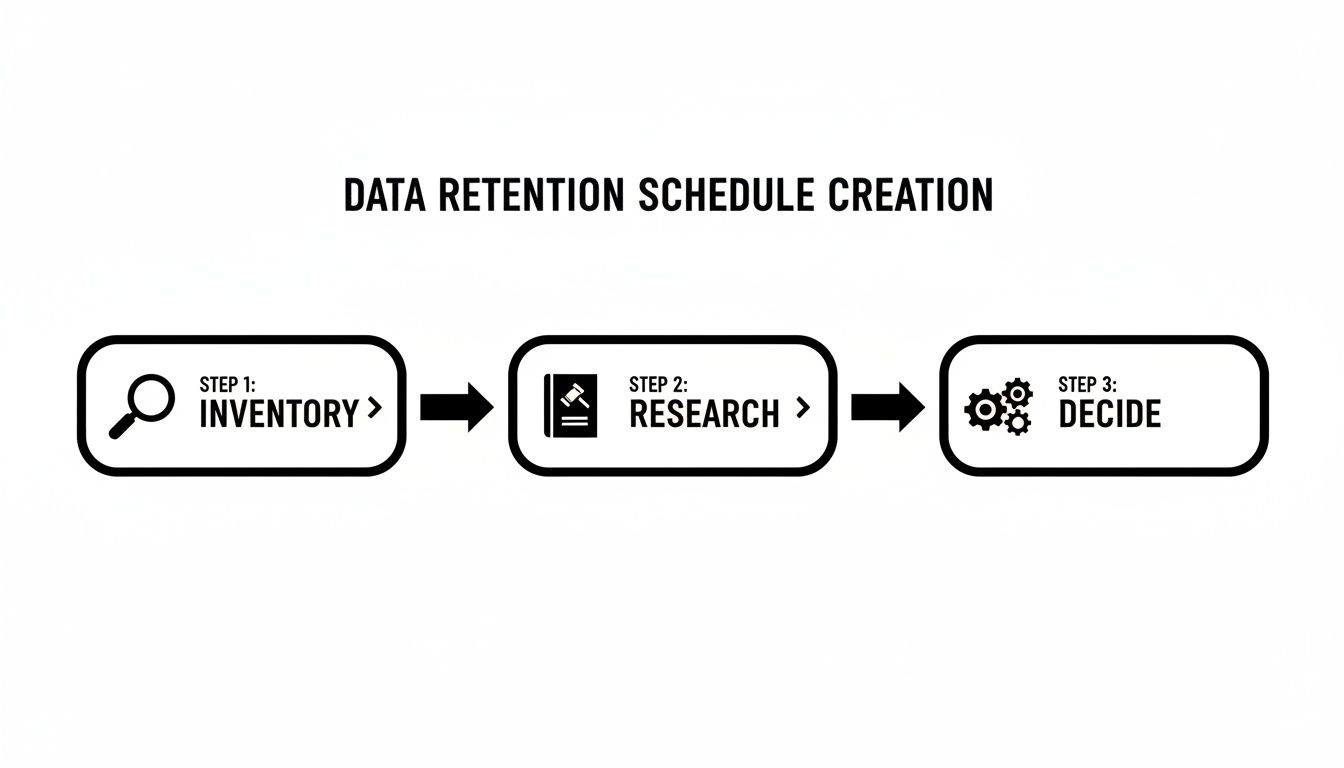
As you can see, a great schedule starts with understanding what you have, then researching your obligations, and finally, making smart decisions based on that info.
Leveraging Your Technology
Once your team understands their role, your technology can take over and handle the tedious work through automation. This ensures your policy is applied consistently across the board and seriously cuts down on the risk of human error. The good news is that many small and midsize businesses in Western Pennsylvania and Eastern Ohio already have the tools they need.
For example, if you’re using Microsoft 365, you have built-in tools that allow you to apply retention labels to documents, emails, and SharePoint folders. These labels can automatically trigger actions, like archiving a project folder one year after it was last touched or deleting an old invoice after seven years. It automates the most mind-numbing part of your data retention policy without requiring a huge budget.
This kind of automation has become more critical than ever. As data privacy laws mature, customers are more aware of their right to have their data deleted. Having automated retention and erasure capabilities makes responding to these requests manageable instead of a frantic, manual fire drill.
Tackling Unstructured Data and Secure Destruction
One of the biggest headaches I see is managing unstructured data—all those random Word docs, spreadsheets, and PDFs scattered across shared drives. The best way to get a handle on this is to get your team into the habit of using designated, properly labeled folders in systems like SharePoint or OneDrive. That structure is what allows you to apply your retention rules effectively.
Lastly, make sure your destruction methods are actually secure. Just hitting "delete" on a file or even reformatting a hard drive doesn't guarantee that data is gone for good.
Secure data destruction is non-negotiable. For physical media like old servers or laptops, you need to use secure erasure software or, even better, physical destruction. This step is a critical part of your overall strategy for how to prevent data loss.
When you’re putting your policy into practice, getting a hard drive destruction certificate is a smart move. It provides auditable proof that you’ve securely disposed of data, which is a huge asset for mitigating compliance and legal risks. That piece of paper proves you followed through on your policy’s promises.
Let Us Help You Simplify Data Management
Let’s be honest—creating and managing a data retention policy can feel like a full-time job, especially when you’re already juggling everything else that comes with running a business. This is where having a trusted advisor in your corner can make all the difference. We’ve worked with enough SMBs across Western Pennsylvania and Eastern Ohio to know the challenges you face: limited time, tight budgets, and no specialized IT expert on staff.
At Eagle Point Technology Solutions, we help businesses like yours navigate this entire process from the ground up. Think of us as your guide and technical arm, turning what seems like an intimidating, complex project into something clear and manageable.
How We Can Help
We’re all about hands-on assistance where it matters most, making sure your policy isn’t just a document but a practical, effective tool. Our process is built for SMBs, focusing on real results, not just fancy reports.
Here's how we can support you:
- Data Discovery and Classification: First, we help you figure out what data you actually have, where it’s stored, and how sensitive it is. This step is the bedrock of your entire retention schedule.
- Tailored Policy Creation: We work with you to build a data retention policy that fits your business like a glove. Whether you need to comply with HIPAA, CMMC, or other industry regulations, we’ll make sure your policy checks all the right boxes.
- Automation and Implementation: We’ll configure the tools you might already be using, like Microsoft 365, to automate retention and deletion. This cuts down on manual work and significantly reduces the risk of human error.
Our goal is to transform data management from a source of risk and expense into a strategic asset. A well-implemented policy ensures your data is secure, compliant, and working for you—not against you.
Partnering with us gives you a clear roadmap for data governance. This proactive approach is a core part of our comprehensive cybersecurity solutions for businesses, designed to protect your operations from every angle.
If you're ready to get a handle on your data without adding another massive project to your plate, let's have a conversation. We’ll help you build a policy that fits your business perfectly.
Answering Your Data Retention Questions
When you start digging into data retention policies, a few key questions always seem to pop up. As an MSP that works with SMBs across Western Pennsylvania and Eastern Ohio every day, we've heard them all. Here are some quick, straightforward answers to the most common ones we hear from business owners and IT managers just like you.
How Often Should We Review Our Data Retention Policy?
Think of your policy as a living document, not a "set it and forget it" file. You should schedule a formal review at least once a year. An annual check-in is just good business hygiene, ensuring your rules still line up with how you operate and what current regulations demand.
However, certain events should trigger an immediate review. If you're adopting a major new piece of technology (like a new CRM or ERP system), expanding into a new market, or new industry-specific regulations are passed, it's time to pull out the policy. This proactive habit keeps your policy from becoming a useless, outdated document.
What Is the Biggest Data Retention Mistake SMBs Make?
Hands down, the most common and dangerous mistake is "data hoarding"—the habit of keeping everything forever "just in case." I get it; it feels safer. But in reality, it dramatically increases your risk profile by expanding the amount of data that could be stolen in a breach. It also needlessly inflates your storage costs and can become a massive liability if you're ever involved in a legal dispute.
A very close second? Crafting a brilliant policy and then letting it collect dust. A data retention policy that isn't actively enforced gives you a false sense of security. It’s essentially worthless. Consistent follow-through is every bit as important as the policy itself.
Does Our Cloud Backup Count as a Retention Policy?
No, and this is a critical point that trips up a lot of businesses. Your backups and your retention policy are two different tools for two completely different jobs. Conflating them is a recipe for compliance headaches.
Let’s break it down with an analogy:
- Backups are your fire extinguisher. Their one and only job is for disaster recovery—getting your business back online quickly after a server dies or a ransomware attack hits. They're a snapshot of your data at a specific moment in time.
- A retention policy is your file room manager. It’s the set of rules that dictates the entire lifecycle of your data: how long a document must legally or operationally be kept and, just as importantly, when it must be securely shredded.
Your backup system absolutely has to support your retention policy (for example, by having the capability to permanently delete old data from archives), but it is no substitute for one. Confusing the two leaves you with serious compliance gaps and a ton of unnecessary risk.
Crafting a data retention policy that is both compliant and practical can feel like a heavy lift, but you don’t have to go it alone. The team at Eagle Point Technology Solutions specializes in helping SMBs across the region build and implement data management strategies that actually work. Schedule a no-obligation consultation today and let's make sure your data is a secure asset, not a hidden liability.