If you're asking, "How much do managed IT services cost?" you're asking the right question. As a business owner or decision-maker in Western Pennsylvania or Eastern Ohio, you need a straight answer, not a sales pitch. The truth is: it depends. There’s no universal price tag.
That said, for a small to medium-sized business (10-250 employees), a realistic budget usually falls between $100 and $250 per user, per month. This isn't just an expense; it's a strategic investment in your company's stability, security, and future growth.
Understanding Your Investment in an IT Partnership
It's helpful to stop thinking of managed IT services as another utility bill and start seeing them for what they are: an operational strategy. This predictable monthly investment is what stands between your business and the crippling costs of downtime, the nightmare of a data breach, or the slow, frustrating drain of an under-supported team.
For most SMBs, this steady, predictable cost actually replaces the wild, unpredictable expenses of emergency tech repairs, lost productivity from system failures, and the hefty salary of a full-time, in-house IT department.
The final price you'll pay comes down to your company's unique situation. A few key variables will always move the needle on your monthly investment:
- Your Team's Size: How many employees need support? The headcount is a primary driver.
- Your Technology Footprint: Are we talking about a handful of laptops and cloud apps, or a complex mix of on-premise servers, workstations, and specialized manufacturing equipment?
- Your Security and Compliance Needs: The level of cybersecurity defense required to protect your specific data and meet industry regulations (like HIPAA or CMMC) is a huge factor.
- Your Operational Demands: How fast do you need a response when things go wrong? Your required support speed impacts the price.
Ultimately, the goal is to flip the script on your IT—transforming it from a reactive cost center that only gets attention when it breaks into a proactive force that helps your business grow. When you understand what goes into the price, you can see how that investment directly fuels business continuity, strengthens security, and gives you a real competitive edge.
Gaining Clarity on Pricing Structures
Before we get into the nitty-gritty, it's helpful to know how providers package their services, as the structure itself can dramatically change your final cost and the value you get. Most managed service providers (MSPs) use one of a few common models to bill for their work.
To give you a real-world example of how a provider might structure their offerings and what common price points look like, you can review illumichat's pricing details. Seeing a live example can give you a clearer picture of how different features and service tiers are presented, which will help you better evaluate the quotes you eventually receive.
Breaking Down the Common MSP Pricing Models
When you start shopping for a managed service provider, you'll quickly notice that no two bill the exact same way. Understanding how MSPs structure their pricing is the first step to figuring out what managed IT services will actually cost your business. Think of it like picking a cell phone plan—each one is built for a different kind of user, and the best fit depends entirely on your needs.
Most MSP pricing falls into one of four main buckets. Each has its own logic, making it a better or worse fit depending on your specific situation.
This decision tree can help you visualize which models might make more sense based on how simple or complex your IT environment is.
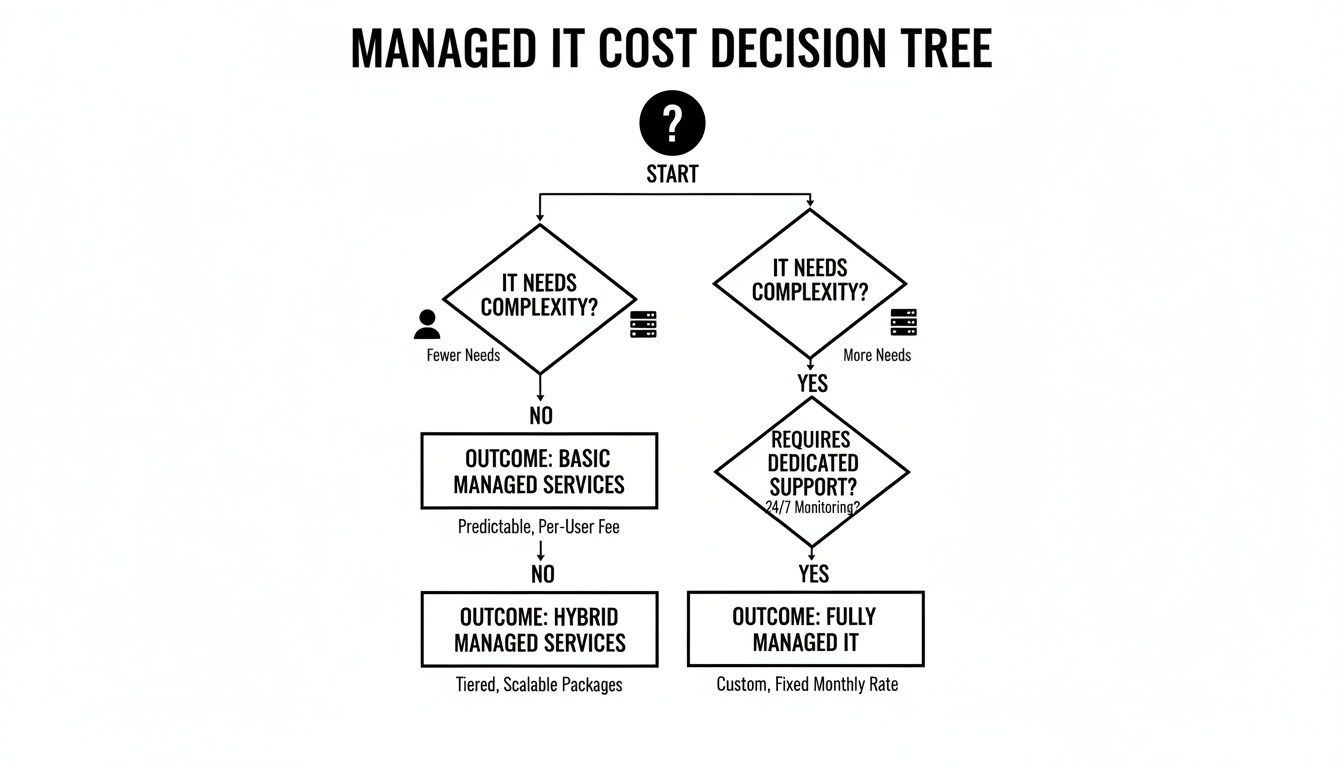
The main takeaway here? As your technology needs get more complicated, pricing tends to shift away from per-unit costs toward more inclusive, predictable plans.
Per-User Pricing
This is perhaps the most common and straightforward model you'll encounter. You simply pay a flat monthly fee for every employee. That fee typically covers all their essential devices—like their desktop, laptop, and work phone—plus their access to the helpdesk, security tools, and other included services.
- Who It's For: Businesses that crave predictable, all-inclusive costs that scale perfectly with headcount. It’s ideal for companies in professional services, healthcare, or retail where employees regularly use multiple devices to get their work done.
- The Analogy: It’s like a company-wide subscription to a productivity suite. You pay one price per person, and they get everything they need to do their job safely and efficiently.
Per-Device Pricing
With this model, the MSP charges a flat fee for each piece of equipment they manage. This includes servers, workstations, firewalls, and sometimes even network printers. The cost per device isn't always the same; managing a critical server that runs your entire operation is naturally going to cost more than managing a simple desktop computer.
- Who It's For: Companies that have more devices than people. Think of a manufacturing floor with shared computer stations, a distribution center with various scanners and terminals, or a lab filled with specialized hardware.
- The Analogy: This is like having a dedicated maintenance plan for every vehicle in a company's fleet. Each piece of equipment gets its own service contract to keep it running in peak condition.
Key Takeaway: The choice between per-user and per-device often boils down to a simple math problem. If your team members each juggle a laptop, a desktop, and a smartphone, the per-user model will almost always be more cost-effective.
Tiered Pricing
The tiered model bundles services into pre-packaged plans, often with names like "Bronze," "Silver," and "Gold." Each tier comes with a specific list of services. As you move up the tiers, you get more comprehensive support, faster response times, or more advanced security features.
- Who It's For: Businesses that need to strike a balance between their budget and their IT needs. You can start with a basic plan and easily upgrade as your company grows or your technology requirements get more demanding.
- The Analogy: It’s a lot like buying a new car. You can get the base model that reliably gets you from A to B, or you can add packages for advanced safety features, a premium sound system, and top-tier support.
A La Carte Pricing
Finally, the a la carte or "on-demand" model lets you pick and choose individual services cafeteria-style. Maybe you only need a managed backup solution and some advanced endpoint security, but you don't need a full-service helpdesk. This approach allows you to pay for exactly what you need and nothing you don't.
While it offers incredible flexibility, this model can get complicated and expensive if you start needing multiple services. More often than not, a bundled plan ends up being a much better value in the long run.
Key Factors That Drive Your Final IT Service Cost
Once you’ve settled on a pricing model that feels right, a few other critical factors will shape the final number on your quote. It’s essential to understand these because they determine how much managed IT services will realistically cost your specific business.
Think of it this way: the pricing model is the type of car you're buying, but these factors are the engine size, trim level, and warranty package. Each one adds a layer of complexity and value that directly impacts your monthly investment.
Your Company Size and Infrastructure Complexity
The most straightforward cost driver is simply scale. A 15-person professional services firm has vastly different needs than a 150-employee manufacturing plant. The total number of users and devices you need to support creates the baseline for your costs.
But it’s not just about headcount; complexity matters just as much. An office with ten laptops and a simple cloud setup is a world away from one with on-premise servers, remote workers connecting from all over, and specialized industrial hardware on the factory floor.
Your technology environment plays a huge role:
- On-Premise Servers: Physical servers require hands-on maintenance, hardware lifecycle management, and specific backup strategies, which naturally adds to the cost.
- Full Cloud Environment: While often more scalable, a cloud-only setup requires serious expertise in security, cost optimization, and ensuring all the different platforms play nicely together.
- Hybrid Model: A mix of on-premise and cloud systems offers great flexibility but introduces its own challenges in ensuring seamless and secure communication between the two worlds.
Your Cybersecurity and Compliance Needs
Let's be clear: not all security is created equal. Your industry and the kind of data you handle are massive cost influencers. A local retail shop needing solid antivirus and firewall management has a completely different risk profile than a healthcare provider that must adhere to strict HIPAA regulations.
Your required security posture is one of the most significant variables in your final IT service cost. It’s the difference between a standard home security system and a commercial-grade solution with 24/7 monitoring.
For instance, a business that needs advanced threat hunting, a 24/7 Security Operations Center (SOC), and regular vulnerability scanning will see a higher price tag. Likewise, getting a government contractor ready for a CMMC audit involves meticulous documentation and specific security controls—these are specialized, high-value services. This growing need for expertise is a big reason the global managed services market is expanding so rapidly; businesses simply can't handle the mounting cyber threats and complex regulations on their own. You can learn more about this market growth and its drivers to get a better sense of the trends.
Service Level Agreements and Support Requirements
A Service Level Agreement (SLA) is the formal promise your MSP makes about how fast they’ll respond and resolve issues. This is where you define how quickly you need help when something goes wrong. An SLA guaranteeing a 15-minute response time for a critical server outage will, of course, cost more than a plan offering a standard four-hour response window.
This is a critical area to dig into when you’re comparing quotes. A cheaper plan might look tempting, but if its SLA doesn't match your operational needs, the potential cost of extended downtime could easily wipe out any savings. Vetting these agreements properly is a huge part of the process, and understanding IT vendor management best practices can arm you with the right questions to ask and help you set clear expectations from day one.
What a Standard Managed IT Plan Actually Includes

Before you sign on the dotted line with any IT provider, you need to get crystal clear on what’s actually “in the box.” It’s one of the most important conversations to have. While every MSP has its own flavor, most standard managed IT plans are built on a core set of services designed to keep your business running smoothly.
Think of it as the foundation of your IT partnership. These are the non-negotiables that prevent daily headaches and keep your team productive. Just as crucial, though, is knowing where that standard support ends and where premium, project-based services begin. This clarity helps you budget accurately and avoids any surprise invoices down the road.
Core Services Typically Included
Most reputable MSPs bundle the absolute essentials into their flat-rate monthly fee. These are the day-to-day services that form the backbone of your support.
You can almost always expect to find these four pillars:
- Unlimited Helpdesk Support: This is your team's lifeline. When someone can't print, a piece of software acts up, or an account gets locked, they have a direct line to an expert for a quick fix. No nickel-and-diming for every little call.
- Proactive Network Monitoring: Your MSP is constantly watching over the health of your network. They’re looking for hiccups with servers, firewalls, and other critical gear before they can cause a full-blown outage. Our approach to managed servers and network infrastructure is all about this proactive stability.
- Software Patching and Updates: One of the simplest yet most effective ways to close security loopholes is keeping software updated. This routine maintenance happens quietly in the background, protecting your systems without interrupting your team.
- Basic Cybersecurity: This foundational layer is your first line of defense. It typically includes centrally managed antivirus, firewall management, and spam filtering to block the most common, everyday digital threats from getting through.
The Bottom Line: A standard plan is all about maintenance and immediate support. Its main job is to keep your current IT environment healthy and secure while helping your users with their day-to-day tech challenges.
Standard Inclusions vs. Premium Add-On Services
To make it even clearer, let's break down what's usually part of the package versus what often comes with an extra price tag. This distinction is key to understanding the value in a proposal and planning for future IT investments.
| Typically Included in Standard Plans | Often Considered Premium Add-Ons |
|---|---|
| Unlimited Remote & Phone Support for day-to-day issues | 24/7 Security Operations Center (SOC) for advanced threat hunting |
| Proactive Monitoring of servers, workstations, and network devices | Major Projects like a full cloud migration or office relocation |
| Software Patch Management for operating systems and key applications | Specialized Compliance Consulting for regulations like HIPAA or CMMC |
| Managed Antivirus & Anti-Malware protection | Advanced Cybersecurity Training and phishing simulations for employees |
| Firewall Management and basic security policy enforcement | Dedicated On-site Support for non-critical issues or scheduled visits |
| Backup Monitoring & Management to ensure data is being backed up | Business Application Support for industry-specific software (e.g., QuickBooks, AutoCAD) |
| Basic Spam Filtering for your email system | Disaster Recovery as a Service (DRaaS) for rapid, full-scale recovery |
This table isn't universal, but it's a great starting point for conversations with potential providers. Always ask them to spell out exactly where their standard service ends.
Common Add-Ons and Project Work
While the core plan keeps the lights on, anything that requires specialized tools, significant labor, or a higher level of strategic thinking is usually priced separately. This is where you move from "maintaining" to "improving."
For example, our clients in manufacturing and professional services often need support beyond the basics as they look to modernize. These premium services often fall into a few key categories:
- Advanced Cybersecurity: This goes way beyond basic antivirus. We're talking about a 24/7 Security Operations Center (SOC) monitoring for threats, advanced threat hunting, and comprehensive employee security awareness training to combat phishing and business email compromise.
- Major Projects: This bucket includes any large, one-time initiative. Think migrating all your servers to the cloud, overhauling your entire network, rolling out a new ERP system, or implementing a new AI-powered tool to automate workflows.
- Compliance Consulting: If your business is in a regulated industry like healthcare (HIPAA) or defense (CMMC), you need more than just IT support. Dedicated consulting to meet and document strict compliance standards is a highly specialized—and separate—service.
- On-site Support: While many issues are fixed remotely, needing a technician on-site for non-critical issues or for scheduled work beyond the initial setup may be billed as an extra.
Thinking Beyond Cost: An Investment in Business Health

It’s tempting to look at a quote for managed IT services and see just another monthly expense hitting the budget. But treating IT support like a utility bill is one of the most common—and costly—mistakes a business owner can make.
The real conversation isn't about the monthly fee. It's about the return on that investment and, more importantly, the catastrophic costs it helps you avoid. A true IT partner fundamentally changes your relationship with technology, shifting it from a reactive cost center to a proactive business asset. You stop paying unpredictable, often huge, fees to fix things after they break and instead make a predictable investment to keep them from breaking in the first place.
The Staggering Price of Downtime
Let's make this real. What does just one hour of downtime actually cost your business? It’s not just a few lost sales. It’s about your entire team grinding to a halt, unable to work.
For a 20-person company, an hour of idleness can easily cost thousands of dollars in lost wages, missed opportunities, and stalled projects. An MSP’s proactive maintenance—the constant monitoring, patching, and behind-the-scenes optimization—is designed specifically to prevent that kind of expensive disruption.
By preventing just a few hours of downtime per year, a managed IT service can often pay for itself entirely. The focus shifts from costly emergency repairs to consistent, predictable operational uptime.
The Strategic Value of a Virtual CIO
Beyond just keeping the lights on, a true IT partner provides strategic guidance. This is where a Virtual Chief Information Officer (vCIO) service becomes a game-changer. A vCIO is your high-level technology advisor, working to make sure every dollar you spend on IT directly supports your bigger business goals.
Instead of guessing which new software to buy or when to upgrade aging servers, a vCIO helps you build a practical technology roadmap. This strategic planning prevents wasteful spending, finds new ways to boost efficiency, and turns your tech from a necessary evil into a powerful competitive advantage.
A vCIO helps you answer critical questions like:
- Are we spending the right amount on technology to hit our growth targets?
- How can we use tools like AI or the cloud to make our operations leaner and more effective?
- What's our plan for replacing old hardware before it fails and causes a crisis?
This kind of guidance completely reframes the conversation. It moves from "how much do managed IT services cost?" to "how can our technology investment drive more revenue?" It’s a fundamental shift that aligns your IT directly with your bottom line.
Your Practical Checklist: Vetting a Potential IT Partner
You’ve done the homework on pricing models. Now it's time to move from research to action. But let me be clear: evaluating quotes is about so much more than just comparing the monthly fees. You're looking for a genuine technology partner, not just a vendor.
To properly vet potential partners, you have to ask the right questions. This isn't just about checking their technical skills; it's about digging into how they operate as a business and whether they're truly invested in helping you hit your specific goals.
- Service & Support: What are your guaranteed response and resolution times in the Service Level Agreement (SLA)? Get specific numbers.
- Experience & Proof: Can you provide references from companies my size and in my industry (e.g., manufacturing, professional services)? This is non-negotiable.
- Billing Transparency: What is explicitly not covered in this monthly fee? And what are your rates for out-of-scope projects?
- Strategic Alignment: How will you help us build a technology roadmap that aligns with our business goals for the next 1-3 years?
- Team & Location: Who will be my primary point of contact, and where is your support team located?
Looking past the price tag to get solid answers here is what separates a good choice from a great one. You're searching for a partner who communicates clearly, understands your vision, and is upfront about everything.
For more ideas on managing your tech expenses, check out our guide on practical IT cost optimization strategies for SMBs.
Your Questions About Managed IT Costs, Answered
When you start looking into managed IT, a lot of questions pop up. It's a big decision, and you need clear, straightforward answers. Let's tackle some of the most common ones I hear from business owners just like you.
Am I Going to Be Locked into a Long-Term Contract?
Most solid MSPs will propose agreements ranging from 1 to 3 years, and there’s a good reason for that. It gives them the runway they need to really dig in, stabilize your environment, and make the strategic improvements that deliver real results. Think of it as a commitment to a partnership.
While some providers might offer a month-to-month option, it usually comes at a higher price. A longer-term agreement almost always secures you better pricing and shows both sides are invested in a successful, long-term relationship.
Does This Mean I Have to Replace My Existing IT Staff?
Not at all. In fact, one of the most effective setups is a co-managed IT model. We see this work beautifully all the time, especially in companies with an existing IT manager or a small internal team.
In this scenario, the MSP handles the relentless, around-the-clock tasks—like 24/7 monitoring, security patches, and the day-to-day helpdesk tickets. This frees up your internal IT experts to focus on the big-picture, high-value projects that drive your business forward. It's about empowering your team with more resources, not making them redundant.
Key Insight: To truly understand the economic impact of managed IT, it's crucial to compare the investment with traditional models, such as by analyzing AI receptionist costs versus in-house staff. This highlights how outsourcing specialized functions can be a more efficient use of resources.
What Happens When My Company Grows?
This is where a good MSP partnership really shines. Scalability is baked right into most pricing models.
Whether your plan is based on the number of users or devices, it’s designed to flex right alongside your business. When you hire a new employee or add a new computer, it’s a simple, predictable adjustment to your monthly plan. This makes your IT costs easy to forecast as you expand.
This built-in flexibility ensures your technology support keeps pace with your success, so you don't have to suffer the usual growing pains. Your MSP should feel like a partner in that growth, making technology one less thing you have to worry about.
Your technology should be a competitive advantage, not a constant headache. At Eagle Point Technology Solutions, we provide proactive IT support and strategic guidance to businesses across Western Pennsylvania and Eastern Ohio, specializing in cybersecurity, AI integration, and cloud services. If you’re ready to get a clear, predictable handle on your IT costs and performance, let's talk.