As a business owner in Western Pennsylvania or Eastern Ohio, when you think about cybersecurity, you probably picture a shadowy hacker in a distant country. While that external threat is very real, some of the most damaging security incidents we see originate from right inside your own walls.
An insider threat isn't always the dramatic scenario from a movie—a disgruntled employee sabotaging servers on their way out. More often, it’s a loyal, hardworking team member who simply makes an honest mistake. This is the reality for the small and mid-sized businesses we partner with every day.
The Threat Hiding in Plain Sight
Imagine this: a trusted manager at your manufacturing plant receives a convincing email, clicks a link without a second thought, and suddenly, sensitive client schematics are exposed. This isn't a far-fetched scenario for an SMB; it's a risk you face daily.

This is why an effective insider threat program isn't just about stopping malicious actors. It's about building a resilient organization that can absorb the impact of human error and defend against accounts that have been quietly compromised by external attackers. To do that, you first have to understand what you're up against.
Recognizing the Three Faces of Insider Risk
In our experience helping SMBs, insider threats almost always fall into one of three categories. Each requires a slightly different approach to detect and prevent.
- The Negligent Insider: This is, by far, the most common type we encounter. This isn't a malicious person; they just made a mistake due to a lack of security awareness, a moment of carelessness, or falling for a sophisticated scam. Think of someone using "Password123" or getting tricked by a phishing email that appears to be from the CEO.
- The Malicious Insider: This is the classic "disgruntled employee" who intentionally wants to cause harm. They might steal customer lists, disrupt operations, or sabotage your systems for personal gain or revenge. While less frequent, the damage they can inflict is often catastrophic.
- The Compromised Insider: This person is an unwitting pawn. An external attacker has stolen their legitimate credentials—like their email login or network access. The hacker then logs in and moves around your network, appearing to your systems as a trusted employee.
Understanding these different threat actors is the first, most crucial step. It helps shift your company culture from one of blame toward one of resilience. The goal isn't to create a paranoid workplace; it's to make it harder for mistakes to happen and much easier to spot when they do.
As an IT partner who understands the challenges SMBs face—limited budgets, small IT teams, and competing priorities—this guide is designed to give you a practical playbook. The following steps will help you build a real-world framework that protects your business by creating a stronger, more secure environment for everyone.
Building a Human Firewall Through Training and Culture
You can invest in the best cybersecurity software on the market, but it can’t stop a well-meaning employee from making a simple, human error. Your most powerful and cost-effective defense against insider threats isn’t a piece of technology—it's your people. The goal is to build an ongoing security culture, transforming every team member into a proactive defender of your business.
This isn't about a one-time, check-the-box training session during onboarding. For security to be effective, it has to become a daily habit, not an annual lecture.

Establish Clear and Simple Policies
Before you can train your team effectively, everyone needs to know the rules of the road. An Acceptable Use Policy (AUP) is your foundation, clearly outlining what employees can and cannot do with company technology and data.
But let's be realistic—a 30-page legal document that no one reads is useless. For a small or mid-sized business, the best AUP is short, simple, and written in plain English. It should cover the critical areas without overwhelming your team.
Key AUP Components:
- Data Handling: Clearly define what’s sensitive (like customer lists or financial records) and the correct way to handle it. A non-negotiable rule: no sending company data to personal email or cloud accounts.
- Password Requirements: Mandate strong, unique passwords and the use of multi-factor authentication (MFA) wherever possible.
- Software and Device Usage: Prohibit the installation of unauthorized software. Ban personal USB drives on company computers—they’re a common vector for malware.
- Reporting Incidents: Create a simple, no-blame process for employees to report suspected security issues immediately. Make them feel safe to speak up.
Clarity is paramount. When people understand the expectations, they are far more likely to meet them.
Create a Continuous Awareness Program
A single training session is forgotten within a week. To truly build a human firewall, security awareness must be an ongoing conversation. The cornerstone of this is robust security awareness training, which equips your team with the skills to spot and shut down social engineering attempts and other insider threats.
This approach delivers significant ROI. Implementing comprehensive training is one of the most effective security investments you can make, especially since negligence is the root cause of 55% of all insider incidents. Strong, continuous programs can slash the risk of employee-driven cyber incidents by up to 72%, and even 90 days of consistent training can reduce phishing susceptibility by over 40%.
The most successful security programs don't just teach rules; they change behavior. They make security personal and relevant to each employee's daily job.
Implement Role-Specific Training
Your finance team faces entirely different threats than your sales team. Generic, one-size-fits-all training doesn't stick because it's not relevant. When you tailor the content, it becomes far more engaging and effective.
- Finance Department: Train them relentlessly on business email compromise (BEC) and wire transfer fraud. Run simulations that mimic urgent payment requests from the CEO.
- Sales & Marketing: Focus on protecting CRM data. Show them how to spot fake lead-generation forms designed to steal their login credentials.
- HR Department: Emphasize the secure handling of sensitive employee data (PII) and the risks of phishing attacks impersonating job applicants or government agencies.
- Leadership Team: Educate executives on "whaling" attacks—highly targeted, sophisticated phishing scams aimed directly at the C-suite.
Use Realistic Simulations and Reinforcement
The best way to teach someone to spot a scam is to let them practice in a safe environment. This is where regular, simulated phishing campaigns become invaluable for building muscle memory.
These emails should look and feel real, mimicking the kinds of messages your employees receive daily. When someone clicks a simulated phishing link, it’s not a "gotcha" moment; it's a teaching opportunity. They are immediately redirected to a short training module explaining the red flags they missed. For a deeper dive, explore our guide on how to protect your business from phishing attacks.
Combine these simulations with other reinforcement, like a quarterly security newsletter sharing real-world examples of recent scams or a quick "security minute" talk at the start of team meetings. By weaving security into your company's normal rhythm, it becomes part of the culture, not just another task. That consistent effort is how you truly prevent insider threats from the inside out.
Mastering Access to Your Digital Kingdom
If your business is a building, your data and systems are the most valuable rooms inside. A common mistake business owners make is handing out a master key to everyone on the payroll. This is where most insider threat incidents, especially accidental ones, gain a foothold. The solution is to get smart about who has access to what, and why.
This isn't about micromanaging or showing a lack of trust. It's about proactively limiting the "blast radius" of a potential incident. If an employee's account gets compromised or they make a simple mistake, the damage they can cause is strictly confined to only what they absolutely need to do their job.

Embrace the Principle of Least Privilege
The foundational concept here is the Principle of Least Privilege (PoLP). It may sound technical, but the idea is refreshingly simple: employees should only have the bare minimum access to information and systems required for their specific role. Nothing more.
An accountant needs to get into the financial software but has no business in the marketing team's creative files. A salesperson needs the CRM but definitely doesn't need administrator controls for your network server. By putting this principle into practice, you dramatically shrink the potential for both accidental data exposure and intentional misuse.
Secure the Keys to the Kingdom
Every business has them—a few accounts with elevated permissions, the administrator accounts. These are the true "keys to the kingdom." A compromised admin account is a worst-case scenario, giving an attacker complete control. This is where Privileged Access Management (PAM) comes into play.
For an SMB, this doesn't need to be a complex, enterprise-grade system. It starts with a few basic, non-negotiable rules:
- Keep Admin Accounts Scarce: Only a small, trusted group of individuals should have them. No one should ever use an admin account for daily tasks like checking email.
- Enforce MFA Everywhere: Multi-factor authentication is your single most powerful defense. Make it mandatory on all privileged accounts and any application holding sensitive data.
- Strengthen Your Credentials: A strong password is the first line of defense. For more on this, you can review our insights on the importance of strong password policies.
Think of it this way—if a regular employee's account is compromised, the intruder can only access one "room." If an admin account is compromised, they can burn down the entire building.
Conduct Regular Access Reviews
"Permissions creep" is a real problem we see constantly. An employee changes roles but keeps their old access rights. Someone leaves the company, but their account in a third-party app is never deactivated. These idle permissions are security risks waiting to be exploited.
A quarterly access review is a crucial, high-impact habit:
- Generate a List: Pull a report of all users and their access levels for your key systems (e.g., your file server, Microsoft 365, financial software).
- Verify with Managers: Send the list to department heads. Ask them to confirm if each person on their team still needs the access they currently have.
- Revoke Unnecessary Access: Immediately remove any permissions that are no longer required. Pay special attention to former employees.
This simple process ensures your access controls remain tight and relevant. Looking beyond traditional controls, adopting Zero Trust Security principles takes this even further by ensuring no user or device is inherently trusted, requiring verification for every single access request.
Perfect Your Onboarding and Offboarding Processes
Finally, a well-defined checklist for when employees join and leave is absolutely non-negotiable. This process must be documented and followed without exception, every single time.
Onboarding Checklist Must-Haves:
- Grant access only to pre-approved systems based on the specific job role.
- Document all access that was granted.
- Provide immediate security awareness training.
Offboarding Checklist Must-Haves:
- Disable all account access immediately on their last day.
- Revoke access to all third-party applications.
- Change any shared passwords the employee may have known.
By mastering who can access your digital kingdom and why, you build a powerful, proactive defense against all forms of insider threats.
Using Technology to Detect and Prevent Threats
While building a strong security culture is your first line of defense, the right technology acts as your ever-vigilant digital security guard. For a busy SMB, these tools aren't an enterprise luxury; they are a crucial layer of protection that works 24/7 to watch over your sensitive data and systems.
These tools are essential because insiders are incredibly difficult to spot. A staggering 93% of organizations find insiders as hard or harder to detect than external attacks, and a mere 23% feel confident in their ability to do so proactively. That's a huge gap. Adopting the right technology is one of the most effective actions you can take to close it, as detailed in the 2023 Cost of Insider Risks Global Report.
Let's break down the key technologies in plain English and show how they prevent real-world insider threats.
Putting a Lock on Your Data with DLP
Think of Data Loss Prevention (DLP) as a smart security guard posted at every exit point of your digital office. Its job is to inspect data trying to leave your network and stop anything that breaks your established rules. This is how you prevent sensitive information from walking out the door, whether by accident or on purpose.
A solid DLP solution can monitor and control data across all the places your team works:
- Email: It can block an employee from sending a spreadsheet with client Social Security numbers to their personal Gmail account.
- Cloud Storage: It can prevent someone from uploading a proprietary blueprint to a personal Dropbox folder.
- USB Drives: It can stop a departing salesperson from downloading your entire customer list to a thumb drive. We've seen this happen more times than we can count.
- Printing: It can even restrict the printing of highly confidential documents, creating a digital paper trail.
DLP works by identifying sensitive data based on keywords, patterns (like credit card numbers), or custom rules you define. This takes the guesswork out of data protection and provides an automated backstop against both human error and malicious intent.
Spotting Red Flags with Behavior Analytics
One of the biggest challenges in detecting insider threats is that the person often has legitimate access. This is where User and Entity Behavior Analytics (UEBA) becomes your secret weapon.
UEBA uses machine learning to establish a baseline of what's "normal" for every user and device on your network. It learns who typically accesses what data, from where, and at what times. Once it knows what's normal, it can instantly flag anomalies that could signal a threat.
UEBA doesn't just look for known bad behavior; it looks for abnormal behavior. This is critical for catching threats that traditional security tools would miss, like a compromised account being used by an attacker.
For instance, a UEBA system would raise an immediate alert if:
- An accountant who only works 9-to-5 suddenly starts accessing payroll files at 3 AM.
- A user in your Ohio office unexpectedly logs in from an IP address in another country.
- An employee who has never touched engineering files begins downloading large quantities of CAD drawings.
This technology shifts you from being reactive to proactive, allowing you to investigate suspicious activity before it becomes a full-blown data breach.
Protecting Your Devices with EDR
Every laptop, server, and smartphone connected to your network is an endpoint—a potential entry point for an attack or a device used to exfiltrate data. Endpoint Detection and Response (EDR) acts as a sophisticated security camera and alarm system for every single one of those devices.
Unlike traditional antivirus software that just looks for known viruses, EDR continuously monitors and records all activity on an endpoint. It watches for suspicious behaviors, like a user trying to disable security controls or a Microsoft Word document attempting to run unusual commands. If EDR detects a threat, it can automatically take action to contain it, such as isolating the device from the network to prevent the threat from spreading.
For an SMB, this provides enterprise-level protection without needing a massive in-house security team to manage it.
To help visualize how these tools fit together, here is a simple table outlining the core technologies we recommend for building a strong technical defense against insider threats.
Key Technologies for Insider Threat Prevention
| Technology | What It Does in Simple Terms | Insider Threat Scenario It Prevents |
|---|---|---|
| Data Loss Prevention (DLP) | Acts as a digital "gatekeeper" to stop sensitive data from leaving your network. | A disgruntled employee trying to email a customer list to a competitor. |
| UEBA | Learns normal user behavior and flags anything out of the ordinary. | A compromised account being used to access sensitive files at an unusual time (e.g., 3 AM). |
| Endpoint Detection & Response (EDR) | Provides advanced antivirus and monitoring for every device (laptops, servers). | An employee accidentally clicking a phishing link that installs malware to steal data. |
| Privileged Access Management (PAM) | Strictly controls and monitors access for users with "admin" or high-level permissions. | An IT admin (or a hacker using their account) accessing data they don't need for their job. |
| SIEM | Collects and analyzes security logs from all your systems in one central place. | A user trying to cover their tracks by deleting logs after accessing unauthorized information. |
Each of these technologies plays a distinct yet complementary role. When layered together, they create a formidable barrier that makes it significantly harder for an insider threat—whether accidental or malicious—to cause real damage to your business.
Creating Your Insider Threat Response Plan
Even with the best training and technology, prevention isn't foolproof. A solid response plan is your safety net, turning a potential crisis into a controlled, manageable event. Having a plan ready before you need it is crucial—acting quickly and correctly can dramatically limit the financial and reputational damage.
Despite the high stakes, many businesses are caught unprepared. While developing a formal insider threat response plan significantly improves prevention, only 27% of organizations have detailed plans in place.
That means a startling 69% are relying on informal processes or have no plan at all, creating massive vulnerabilities. This gap is critical. The average time to resolve an insider incident is a lengthy 81 days, a delay that can inflate costs from $10.6M to over $18.7M, according to the 2025 Insider Risk Report.
The Core Phases of Incident Response
An effective Incident Response Plan (IRP) doesn't have to be a hundred-page document. For an SMB, it should be a clear, actionable playbook that guides your team through four key phases when an insider event is suspected.
- Containment: The immediate priority is to stop the bleeding. This means isolating the threat to prevent further damage. It could involve disabling a user's network access, disconnecting a specific device, or blocking an application. The goal is swift action to limit the incident's scope.
- Investigation: This phase must be handled with discretion and precision. You need to determine what happened, how, and who was involved—all without tipping off the individual or destroying evidence. This is where you will dig into logs from your security tools and preserve digital evidence for potential legal action.
- Eradication: Once you understand the threat, you must remove it completely from your environment. For a compromised account, this means changing passwords and ensuring the attacker is locked out for good. For a malicious insider, it means ensuring all their access has been permanently revoked.
- Recovery and Lessons Learned: After the threat is gone, you restore normal operations. But you're not done. It's time for a "post-mortem" analysis. What went wrong? Which of our policies or controls failed? Use every incident as a learning opportunity to strengthen your defenses.
Involving HR and Legal Counsel
Insider threats are unique because they involve your own people, which introduces significant HR and legal complexities. Rushing to action without proper guidance can easily lead to wrongful termination lawsuits or other employment law headaches.
Your IRP must define clear triggers for when to bring in HR and legal counsel. This isn't just an IT problem; it's a business problem that requires a coordinated response from leadership, IT, HR, and legal advisors.
This is especially critical during the investigation. HR can guide you on handling employee interviews and disciplinary actions, while legal counsel ensures that any evidence you collect is preserved in a way that will hold up if needed.
The visual below shows how your technology stack—from Data Loss Prevention (DLP) to Endpoint Detection and Response (EDR)—feeds crucial data into this response process.
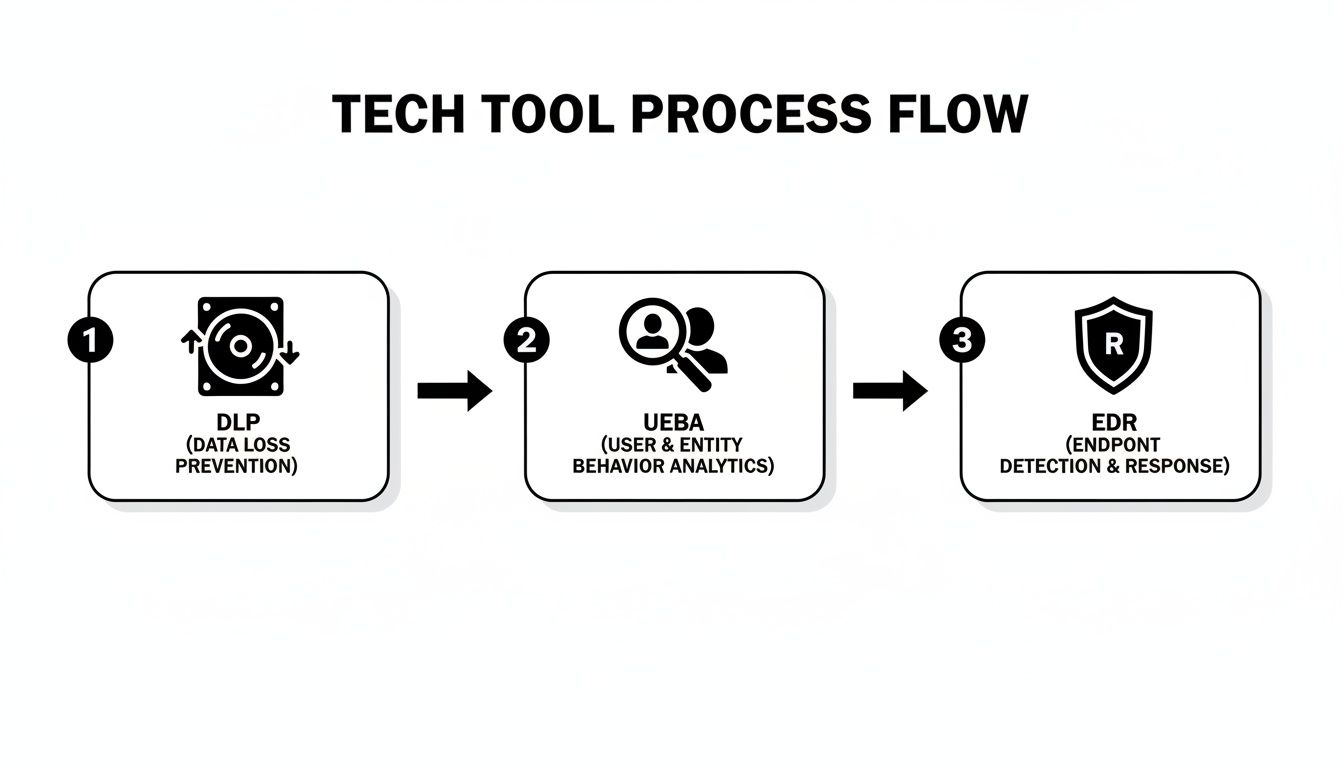
This flow highlights how each tool provides a different piece of the puzzle, giving you the visibility needed to contain, investigate, and ultimately resolve an incident effectively.
Partnering with Experts for Peace of Mind
Let's be practical—implementing all of these strategies can feel overwhelming for a business owner. From crafting policies and running continuous training to deploying and managing sophisticated security tools, it's a monumental task.
The reality for most SMBs is that you don't have a dedicated cybersecurity team on standby. This is where partnering with a Managed Service Provider (MSP) can be a game-changer.
Think of an MSP like Eagle Point Technology Solutions as your dedicated, outsourced security department. We manage comprehensive insider threat programs for businesses just like yours, giving you access to enterprise-grade expertise and technology that would otherwise be out of reach.
Your Dedicated Security Partner
Instead of spending your valuable time researching, implementing, and struggling to manage complex tools like DLP or UEBA, we handle it all for you. Our job is to build and maintain your defenses so you can focus on what you do best—running your business.
A partnership like this gives you a clear, straightforward path to a much stronger security posture:
- Initial Risk Assessment: We start by identifying your unique vulnerabilities and blind spots.
- Policy & Procedure Development: We work with you to create practical, real-world policies your team can actually follow.
- Tool Deployment & Monitoring: We implement and manage the entire security stack, keeping a watchful eye on your systems 24/7.
- Ongoing Management: We provide constant monitoring, clear reporting, and strategic guidance to keep you ahead of evolving threats.
A partnership isn't just about outsourcing tasks; it's about gaining genuine peace of mind. It’s knowing you have a team of experts constantly working behind the scenes to protect your business.
By working with a dedicated provider, you can put robust protections in place without the massive overhead of hiring a full-time, in-house security staff. You can learn more about our specific cybersecurity solutions for businesses to see how a managed approach can fit your needs and budget.
Frequently Asked Questions
When you're trying to wrap your head around insider threats, a lot of questions pop up. As the go-to IT partner for businesses across Western Pennsylvania and Eastern Ohio, we’ve heard just about all of them. Here are some of the most common concerns we hear from business owners, along with straightforward answers.
What is the real cost of an insider threat for a small business?
The impact goes far beyond the immediate financial damage. While that can be a knockout blow for an SMB, the ripple effects are often what hurt the most. Consider the crippling downtime, the steep costs of investigating what happened, and then trying to clean up the mess.
Worst of all is the damage to your reputation and the loss of customer trust. For a small business, a major incident isn't just a tough quarter; it can be an existential threat. The real cost is the risk of losing everything you've worked so hard to build.
What is the single most important first step to take?
If you do only one thing, embrace the Principle of Least Privilege (PoLP). It’s a simple concept with a massive impact: people should only have access to the absolute minimum they need to do their jobs. Nothing more.
This single move slashes your risk profile practically overnight, and it doesn't cost a dime in new software. By limiting who can access what, you shrink the blast radius of a simple mistake or a stolen password. It is, without a doubt, the highest-impact first step any SMB can make.
How do I balance security with employee trust?
This is a fantastic question that gets to the heart of building a good security culture. Nobody wants to feel like Big Brother is watching them. The key is to frame your insider threat program as a protective shield for everyone—the company, its clients, and the employees themselves.
Effective security isn't about fostering a culture of suspicion; it's about building a culture of resilience. It’s about creating a safe environment where a simple human mistake doesn't escalate into a business-ending crisis.
Be transparent with your team. Explain that these controls and training sessions aren't about pointing fingers. They're there to protect everyone from outside attackers who might steal an employee's credentials and from the honest mistakes we are all capable of making. When you position security as a shared goal, it builds trust instead of eroding it.
Protecting your business from insider threats requires a layered approach combining culture, smart policies, and the right technology. While you can build a strong foundation with the steps we've covered, keeping it all running smoothly is a full-time job. That's where Eagle Point Technology Solutions comes in. We act as your dedicated security partner, implementing and managing these defenses for you, so you can focus on what matters most: running your business.
Ready to secure your operations with an expert in your corner? Schedule a no-obligation consultation with our team today.