That gut-wrenching moment. Your systems grind to a halt, a strange process is eating up resources, or an employee reports a bizarre pop-up. It's a feeling every business owner in Western Pennsylvania and Eastern Ohio hopes to avoid, but needs to be ready for.
As a business leader, your primary focus is on growth, not on deciphering cybersecurity alerts. You're worried about hitting production targets and keeping customers happy, but a single cyber incident can derail all of that. The reality is, for small to medium-sized businesses (SMBs), the risk isn't theoretical—it's a daily operational threat.
If you suspect you've been hacked, what you do in the next few minutes is absolutely critical. The game plan is simple: stop the attack from spreading, keep the evidence intact for the professionals, and get expert help on the line—fast.
What to Do When You Suspect a Hack
It’s easy to panic. But a calm, methodical response can make the difference between a minor incident and a full-blown financial disaster. This isn’t the time for your team to play the hero and try to fix it themselves. This is about containment.
Your immediate job is to take quick, decisive actions that box the attacker in while you call in the cavalry. For a small business without a dedicated 24/7 security team, these first moves are your best defense. Attackers rely on the chaos and confusion of a breach to burrow deeper into your network. Don't give them that advantage.
Your Immediate Action Plan
Think of the first hour after you suspect a breach as the "golden hour." Everything you do sets the stage for a successful recovery. Daily operations take a backseat to damage control.
This flowchart breaks down the three non-negotiable actions you must take right away.
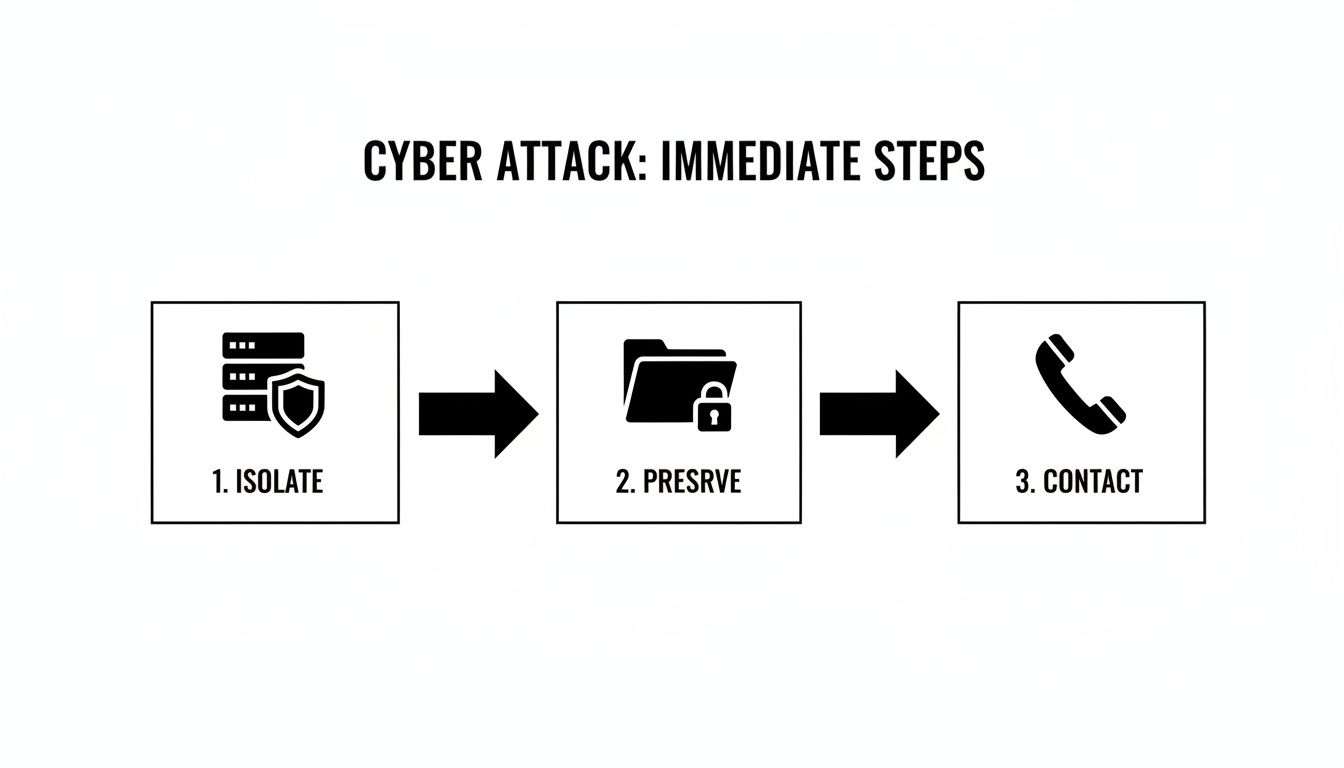
It’s a simple but powerful sequence: contain the threat by isolating the machine, protect the digital crime scene, and then bring in the experts who know how to handle the investigation and cleanup.
Isolate Affected Systems
First thing's first: stop the bleeding. If you have a good idea which computer, server, or device is compromised, get it off the network immediately. That means physically unplugging the ethernet cable or shutting off its Wi-Fi.
Why is this so urgent? Most modern attacks, especially ransomware, are built to move laterally. An infection that starts on one sales rep's laptop can race across the network and encrypt your entire primary server in minutes if they're still connected.
Crucial Tip: Do not power down the machine! The impulse to just shut it off is strong, but doing so erases volatile memory (RAM). That memory often holds critical clues our incident response team needs to figure out exactly how the attacker got in. Isolate, don't shut down.
Preserve and Document Everything
Once the system is safely quarantined, your next job is to preserve the scene. Fight the urge to delete suspicious files or start running antivirus scans. I know it’s tempting, but those actions can stomp all over the digital fingerprints needed for a proper forensic investigation.
Instead, grab a notebook or open a text file on a clean computer and start a log. Document every detail with precise timestamps:
- When did you first notice the issue?
- Who saw it and what did they see (e.g., ransom note, weird files, sluggish performance)?
- What specific actions have you taken so far (e.g., "Disconnected PC-ACCT-02 from the network at 2:15 PM")?
This log will be worth its weight in gold when you hand the situation over to your IT team or a cybersecurity partner like Eagle Point.
Contact Your Response Team
You are not expected to be a cybersecurity expert. The second you’ve isolated the immediate threat, it’s time to call for backup. For most SMBs, that means ringing up your managed service provider or a dedicated cybersecurity firm.
If you have a cyber insurance policy, you must contact your provider right away. They often have strict procedures you have to follow and a list of pre-approved vendors for incident response.
Having these phone numbers printed and easily accessible before an incident is a cornerstone of preparedness. Every minute spent scrambling to find who to call is another minute you’re giving an attacker free rein in your network.
Building Your Foundational Security Controls
Once you've put out the immediate fire, it's time to shift from frantic, reactive defense to smart, proactive prevention. To truly stop getting hacked, you need to build a solid foundation of security controls. This isn't about buying the most expensive, flashy tech; it's about layering practical, proven defenses that work together to make your business a much, much harder target, even on an SMB budget.

Think of it like securing your office building. A single lock on the front door is a start, but it’s not enough. Multiple locks, an alarm system, and strong windows create a much tougher environment for a burglar to crack. Each layer forces an intruder to work harder, dramatically increasing the odds they'll just give up and move on to an easier victim down the street. The exact same principle applies to your digital world.
Start with Multi-Factor Authentication Everywhere
If you only do one thing from this guide, make it this: turn on multi-factor authentication (MFA) for every single account that offers it. Seriously. MFA is your single best defense against the most common attack vector out there—stolen passwords.
Even if a hacker buys your CEO's password on the dark web, they still can't get in without that second piece of verification, which is usually a code from an app on their phone. This simple step slams the door on the overwhelming majority of account takeover attempts.
It’s a critical shield for your:
- Email accounts (especially Microsoft 365 or Google Workspace)
- Cloud applications and SaaS platforms
- Banking and financial portals
- Remote access tools like VPNs
Putting MFA in place is a low-cost, high-impact move that immediately shrinks your risk profile. To truly stop hackers, businesses must implement a range of essential security solutions for businesses, and MFA is one of the most critical digital components in that arsenal.
Modernize Your Endpoint Protection
Let’s be honest: that basic antivirus software that came pre-installed on your computers just doesn't cut it anymore. Today's threats, like fileless malware and zero-day exploits, are specifically designed to sneak right past old-school, signature-based antivirus. You need to upgrade to a modern Endpoint Detection and Response (EDR) solution.
Here's the difference. Traditional antivirus is like a security guard with a photo album of known criminals. If someone's face isn't in the album, they get waved through. EDR, on the other hand, is like a guard who monitors behavior. It might not recognize an intruder's face, but it knows that jimmying a lock at 3 a.m. is deeply suspicious and will intervene immediately.
EDR gives you real-time visibility into what’s actually happening on your computers and servers. This allows it to spot and shut down malicious activity as it happens, even from brand-new threats it has never seen before.
Keep Everything Updated with Patch Management
One of the most common ways attackers stroll into a network is by exploiting known security holes in outdated software. When a developer like Microsoft or Adobe finds a flaw, they release a "patch" to fix it. Hackers absolutely love this, because they can just scan the internet for businesses that haven't applied these patches, giving them a pre-built, easy-access backdoor.
This is where patch management becomes your secret weapon. It’s the simple, disciplined process of consistently identifying, testing, and rolling out these software updates across all your devices—from servers and laptops to firewalls and business apps. It’s about as fundamental as it gets.
A structured approach to patching closes the door on these low-hanging-fruit attacks. You can dive deeper into building a solid process in our guide on what is patch management. Neglecting it is the digital equivalent of leaving your front door wide open with a welcome mat out.
Practical Checklist: Essential Cybersecurity Layers for SMBs
Here’s a quick breakdown of the essential layers every SMB should have in place. Use this checklist to see where you stand.
| Security Control | Primary Purpose | Protects Against |
|---|---|---|
| Multi-Factor Authentication (MFA) | Verifies user identity with a second factor beyond a password. | Stolen credentials, account takeovers, phishing attacks. |
| Endpoint Detection & Response (EDR) | Monitors device behavior to detect and block suspicious activity. | Malware, ransomware, zero-day exploits, fileless attacks. |
| Patch Management | Closes known software vulnerabilities with timely updates. | Exploitation of unpatched systems, common malware infections. |
| Email Filtering | Scans incoming emails for malicious links, attachments, and spam. | Phishing, business email compromise (BEC), malware delivery. |
| Firewall | Controls network traffic, blocking unauthorized access. | Network intrusions, denial-of-service (DoS) attacks. |
These layers aren't optional add-ons; they are the bedrock of a resilient security posture. By implementing them, you force attackers to overcome multiple obstacles, making your business a far less attractive target.
Turning Your Team into a Security Asset
Even with the best firewalls and endpoint protection in place, your business has a vulnerability that can’t be patched with software: your people. As an IT professional who's been in the trenches with businesses across Western Pennsylvania and Eastern Ohio, I've seen this play out time and again. While your team is your greatest asset, they are also the most common target for cybercriminals.
To truly stop getting hacked, you have to shift your thinking. It's not just about installing the right technology; it's about building a security-aware culture from the ground up.
This isn't about blaming employees when things go wrong. It's about empowering them. A well-trained team acts as a human firewall, spotting and reporting threats before they can ever do real damage.
Beyond the Annual Checkbox Training
So many businesses think a once-a-year PowerPoint on cybersecurity is enough. Let me be blunt: it isn't. That kind of "checkbox" training is quickly forgotten and does almost nothing to prepare your team for the sophisticated, ever-changing threats they face every single day.
Effective security awareness isn't a one-time event; it's an ongoing process. It has to involve continuous education, practical examples, and regular reinforcement to actually stick.
Think about this: a shocking percentage of all cybersecurity breaches can be traced back to some form of human error, from clicking a bad link to using a weak password. This is the fundamental weakness that attackers exploit with terrifying efficiency. For instance, sophisticated phishing attacks continue to rise because generative AI now lets attackers create flawless, personalized scam emails at an industrial scale.
Cultivating a Security-Aware Culture
Building this culture means making cybersecurity a shared responsibility that's woven into your daily operations. It starts with teaching your team why these practices matter, not just reciting a list of rules.
Here are a few key areas I always tell my clients to focus their training on:
- Spotting Advanced Phishing: Forget the old "Nigerian prince" scams. You need to teach your team to recognize the subtle red flags of modern phishing—things like unexpected urgency, tiny variations in sender email addresses, and requests that feel just a little "off" from normal business processes, like a sudden request to change payment details for a vendor.
- Password Hygiene: Drill home the importance of using long, unique passphrases for every single account. Explain how a password manager makes this totally manageable, so nobody has to resort to writing credentials on sticky notes.
- Public Wi-Fi Risks: Make sure every employee understands that the Wi-Fi at a coffee shop or airport is inherently insecure. All business conducted on these networks must be done through a company-approved VPN. No exceptions.
Fostering an environment where an employee feels comfortable saying, "This email looks strange, can you check it?" is a massive win. That single moment of hesitation and inquiry can be the difference between a normal workday and a catastrophic breach.
Practical and Actionable Training Tips
To make security training stick, it absolutely has to be relevant and engaging. Generic advice just falls flat, especially for busy people with a lot on their plates.
Try a few of these practical approaches instead:
- Run Phishing Simulations: The best way to learn is by doing. Regular, simulated phishing campaigns can test your team's awareness in a safe, controlled environment. When someone clicks a test link, it becomes a valuable, private teaching moment, not a public shaming.
- Use Real-World Examples: Share anonymized examples of actual phishing attempts your company has received. Breaking down a real scam email shows your employees exactly what to look for and makes the threat feel tangible and immediate.
- Keep it Bite-Sized: Ditch the long, annual snoozefest. Instead, provide brief, monthly security tips via email or a team chat channel. A quick two-minute video or a short checklist is far more likely to be absorbed and remembered.
A well-trained team is the most cost-effective and powerful security layer you can possibly have. For a deeper look into one of the most common threats, we have a helpful guide on phishing attack prevention for SMBs that can arm your team with even more specific knowledge.
Securing Your Business Beyond Your Own Walls
The security controls we've covered so far are fantastic for protecting what’s happening inside your own four walls. But what about the dozens of partners, vendors, and cloud services you lean on every single day? Modern business is a web of connections, which means your security is only as strong as the weakest link in that chain.

This interconnected world creates what we in the industry call supply chain risk. Attackers absolutely love this angle because, frankly, it’s often easier to hack one of your less-secure vendors than it is to hammer away at your hardened defenses. Once they compromise a trusted partner, they can use that legitimate access to waltz right into your network.
Understanding Third-Party Risk
This isn't some theoretical boogeyman; it's one of the biggest threats facing businesses today. An alarming number of data breaches can be traced back to a vulnerability in an external partner’s software or services. For an SMB, this risk often comes from unexpected places.
For a small or midsize business, this threat looks a lot more like this:
- Your HVAC vendor's management software gets compromised, giving hackers a backdoor onto your office network.
- The accounting firm you use falls for a sophisticated phishing attack, and suddenly your financial data is exposed.
- A vulnerability is discovered in that cloud collaboration tool everyone loves, leading to a major data leak.
When you’re looking at third-party tools, it pays to consider the lessons from a recent SharePoint breach. Real-world incidents like that one are full of insights that can help you make smarter, safer choices.
Vet Your Vendors Before You Sign
Managing this risk doesn't require a massive budget. It really starts with a simple shift in mindset: security needs to be a core part of your vendor selection process, right alongside price and functionality. Before you grant any third party access to your systems or data, you have to ask the tough questions.
Think of it as a basic security background check. You wouldn't hire a new employee without checking their references, so why would you give a vendor the keys to your kingdom without doing the same?
A Key Takeaway: You can't outsource your security responsibility. Even when you use a major cloud provider, you are still ultimately accountable for protecting your own data. It's a shared responsibility model, and you absolutely need to understand where their protection ends and yours begins.
Simple Steps to Reduce Partner Risk
You can dramatically lower your exposure by building a few straightforward practices into how you hire vendors and manage IT. This is where you begin to shut down the supply chain as an attack vector.
Practical Vendor Vetting Checklist:
- Ask About Their Security: Add a simple security questionnaire to your vendor onboarding process. Do they use MFA? Do they conduct regular security training for their employees? Do they have an incident response plan? How they answer—or if they can't answer at all—tells you everything you need to know.
- Review Contracts Carefully: Hunt for the clauses related to data security, breach notification, and liability. The contract must clearly define their responsibility to protect your data and—critically—to notify you immediately if something goes wrong.
- Apply Zero Trust Principles: This is huge. Never grant a vendor more access than they absolutely need to do their job. If your payroll provider only needs access to a specific server, then that is the only server they should be able to touch. This principle of "least privilege" is your best friend for containing the damage if their account ever gets compromised.
By treating your supply chain as an extension of your own security perimeter, you close a massive and frequently overlooked entry point for attackers. It’s a proactive stance that makes your entire business far more resilient.
Building a Realistic Incident Response Plan
Let's get one thing straight: no matter how high you build your digital walls, you can't stop every single attack. I’ve seen enough breaches over the years to know that a modern cybersecurity mindset isn't just about prevention—it’s about resilience. It’s about how fast you can get back on your feet when something inevitably goes wrong.
This is where a solid Incident Response Plan (IRP) becomes your most valuable player.
Think of an IRP as your crisis playbook. It takes a potential catastrophe and turns it into a managed, step-by-step process. It clearly outlines who does what and when. For a small or midsize business, this doesn't need to be some hundred-page beast that just collects dust on a shelf. A simple, actionable plan is a thousand times more useful than a complex one nobody has ever bothered to read.
Who’s on First? Defining Roles and Responsibilities
When a breach hits, the last thing you want is confusion. Your first step is to assign roles long before you ever need them. In a crisis, people need to know their exact job and act without hesitation.
For most SMBs, this doesn't mean hiring a new team. It’s about designating roles among your existing people and partners:
- Incident Coordinator: This is your quarterback. It’s often the business owner or IT manager who directs the entire response, communicates with everyone involved, and makes the tough calls.
- Technical Lead: This is your expert on the ground. It could be your internal IT person, but more often than not, it's your main contact at your managed service provider—someone like us at Eagle Point. They're the ones doing the technical work of containment and cleanup.
- Communications Lead: This person handles all messaging, both inside and outside the company. They make sure employees, customers, and any legal or insurance folks get a clear, consistent story.
Assigning these roles ahead of time cuts through the "who's in charge?" chaos that can paralyze a business during those critical first hours.
Setting Up a Crisis Communication Channel
Your communication strategy is just as vital as your technical one. You need to figure out how you'll talk to each other if your main systems—like your email server—are down or compromised.
Set up an out-of-band communication channel now. This could be a secure group chat on an app like Signal or even a simple text message tree with key personnel. The goal is to have a reliable way to coordinate that doesn't rely on the very network that's under attack.
A plan sitting on a shelf is useless. You absolutely must test and practice your IRP at least once or twice a year. Run a simple tabletop exercise: walk through a fictional scenario and have each person explain the steps they’d take. You'll quickly find the gaps and refine your process in a low-stress setting.
Your Ultimate Safety Net: Data Backups
When ransomware hits, your last line of defense—and often your only real way out—is a reliable, tested data backup. The threat is real and growing. In fact, ransomware remains a primary threat to businesses of all sizes, often leading to costly downtime and data loss.
What’s even more alarming is how quickly attackers make their move. A significant number of these incidents are discovered within just one week, usually because the attackers themselves announce their presence with a ransom note. For businesses here in Western Pennsylvania and Eastern Ohio, this trend makes having a robust incident response plan non-negotiable. You can discover more insights about these cybersecurity statistics on NordLayer.
A solid backup strategy is your ultimate undo button. It should follow the classic 3-2-1 rule: three copies of your data, on two different types of media, with at least one copy stored off-site and offline (or immutable). That offline copy is what saves your skin when ransomware tries to encrypt your network-connected backups, too.
Having a plan is about more than just technical steps; it's about giving your business a clear path back to normal. To get a head start, you can use our cybersecurity risk assessment template to pinpoint the critical systems you need to prioritize in your response and backup plans. This structured approach helps ensure you're protecting what matters most.