If you tried managing your business finances without a budget, you’d be flying blind. Surprise expenses would pop up, money would be wasted on things you don’t need, and you’d have no clear path to growth. Yet, a surprising number of small and midsize businesses in Western Pennsylvania and Eastern Ohio manage their technology in exactly this way—reactively, with no real plan.
This approach feels manageable until a critical server dies without warning, a compliance audit reveals a dozen unaccounted-for laptops, or you realize you’re still paying for software licenses for employees who left months ago. This is where the small, nagging problems become big, expensive headaches.
Why Your Technology Needs a Financial Plan
This is where IT Asset Lifecycle Management (ITAM) comes in. Think of it as the financial plan for your technology. It’s a structured, proactive process for tracking your tech—from the day you buy it to the day you safely retire it—to maximize its value and minimize your risk.
An ITAM strategy gives you clear, confident answers to crucial questions that every business owner should be able to answer:
- What hardware and software do we actually own?
- Where is it all, and who is using it?
- Are our devices secure and up-to-date?
- When do our warranties expire, and when will critical systems need to be replaced?
- Are we getting a real return on our technology spending?
Without a formal process, answering these questions is mostly guesswork. That trusty spreadsheet your team started a few years ago quickly becomes an outdated, unreliable mess. A great first step to getting a clearer picture is to conduct a structured review of your current setup using our IT infrastructure audit checklist.
Moving from Chaos to Control
The entire goal of ITAM is to shift from a state of technological chaos to one of control and predictability. This isn’t just corporate jargon; it’s a fundamental business practice that protects your bottom line. The global ITAM software market was valued at USD 2.63 billion and is projected to hit USD 4.11 billion by 2030, largely because businesses are finally recognizing the serious security and compliance risks of not managing their assets.
This isn’t just a game for large enterprises. For a manufacturing company, professional services firm, or healthcare practice, a solid ITAM process protects your budget and significantly strengthens your security. You stop constantly putting out fires and start making proactive, data-driven decisions that save money and reduce risk.
If you’re looking for a good primer on the topic, this a simple guide to IT Asset Lifecycle Management offers some valuable insights. Ultimately, this approach transforms your technology from an unpredictable expense into a powerful, value-driving asset for your business.
Navigating The Five Stages Of The IT Asset Lifecycle
Every piece of technology in your business, from a new hire’s laptop to your main server, follows a predictable journey. This journey is the core of IT asset lifecycle management. Understanding and actively managing this path doesn’t just keep you organized; it’s a strategic move that directly impacts your budget, security, and the productivity of your team.
Think of it like owning a company vehicle. You don’t just buy it and drive it into the ground. You research the purchase (Procurement), get it registered and insured (Deployment), handle regular oil changes (Maintenance), and eventually, you trade it in or sell it (Disposal). Each step is a planned decision to maximize value and safety. Your IT assets deserve the same deliberate attention.
This process flow chart brings the concept to life. It shows how a structured approach can take your technology management from a state of reactive chaos to a system that delivers predictable control and real business value.
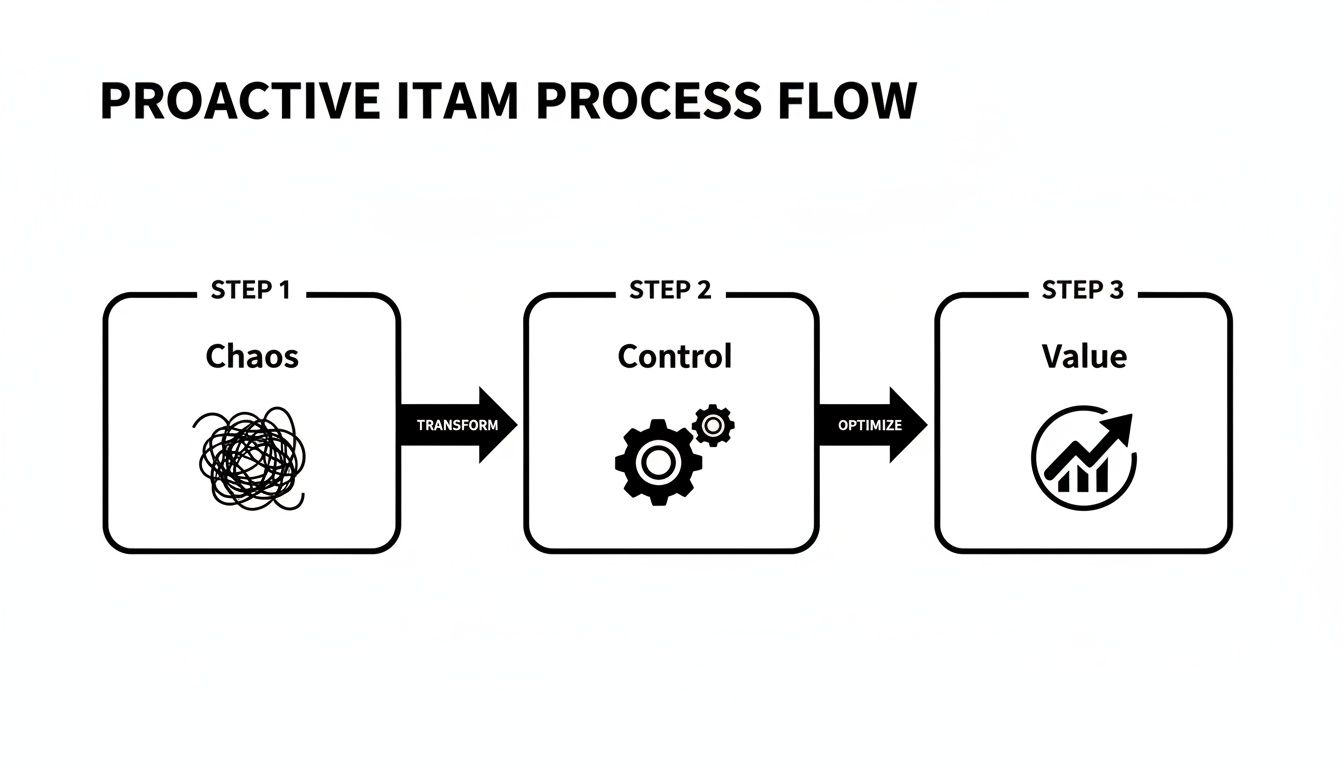
As you can see, moving from left to right, gaining control over your assets is the crucial middle step. It’s the bridge you cross to unlock their true financial and operational potential for your business.
Let’s break down each of these five stages. This table gives you a quick snapshot of what happens in each phase and, more importantly, why it matters to your bottom line.
The 5 Stages of IT Asset Lifecycle Management
| Lifecycle Stage | Key Activities | Primary Goal for Your Business |
|---|---|---|
| Procurement | Needs analysis, vendor selection, purchasing, and lease negotiation. | Acquire the right technology at the best price without overspending or creating future compatibility issues. |
| Deployment | Installation, configuration, security setup, and adding the asset to your inventory system. | Get new technology up and running securely and efficiently, ensuring it’s immediately productive and accounted for. |
| Management | Tracking asset location and usage, managing software licenses, and monitoring performance. | Maximize the asset's value and productivity throughout its useful life while maintaining security and compliance. |
| Maintenance | Applying patches and updates, performing hardware repairs, and optimizing performance. | Keep technology running smoothly and securely, preventing downtime and extending its functional lifespan. |
| Disposal | Secure data wiping, decommissioning, recycling, or reselling old hardware. | Retire assets safely and responsibly, protecting sensitive data and complying with environmental regulations. |
Now that you have the big picture, let's dive a little deeper into what each stage involves day-to-day.
Stage 1: Procurement
Procurement is so much more than just buying new tech; it’s about strategic acquisition. For a small or midsize business, this means asking some tough questions before you ever spend a dime. Will this new software actually work with our existing systems? Does this particular laptop model meet the security standards our industry demands?
Making a purchase without this foresight is a recipe for compatibility nightmares and surprise costs down the line. A smart procurement plan ensures every dollar you spend on technology is aligned with your long-term business goals, preventing you from ending up with expensive paperweights that don't quite fit your needs.
Stage 2: Deployment
Once an asset physically arrives, the deployment stage kicks off. This is where the technology is installed, configured, and integrated into your network. It's also a critical security checkpoint.
A poorly configured device can create a significant vulnerability in your defenses. Deployment isn't just plugging something in; it involves setting up user accounts, installing essential security software, and officially adding the asset to your central tracking system. Whether you're a manufacturer in Ohio or a law firm in Pennsylvania, a proper deployment process ensures that new computer is a secure tool, not a new risk.
Stage 3: Management
The Management stage is the long haul—it’s where the asset lives its productive life, actively generating value for your business. This entire phase is about continuously monitoring the asset’s performance, its physical location, and all the software installed on it.
Simple questions become crucial here. Who is using this device? What software is actually on it? Is it connecting to our network securely? Answering these is impossible without an active management process. This visibility is your best defense against "shadow IT"—unauthorized software that can introduce serious security threats—and guarantees you have a real-time, accurate inventory of your tech.
Stage 4: Maintenance
Technology, like any tool, needs regular maintenance to perform at its best and stay secure. This stage covers everything from applying software updates and security patches to replacing failing parts like a worn-out hard drive.
Proactive maintenance is what prevents small glitches from turning into business-disrupting disasters. A server that goes down unexpectedly can bring your entire operation to a screeching halt, costing you thousands in lost revenue and productivity. By keeping your systems updated, you not only boost performance but also close the security gaps that hackers are constantly looking to exploit. If you want to dig deeper into this, our guide on what is patch management is a great place to start.
Proactive maintenance is the difference between a minor, scheduled inconvenience and a major, unexpected catastrophe. It’s about spending a little time and money now to save a lot of both later.
Stage 5: Disposal
Eventually, every asset reaches the end of its useful life. The disposal stage is the final, and frankly, one of the most critical phases of IT asset lifecycle management. Just tossing an old computer in a closet or, even worse, a dumpster is a massive security and compliance risk waiting to happen.
These devices are packed with sensitive company and customer data. Secure disposal involves completely and permanently wiping all data from storage drives before the hardware is recycled or destroyed. This final step is a core part of a strong IT asset lifecycle and often involves professional IT Asset Disposition (ITAD) services. They ensure you stay compliant with data privacy laws and protect your business from a potential breach, even long after the asset has left your building.
The Real-World Payoffs of Mastering Your IT Assets
We've walked through the theory and the stages. Now, let's get to the part that really matters: what's in it for your business? Implementing an IT asset lifecycle management strategy isn't just an abstract IT project—it’s a business decision that pays you back directly on your bottom line. For any SMB, the results are clear, measurable, and incredibly valuable.
When you get a handle on your technology, the benefits stack up across three core areas: you'll see significant cost savings, build a much stronger defense against cyberattacks, and make your day-to-day operations run a whole lot smoother.

Uncovering Significant Cost Savings
Let's start with the most immediate and compelling payoff: the impact on your budget. If you don’t have a crystal-clear view of your technology, I can almost guarantee you're wasting money somewhere. A good ITAM program turns on the lights, revealing those hidden costs and empowering you to make smarter financial decisions.
This goes way beyond just finding a good deal on a new laptop. A well-oiled ITAM program systematically hunts down and eliminates financial waste. A report from Flexera highlighted the massive returns for businesses that master this process. The report found that 39% of organizations saved between $1-10 million a year with mature ITAM programs. While your SMB might not see savings on that scale, the principle is the same: control leads to cost reduction.
Here’s where you’ll start seeing those savings pop up:
- Eliminate "Shelfware": You can finally pinpoint and stop paying for software licenses that are just gathering digital dust, perhaps assigned to former employees or simply never used.
- Optimize Software Licensing: Nothing stings like a surprise fine from a software audit. ITAM ensures you have exactly the right number of licenses for the software you actually use, keeping you compliant and penalty-free.
- Improve Vendor Negotiations: Walking into a negotiation knowing exactly what you own and how you use it gives you incredible leverage. You can demand better pricing and terms because you have the data to back it up.
- Avoid Surprise Capital Expenses: By tracking the age and performance of your hardware, you can plan and budget for replacements ahead of time. No more scrambling to cover a sudden, expensive failure.
Strengthening Your Cybersecurity Posture
Here's a fundamental truth in cybersecurity: you can't protect what you don't know you have. That simple fact is why ITAM is no longer just an operational tool—it's an essential piece of your security strategy. Every unmanaged laptop, unpatched server, or forgotten device on your network is a potential open door for a cyberattack.
Think of a complete asset inventory as your first line of defense. It gives your IT team, or a partner like Eagle Point, a complete map to systematically find and shut down risks before they can be exploited.
A comprehensive ITAM program isn't just an inventory list; it's a dynamic security map of your entire business. It shows you exactly where your digital vulnerabilities are so you can fortify them.
This process directly hardens your security by:
- Identifying Vulnerable Assets: You can quickly find—and fix—devices running old operating systems or software that are no longer receiving security patches.
- Preventing "Shadow IT": Discover all the unauthorized software and cloud services your employees might be using. These unsanctioned tools can introduce massive security and compliance risks without anyone knowing.
- Ensuring Consistent Patching: An effective patch management program depends on a complete asset list. Without one, it’s easy to miss devices during critical security updates, leaving you exposed.
Streamlining Business Operations
Finally, a well-managed asset lifecycle just makes your entire business run better. When your technology is organized and accounted for, the positive effects ripple out to every department. The goal is to make technology a silent partner in productivity, not a constant source of frustration.
This operational boost isn't just theoretical; you see it in very real, day-to-day improvements. Think about how a solid ITAM process transforms common business tasks:
- Faster Employee Onboarding: New hires get the right computer, fully configured and ready to go, on day one. They can start being productive immediately instead of waiting on IT.
- Reduced Downtime: Proactive maintenance and planned replacement cycles mean fewer unexpected hardware failures that can grind work to a halt.
- Simplified IT Support: When an employee has an issue, your support team has all the asset information at their fingertips—age, warranty, configuration—allowing them to diagnose and solve problems much faster.
- Easier Compliance Reporting: For businesses in regulated industries like healthcare (HIPAA) or manufacturing (CMMC), ITAM is a lifesaver. It provides the detailed audit trails you need to prove compliance with industry standards.
How to Sidestep Common Asset Management Pitfalls
Even the sharpest small and midsize businesses can stumble when it comes to managing their technology. Think of a solid IT asset lifecycle management program as your best defense—a way to steer clear of common, costly mistakes that quietly drain your budget and expose you to serious risks. These aren't just theoretical problems; they're everyday issues that a smart strategy can solve.