
A solid business continuity plan isn't some massive, dusty binder you stick on a shelf. For a small or mid-sized business in Western Pennsylvania or Eastern Ohio, it’s a living playbook—a practical guide to keep you standing when things go sideways. It boils down to a few key business continuity planning steps: figuring out your real risks, knowing which parts of your business absolutely must keep running, creating smart recovery strategies, and then testing the whole thing to make sure it actually works.
Why Business Continuity Is Not an Enterprise Luxury

Picture this: your main server crashes in the middle of your busiest season. Or a classic Western Pennsylvania winter storm knocks out power for three days straight. These aren't just headaches; for a small or mid-sized business (SMB), they're existential threats that can shut down operations, tank your reputation, and bleed you dry. This is exactly where business continuity planning comes in.
Too many SMB owners I talk to hear "business continuity plan" (BCP) and immediately think it's some complicated, big-corporation process they can't afford. But that’s a misconception. As a trusted advisor to businesses in our community, I can tell you that at its heart, a BCP is simply your team's roadmap for a crisis. It’s what turns chaos and panic into a calm, controlled response.
From Panic to Proactive Planning
A good plan isn't about preparing for a zombie apocalypse. It’s about tackling the real, everyday threats your business actually faces. We're talking about the common disruptions that can absolutely cripple a company that hasn't thought ahead.
In my experience helping local businesses, these are the usual suspects:
- Cyberattacks: Think ransomware locking up every file you own. Suddenly, you can't access customer data, process a single order, or even send an email. This is a very real threat to manufacturers, healthcare providers, and professional services firms alike.
- Supply Chain Breaks: What happens when your go-to supplier has their own disaster? Your entire production line or service delivery can grind to a halt.
- Severe Weather: Here in our region, a major snowstorm or flash flood can mean no one gets to the office, or you're without power for an extended period.
- Key Personnel Unavailability: The sudden loss of a critical team member, even temporarily, can leave a massive hole in your day-to-day operations and knowledge base, especially in smaller teams where people wear multiple hats.
A BCP is your playbook for resilience. It ensures that when a disruption hits, your team isn't scrambling to figure out what to do. Instead, they have clear instructions to follow, minimizing downtime and protecting the reputation you've worked so hard to build.
The Real Cost of Unpreparedness
Putting this off can be a fatal mistake for an SMB. Look no further than the run-up to COVID-19 for a brutal lesson. Back in 2020, reports showed that a shocking 51% of companies had zero business continuity plan in place when the world shut down.
The numbers don't lie. Global data shows that 40% of businesses that suffer a major disaster never reopen their doors. Another 25% fail within a year. Those statistics hammer home the cost of winging it, making a BCP a non-negotiable for any forward-thinking SMB. You can learn more about the impact of crisis on business operations.
Step 1: Identify What Truly Keeps Your Business Running
Before you can build a plan to protect your business, you need a crystal-clear picture of what actually makes it tick. This is where we roll up our sleeves and get into the first practical steps of business continuity planning: the Business Impact Analysis (BIA) and a straightforward Risk Assessment.
Forget the corporate jargon for a minute. This is all about answering one simple, gut-check question:
“If something broke right now, what would hurt the most?”
This process is a core part of a comprehensive business risk management framework, which is just a structured way of looking at potential threats. For a small or mid-sized business, it means looking past the obvious and getting real about how work gets done every single day.
Pinpointing Your Critical Operations
A Business Impact Analysis sounds intimidating, but it’s really just about making a priority list. It’s a methodical way to identify the core processes that generate revenue, serve your customers, and literally keep the lights on.
Think about your specific operations. For a manufacturing company in Erie, that critical function might be the production line control system. If it goes down, everything stops. For a law firm in Pittsburgh, it’s probably the client file server and the billing software that keeps cash flow moving.
Start by brainstorming your key functions. Your list might include things like:
- Customer Order Processing: How do you take orders? What systems are involved from start to finish?
- Client Support and Service Delivery: What tools do your teams absolutely need to help customers?
- Payroll and Invoicing: How do you make sure your people and your vendors get paid on time?
- Inventory Management: What software tracks your products, parts, or materials?
Once you have this list, you’re ready to figure out how fast you need each one back online.
Setting Realistic Recovery Targets
This is where two important acronyms come into play: RTO and RPO. They might sound technical, but the concepts are simple and absolutely essential for building a plan that works for your budget.
- Recovery Time Objective (RTO): This is the maximum acceptable downtime for a specific function. How long can your invoicing system be down before it starts causing serious financial pain? Two hours? A couple of days? Be honest.
- Recovery Point Objective (RPO): This defines the maximum acceptable data loss you can tolerate. If your main server fails, are you okay losing a full day's worth of data, or do you need it restored up to the last 15 minutes?
Answering these two questions is the bedrock of your entire recovery strategy. Your RTO and RPO targets dictate the kind of backup and disaster recovery technology you need, which directly impacts your budget and planning.
A very low RTO (just minutes) and a low RPO (seconds) require much more advanced—and expensive—solutions than an RTO of 24 hours. Getting this right helps you focus your limited resources where they matter most.
Use this sample table to identify your most critical business functions and set realistic targets for recovery time (RTO) and data loss (RPO).
Mapping Your Critical Functions and Recovery Goals
| Business Function | Description of Impact if Disrupted | Maximum Acceptable Downtime (RTO) | Maximum Acceptable Data Loss (RPO) |
|---|---|---|---|
| Example: Order Entry System | Inability to process new sales, leading to immediate revenue loss and customer frustration. | 4 Hours | 15 Minutes |
| Example: Client CRM | Sales and support teams cannot access customer history or contact information, halting service. | 8 Hours | 1 Hour |
| Example: Payroll Processing | Failure to pay employees on time, causing major morale issues and potential legal penalties. | 2 Business Days | 24 Hours |
This exercise helps you translate abstract risks into concrete goals that will guide the rest of your planning.
Assessing Your Unique Risks
With your critical functions mapped out, the next step is a Risk Assessment. This isn’t about creating a doomsday list of every possible disaster. It’s about identifying the most likely threats your business in Western Pennsylvania or Eastern Ohio will actually face.
To keep it manageable, start by categorizing potential threats into a few buckets:
- Natural Disasters: Think about what’s common here. Major snowstorms, regional flooding, or severe thunderstorms that knock out power or make your office inaccessible for days.
- Technical Failures: This is the stuff we see all the time—server crashes, prolonged internet outages from a local provider, or a critical software application failing spectacularly.
- Human-Related Threats: This category is broad. It could be a key employee suddenly leaving, an internal mistake that corrupts data, or malicious cyberattacks like phishing and ransomware. This is a huge area of concern for SMBs, as they are increasingly targeted.
This process doesn’t have to be a massive undertaking. We’ve actually created a resource to help you get started on the cyber threat side of things. You can download our free cybersecurity risk assessment template to get a structured framework for identifying and prioritizing these threats.
By the end of this stage, you'll have a clear, prioritized list of what you need to protect and what you need to protect it from. That clarity is the single most important outcome here, and it paves the way for developing recovery strategies that are both effective and realistic.
Step 2: Develop Smart Recovery Strategies
Alright, you’ve done the hard work of identifying what absolutely must keep running and what could knock you off your feet. Now comes the part where we build your recovery playbook.
For a small or mid-sized business, this isn't about buying a duplicate of everything you own—that's just not realistic. It’s about making smart, strategic choices that give you the most resilience for your budget. This is where all that analysis you just did really starts to pay off. The RTOs and RPOs you defined will be your north star, guiding every decision you make about technology and processes.
Think of it like this:
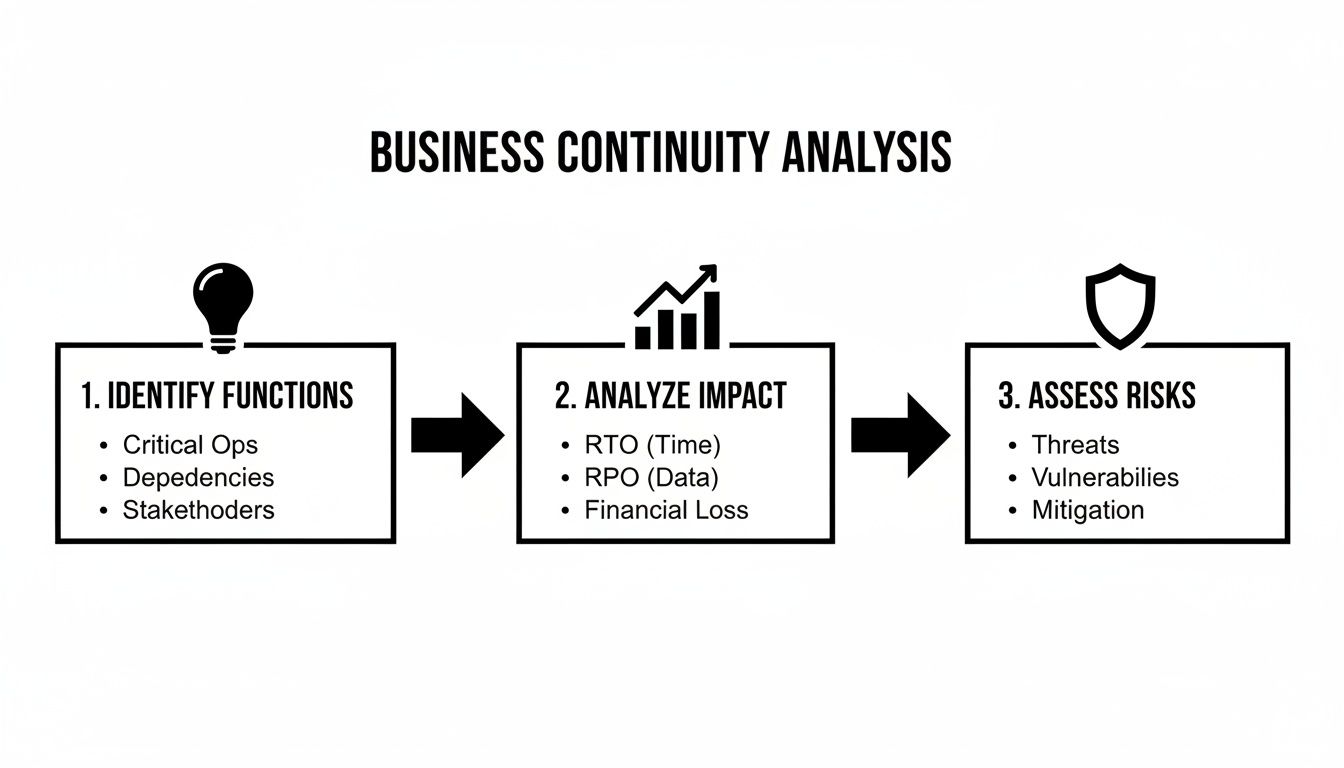
As you can see, a solid recovery plan is built on a foundation of clear-headed analysis. You have to know what you’re solving for before you can pick the right tools.
Fortifying Your IT and Data Recovery
Let's be honest, for most businesses today, getting back on your feet starts with technology. If your systems are down, not much else is happening. The good news? Enterprise-grade IT recovery isn't just for enterprises anymore. Cloud services have made robust protection accessible for SMBs.
Here are the key solutions we see SMBs successfully put in place all the time:
- Modern Cloud Backups: Forget swapping out tapes or crossing your fingers that an old external hard drive still works. Today’s solutions automatically back up your critical servers and Microsoft 365 data—think email, SharePoint, and OneDrive—to secure, off-site cloud data centers. This move alone protects you from localized disasters like a fire, flood, or theft.
- Disaster Recovery as a Service (DRaaS): This is the next level up and, frankly, a game-changer. DRaaS doesn't just back up your files; it creates a live, bootable replica of your entire server environment in the cloud. If your main server goes down due to hardware failure or a cyberattack, you can "failover" to the cloud replica and be back up and running in minutes, not hours or days. It’s the ultimate safety net for your most critical systems.
These technologies are designed to hit the very RTO and RPO targets you already defined. If you want to dig deeper into the nuts and bolts, our guide on how to prevent data loss explores some of these strategies in more detail.
Key Takeaway: The goal of IT recovery isn't just to get your data back; it's to restore your operations. A successful strategy means your team can access the apps and information they need to do their jobs, from anywhere.
Planning for Your Operations and People
Technology is just one piece of the puzzle. I’ve seen companies with perfect backups fail during a crisis because they forgot about the human element. A truly effective continuity plan is built for people, recognizing they’re your most important asset when things go sideways.
When a disruption hits, clear communication and predefined roles are what separate chaos from a coordinated response. Your operational recovery strategy should absolutely include these essentials.
A Checklist for a Human-Centric Playbook:
- Communication Tree: Create a simple, clear chart showing who calls whom. This stops one person from becoming a bottleneck and ensures information flows fast, especially when key decision-makers are unavailable.
- Remote Work Protocol: Have a documented plan for secure remote work so your team stays productive even if the office is a no-go zone. This includes making sure they have the right equipment and secure access to company data.
- Backup Supplier List: Identify and pre-vet alternate suppliers for critical materials or services. What happens if your key supplier is the one having the disaster? Don't be left scrambling.
- Emergency Contact Info: Compile and maintain an up-to-date list of all employees, key clients, and critical vendors, accessible even if your primary network is down.
None of these steps require a massive budget. They just require some thoughtful planning. It’s all about anticipating the non-technical problems that can bring a business to a grinding halt.
Ensuring Workspace and Facility Continuity
So, what happens when your team physically can't get to the office? Whether it's a power outage, a flooded road, or a public health advisory, your plan has to account for your primary location being inaccessible.
Fortunately, for many SMBs, the shift to cloud tools has made this problem much, much easier to solve than it was a decade ago.
- Lean on Your Cloud-Based Tools: Platforms like Microsoft 365, your CRM, and other SaaS applications are your biggest advantage here. They’re accessible from any device with an internet connection, turning any location into a potential workspace.
- Define an Alternate Meeting Point: If your team absolutely needs to get together in person, designate a secondary location ahead of time. This could be a shared workspace, a partner's office, or even a local coffee shop for a quick huddle.
- Reroute Critical Communications: Make sure you have a plan to forward your main office phone line to a cell phone or a softphone app. You can’t afford to miss crucial customer calls during a crisis.
By focusing on these practical, scalable solutions across your IT, operations, and facilities, you can build a robust recovery strategy that delivers real resilience without that enterprise-level price tag.
Step 3: Create a Plan Your Team Will Actually Use
Here’s the most common mistake I see companies make: they create a massive, 100-page binder for business continuity, shove it on a shelf, and call it a day. In a real crisis, nobody has time to thumb through a novel.
The best plan is one your team can grab and act on immediately. It needs to be concise, clear, and intensely practical. Think of it less as a formal document and more as an emergency playbook. Its real value is measured by how fast it gets your team from panic mode to productive action.
Building Your Actionable Playbook
Your plan doesn't need to map out every wild "what-if" scenario. Instead, it should zero in on giving clear directions for the most likely disruptions you’ve already identified. A truly effective BCP playbook has a few non-negotiable elements that provide structure when everything feels chaotic.
Here are the essentials you absolutely must include:
- Simple Activation Criteria: Spell out exactly what triggers the plan. Is it a server being down for more than an hour? Is it an office closure ordered by local authorities? Be specific to eliminate any guesswork when stress levels are high.
- Response Team Roster: List the core members of your continuity team. More importantly, define their exact roles and responsibilities during a crisis. Who handles employee communications? Who gets on the phone with key vendors? Who has the final say on big decisions?
- Clear Communication Templates: Draft simple, pre-approved messages for employees, customers, and critical partners. Having these ready to go saves precious time and ensures your messaging stays consistent and calm under pressure.
These components are the backbone of a plan that people will actually use when they need it most.
Making Your Plan Accessible
A brilliant plan is completely useless if it’s trapped on the same server that just went down. Accessibility is one of the most overlooked parts of business continuity planning, but it's vital. You have to store your plan in multiple formats and locations to guarantee access no matter what happens.
I once worked with a client whose BCP was stored exclusively on their main file server. When a ransomware attack encrypted that server, their recovery plan was encrypted right along with it. Don't let that be you.
Your plan should live in at least three places:
- In the Cloud: A secure, shared spot like Microsoft SharePoint or a dedicated BCP platform.
- On Local Devices: Key team members need an offline copy saved directly to their laptops.
- A Physical Copy: Keep at least one printed copy in a secure, off-site location. It might feel old-school, but it's foolproof.
This simple redundancy ensures your team has the instructions they need, even if your primary systems are completely offline.
Partnering for Clarity and Accuracy
While the core of your BCP is about business operations, the technical details have to be perfect. This is where having an expert partner makes all the difference, especially when you have limited internal IT staff. Trying to accurately document server failover procedures or data restoration steps requires deep technical knowledge that most businesses don't have in-house.
An experienced IT provider ensures the technical recovery sections of your plan aren't just accurate, but are also practical and aligned with your real-world capabilities. For many small and mid-sized businesses, understanding what a managed service provider does can shine a light on how this partnership bridges the gap between business strategy and IT execution. A well-documented, accessible, and accurate plan is what transforms a good strategy into successful execution during a crisis.
Step 4: Test, Maintain, and Improve Your Plan
One of the biggest mistakes I see businesses make is treating their continuity plan like a one-and-done project. They put in the hard work, build a solid plan, drop it in a shared folder, and then… nothing. But a business continuity plan isn't a trophy to be admired on a shelf; it's a living document, and its value plummets the second it gets stale.
A plan that hasn't been tested is just a theory. To turn it into a reliable tool you can count on during a crisis, you have to put it through its paces. Regular testing and maintenance are what transform a good plan on paper into a powerful, real-world response.


