An IT managed services agreement is the formal contract that lays out the entire relationship between your business and your technology provider. It's the document that spells out every service, responsibility, and performance standard you both agree to. More than just a piece of paper, it turns a simple vendor relationship into a true strategic partnership, making sure everyone is on the same page and your operations are protected.
Why Your Business Needs an IT Managed Services Agreement
For many small and medium-sized businesses (SMBs) in Western Pennsylvania and Eastern Ohio, a handshake deal for IT support can feel faster and easier. But when your customer data, your ability to operate, and your revenue are all on the line, relying on an informal understanding is a huge gamble.
Think of it like building a house: you wouldn't let a contractor start pouring the foundation without a detailed blueprint. An IT managed services agreement is that exact blueprint for your entire technology infrastructure. It ensures you and your provider have agreed on the design, the materials, and the timeline before any work begins.
This document is what shifts your IT support from a reactive, break-fix model—where you call someone only when things go wrong—to a proactive partnership focused on preventing problems in the first place. The goal is to align your provider’s success with your own. When they’re incentivized to keep your systems running smoothly, everyone wins.
From Vendor to Strategic Partner
Operating without a formal agreement leaves your business wide open to undefined risks. What happens when a critical server crashes at 2 AM on a Saturday? Without a contract, you have no guarantee of when—or if—they’ll respond. If a new cybersecurity threat like ransomware emerges, is your provider obligated to handle it, or will that come with a surprise invoice you weren't expecting?
A well-crafted MSA clears up all that ambiguity. It creates a predictable, stable framework for:
- Accountability: It clearly defines who is responsible for what, from daily data backups to crafting a long-term security strategy. No more guessing games.
- Cost Predictability: You can finally move away from those shocking, out-of-scope bills and into a fixed, manageable monthly investment. A huge advantage here is the expertise a good provider brings to optimizing cloud spend, often following established principles like these AWS cost management best practices.
- Operational Stability: It guarantees system uptime and sets crystal-clear expectations for how quickly issues will be resolved, which means fewer disruptions for your team.
The Growing Importance of Formal Agreements
The move toward formal agreements isn't just a local trend; it's happening everywhere. The global managed IT services market is on track to hit USD 329.1 billion by 2025. That explosive growth is driven by businesses like yours that are tired of downtime and want to make sure their technology is actually helping them hit their goals. A formal agreement is the engine that makes all these benefits possible.
At the end of the day, this document is about more than just legal protection—it’s about building a solid foundation of trust. To get a better feel for the proactive role a provider should be playing, you can learn more about what a managed service provider does in our guide. It solidifies your IT provider's commitment to protecting your assets and helping your business not just survive, but thrive.
Deconstructing Your IT Managed Services Agreement
When you first get your hands on a managed services agreement, it can look like a mountain of dense legal jargon. I get it. But I always tell my clients to think of it less as a legal hurdle and more as a detailed game plan for a successful partnership. Once you break it down into its core parts, it becomes a practical checklist that ensures your IT provider is truly set up to help your business win.
Every single clause in an IT managed services agreement has a job to do, from spelling out day-to-day tasks to defining a clear exit strategy if things don't work out. By understanding these pieces, you can spot potential gaps before they become problems and make sure the contract is perfectly aligned with how your business actually operates.
This isn't just about paperwork; it's about building a solid foundation. A well-crafted MSA is the blueprint for business stability, holding up the essential pillars of growth, security, and operational efficiency.
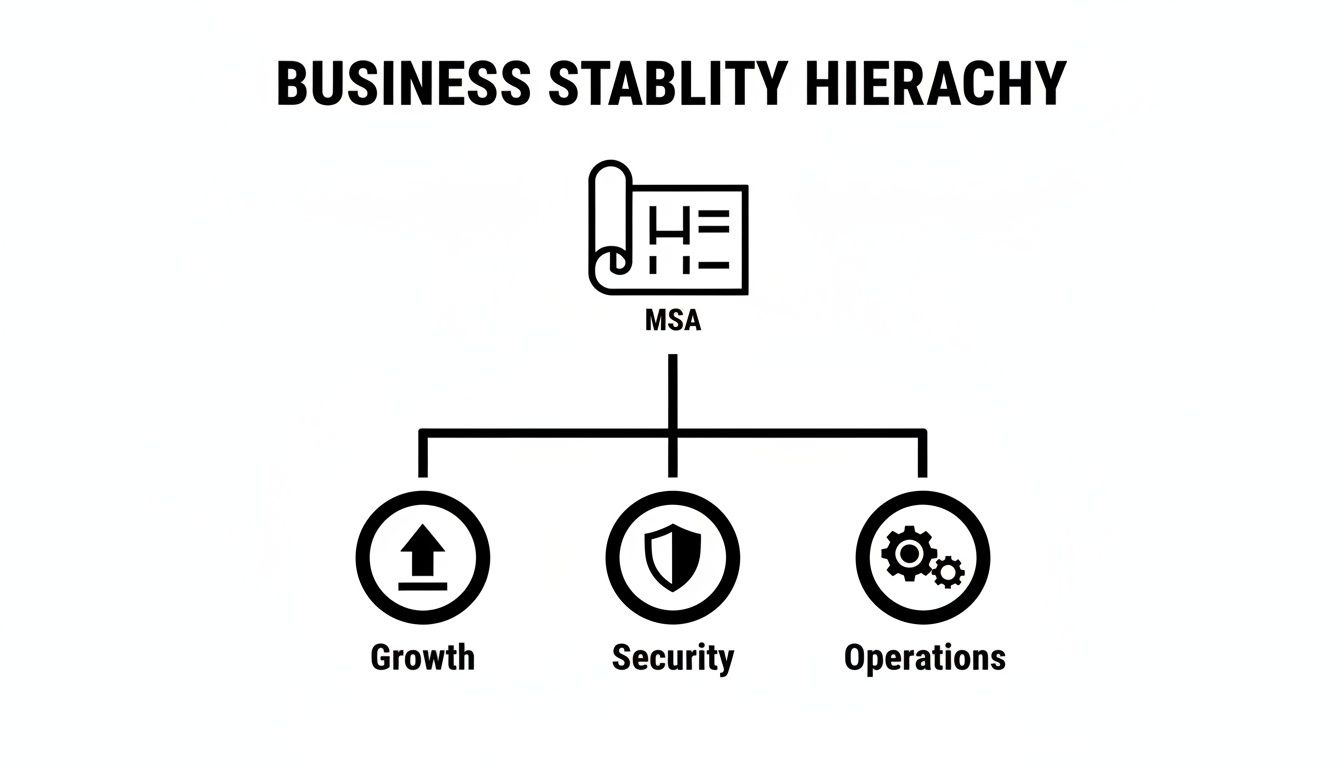
As you can see, this agreement is a strategic tool. It directly supports the core functions that keep your business moving forward.
Before we dive into the nitty-gritty of each clause, here's a quick-reference table that breaks down the most critical components. Think of this as your cheat sheet for navigating your next MSA negotiation.
Essential Clauses in Your IT Managed Services Agreement
| MSA Component | What It Defines | Why It's Critical for Your Business |
|---|---|---|
| Scope of Services | Exactly what tasks, systems, and hardware are covered—and what's not. | Prevents surprise bills and ensures critical systems aren't neglected. It's your single source of truth for what you're paying for. |
| Security & Compliance | The specific security measures and regulatory standards (HIPAA, CMMC) the provider will meet. | Protects your sensitive data from cyber threats and ensures you meet industry-specific legal requirements, avoiding massive fines. |
| Roles & Responsibilities | Who does what. It clarifies your duties (e.g., approving purchases) and the provider's (e.g., daily backups). | Eliminates confusion and finger-pointing. When something goes wrong, you know exactly who is responsible for fixing it. |
| Term & Termination | The contract's length and the rules for ending the partnership, including notice periods and potential fees. | This is your exit strategy. It protects you from getting locked into a long-term contract with an underperforming provider. |
This table covers the absolute must-haves, but the real power comes from understanding the details behind each one. Let's break them down further.
Scope of Services: The What and the What Not
Pay close attention here, because this is arguably the most important section in the entire document. The Scope of Services clause is a detailed, itemized list of every single task, system, and piece of equipment your IT provider is responsible for. This is where you find out if they’re monitoring your servers 24/7, managing your Microsoft 365 licenses, or just handling basic helpdesk tickets.
Just as crucial is what this section excludes. A great agreement is crystal clear about what is not covered. For example, it might state that while they manage your office network, any custom software development or on-site support for your remote employees will cost extra.
Ambiguity is the enemy of a good partnership. A clearly defined scope prevents surprise invoices and ensures that critical tasks don't fall through the cracks because both parties assumed the other was handling them.
Getting this right helps you avoid that dreaded "that's out of scope" conversation in the middle of a crisis. It sets clear boundaries and expectations right from the start.
Security and Compliance Protocols
For any business in manufacturing, healthcare, or professional services, this clause is completely non-negotiable. It outlines the specific security measures your provider will put in place to protect your data. This isn't just about antivirus software; it should cover everything from firewall management to regular vulnerability scans and security audits.
Beyond that, this section has to address your compliance requirements. If your business handles patient data and needs to be HIPAA compliant, or you work on government contracts that require CMMC standards, the MSA must explicitly state that your provider will meet those obligations on your behalf.
This part of the agreement is your proof that the provider isn't just keeping the lights on—they are actively working to shield you from cyber threats and help you meet your regulatory duties.
Roles and Responsibilities
So, who gets the call when a new employee can't log into their email? And who has the final say on purchasing a new server? The Roles and Responsibilities section clears all this up, creating a straightforward chain of command for both everyday tasks and big-picture decisions.
It typically breaks down like this:
- Your Responsibilities: This could include providing prompt access to systems when needed, designating a primary point of contact from your team, and signing off on major IT investments.
- Provider Responsibilities: This covers their duties, like performing daily backups, responding to system alerts within a certain timeframe, and providing strategic guidance through a vCIO (Virtual Chief Information Officer).
This clarity is gold. It cuts through confusion, streamlines communication, and makes sure issues get to the right person for a fast and efficient fix.
Term and Termination
Every partnership has a lifecycle, and this clause defines its length and the rules for calling it quits. The Term specifies how long the agreement lasts, which is usually between one and three years. You can sometimes get better pricing with a longer term, but a shorter term offers more flexibility if your business needs change.
The Termination section is your escape hatch. It details the conditions under which either you or the provider can end the contract. This includes "termination for cause" (if the provider repeatedly fails to meet their obligations) and "termination for convenience" (if you simply want to move in a different direction). Always look closely at the required notice periods and any fees tied to an early exit. For a wider view on these types of contracts, looking at general web technology agreements can provide some helpful context. Ultimately, this clause ensures you’re not stuck in a relationship that isn’t working.
Translating SLAs from Technical Jargon to Business Impact
The Service Level Agreement, or SLA, is the true heartbeat of any IT managed services agreement. While the main contract outlines the partnership, the SLA is where your provider puts their promises in writing—concrete, measurable guarantees about service quality. The problem is, these promises are often buried in technical jargon that feels a million miles away from your daily operations.
For a business owner here in Western Pennsylvania or Eastern Ohio, the only question that matters is: what does this actually mean for my company? Let’s cut through the tech-speak and translate these terms into real-world business impact.

Uptime Guarantees and The Real Cost of Downtime
You’ll often see providers touting impressive-sounding uptime percentages like 99.9% or 99.99%. They look almost identical on paper, but the difference in potential downtime is huge. Understanding this helps you make sure their guarantee actually matches what your business can tolerate.
Let's break down what those numbers mean in minutes and hours:
- 99.9% Uptime ("Three Nines"): This sounds great, but it allows for roughly 43 minutes of downtime per month. This might be fine for non-critical internal systems.
- 99.99% Uptime ("Four Nines"): Now we're talking. This slashes potential downtime to just over 4 minutes per month. This is a much better standard for your most important software, like your ERP or primary sales platform.
- 99.999% Uptime ("Five Nines"): This is the gold standard, allowing for only 26 seconds of downtime a month. It’s typically reserved for systems where failure is not an option, like in hospitals or critical financial institutions.
For most small and midsize businesses, the sweet spot for essential systems is 99.99%. It ensures that any disruption is a rare, brief hiccup, not a recurring problem that grinds your entire operation to a halt.
Key Takeaway: That extra '9' in an uptime guarantee isn't just a technicality—it's the difference between a minor inconvenience and a major operational disaster that could cost you sales and damage your reputation.
Response Time vs. Resolution Time: The Critical Difference
This is one of the most common—and most costly—misunderstandings in any SLA. Getting this wrong is a recipe for frustration when you’re in the middle of a crisis.
Imagine your manufacturing plant’s core scheduling software goes down. Every minute it’s offline, your production schedule is thrown into chaos, and customer orders are delayed.
- Response Time: This is simply how fast your provider promises to acknowledge your support ticket. A 15-minute response time means you’ll get a call or an email within 15 minutes saying, "We got your ticket and we're looking at it." It's a start, but it doesn't fix anything.
- Resolution Time: This is the metric that matters. It’s how quickly your provider commits to actually fixing the problem. A 4-hour resolution time means they guarantee your software will be back online and working within four hours.
In our manufacturing scenario, a quick response is nice, but it doesn’t get the production line moving again. Resolution time is what directly impacts your bottom line.
When you review your it managed services agreement, demand that resolution times are clearly defined and tiered based on business impact. A problem with a single user’s printer should never have the same resolution priority as a company-wide network outage. A well-written SLA will categorize issues by severity (e.g., Critical, High, Medium, Low) and assign different resolution targets to each. This ensures your provider focuses their resources where they matter most—on keeping your business running.
Choosing the Right Pricing Model for Your Budget
For any small or medium-sized business, predictable costs are non-negotiable. You need them for strategic planning. An IT managed services agreement is supposed to turn those chaotic, unpredictable IT expenses into a stable monthly investment, but that only works if you pick the right pricing model.
It can feel a lot like comparing cell phone plans—some look like a great deal upfront but end up costing you a fortune in surprise overage charges. The goal is to land on a model that fits your budget without forcing you to skimp on critical support right when you need it most. Let's break down the common pricing models so you can look at quotes with confidence and know exactly what you’re paying for.
The Per-User or Per-Device Model
This is one of the most straightforward and easy-to-understand structures out there. You simply pay a flat fee each month for every employee (per-user) or for every piece of hardware your provider manages, like a laptop, server, or workstation (per-device).
- Pros: This model makes budgeting a breeze. As you hire new team members, your IT costs scale up in a predictable way. It’s a transparent system where your provider's revenue is tied directly to the size of your team.
- Cons: If your team uses multiple devices per person (say, a laptop, a desktop, and a company phone), the per-device model can get pricey fast. On the flip side, the per-user model is perfect for those exact scenarios.
This approach is tailor-made for growing businesses that need a simple, scalable way to keep IT costs in check. It ensures everyone on your team has the support they need without you having to do complex math every month.
The Tiered (or Menu-Style) Model
The tiered model is the IT equivalent of a cable TV package. You pick from different service levels—think Bronze, Silver, Gold—and each one comes with a pre-set list of services. A basic tier might only cover remote monitoring and helpdesk support. A premium tier, however, could add 24/7 on-site support, advanced security management, and strategic vCIO services.
This model looks attractive because it seems to offer flexibility. The problem is, this is where hidden costs love to hide. If you're on a lower-tier plan and run into a major issue that falls outside its scope, like a server crashing, you're going to get hit with a hefty out-of-scope bill for that emergency work. Those extra charges can quickly wipe out any savings you thought you were getting from the cheaper plan.
The All-Inclusive (Flat-Fee) Model
Think of the all-inclusive model as the "unlimited plan" for your IT services. You pay one predictable monthly fee, and in return, you get comprehensive management and support for your entire technology environment. This structure is built to be a true partnership; your provider is now financially motivated to keep your systems running smoothly because it minimizes their own support costs.
The beauty of an all-inclusive model is its financial predictability. It removes the fear of surprise invoices and allows you to budget for IT with complete confidence, knowing that nearly every eventuality is covered.
This is the ideal model for businesses that want to completely hand off their IT management and get back to focusing on what they do best. It fosters a proactive relationship where your provider is incentivized to prevent problems, not just react to them. For many SMBs, making IT costs predictable is a huge piece of their overall financial health, a topic we dive into deeper in our guide on IT cost optimization strategies.
The managed services market is massive, with North America holding a commanding 43.78% market share in 2024. What’s interesting for SMBs is that on-premise deployments still make up 67% of revenue share. This is often because businesses in regulated industries need more direct control over their data and systems, which heavily influences the pricing and structure of these agreements. You can see more on these market trends and their implications on Grand View Research.
Ultimately, the right model for you boils down to your growth plans, how much risk you're willing to take on, and just how predictable you need your spending to be.
Your Pre-Signing Checklist for a Bulletproof Partnership
You’ve gone through the proposals, debated the pricing, and hammered out the SLAs. Now, the final IT managed services agreement is sitting on your desk, ready for a signature. Before you pick up that pen, this is your last, best opportunity to prevent future headaches and lay the foundation for a truly successful partnership.
This isn't just about skimming the legal jargon one more time. It’s a practical, real-world check to make sure the contract aligns with how your business actually runs day-to-day. A few smart questions right now can save you from major operational headaches down the line.

Confirming the Onboarding and Transition Plan
A great partnership has to start with a great beginning. The agreement should outline the onboarding process, but you need to dig into the practical details. A vague plan is a recipe for a chaotic transition, leading to unnecessary downtime and frustrated employees.
Get the clarity you need by asking these questions:
- What is the exact timeline? Ask for a week-by-week breakdown of the first 30-60 days. When are they installing monitoring agents? When will they document your network? And when, exactly, do they take over helpdesk duties?
- Who is my point of contact? Find out who is leading your onboarding and how your team should communicate with them during this critical phase.
- What is required from my team? Understand what access, credentials, and time your own staff will need to provide to make the handover seamless.
A provider with a detailed, documented onboarding plan has done this many times before. It’s a powerful signal of their overall organization and professionalism.
Clarifying Day-to-Day Operational Processes
The best IT managed services agreement is a living document that guides daily work, not some file that sits in a drawer collecting dust. Make sure it clearly spells out the procedures for common, everyday business changes.
For instance, the process for adding a new employee or offboarding someone who's leaving should be simple and transparent. The agreement needs to specify how to submit those requests, the expected turnaround time, and how it affects your monthly bill. The same goes for bigger changes, like a planned server upgrade or moving services to the cloud.
A strong MSA anticipates your operational needs. It shouldn't just react to problems; it should provide a clear, agreed-upon framework for managing growth, change, and risk.
Confirming these procedures now prevents confusion later when you’re just trying to get a new hire up and running on their first day. It ensures the provider’s workflow fits your business rhythm, not the other way around.
Reviewing Your Exit Strategy and Protections
While you’re aiming for a long and successful partnership, you have to protect your business if things go south. The termination clause is your official exit strategy, and it deserves one last, careful read-through.
Look at two key scenarios:
- Termination for Cause: If the provider consistently fails to meet the SLAs you both agreed on, what can you do? The clause should define what counts as a breach and spell out the steps you can take.
- Termination for Convenience: If your business needs change and you just need to end the agreement, what does that process look like? Pay close attention to the required notice period (usually 30-90 days) and any early termination fees.
Beyond just ending the contract, double-check the provider’s liability and insurance coverage. This section specifies their financial responsibility if their actions—or lack thereof—cause your business financial harm. Make sure their coverage is enough to protect your assets. Properly managing this is a core part of any good technology relationship, and you can learn more by exploring some fundamental IT vendor management best practices.
This final check ensures your business is protected, no matter what happens, solidifying a partnership built on mutual trust and crystal-clear expectations.
Common Questions About IT Managed Services Agreements
Even after you’ve gone through an IT managed services agreement with a fine-tooth comb, it's totally normal to have a few questions rattling around. This document isn't just a piece of paper; it's the foundation of a critical business partnership. Getting total clarity before you sign is absolutely essential.
To help you out, I've pulled together some of the most common questions we hear from business owners and leaders right here in Western Pennsylvania and Eastern Ohio. My goal is to give you clear, straight-ahead answers that cut through the jargon and show you how these agreements really work in the wild.
What Is the Real Difference Between Managed Services and Break-Fix IT Support?
This is probably the most important question of all, and the answer gets right to the heart of the business model. A break-fix IT support contract is 100% reactive. You only pick up the phone when something is already on fire, which almost always means your business is already feeling the pain of downtime and lost productivity. Their incentive is to fix the immediate problem, but there's no real financial motivation for them to stop it from happening all over again.
On the other hand, an IT managed services agreement is built from the ground up to be proactive. You pay a flat monthly fee to have a partner whose job is to keep your entire technology environment running like a well-oiled machine. This completely aligns their success with yours. They are financially motivated to sniff out and solve problems before they can ever mess up your day, because every emergency call they get costs them time and money.
Think of it like this: Break-fix support is like having a firefighter on speed dial. A managed services agreement is like hiring an architect to design a fireproof building from the very beginning. One reacts to disasters; the other prevents them from ever starting.
This proactive approach ultimately leads to better stability, predictable IT costs, and a real strategic partner who's invested in where your business is going, not just in your next crisis.
Can I Negotiate the Terms of an IT Managed Services Agreement?
Yes, you absolutely can—and you definitely should. Any reputable managed service provider expects this to be a conversation, not a take-it-or-leave-it deal. While they’ll likely start with a standard agreement they’ve polished over the years, a good partner knows that no two businesses are the same.
Certain parts of the agreement should always be on the table for discussion to make sure the partnership truly fits your needs. These typically include:
- Specific Services: Maybe your business needs more intense security monitoring but less on-site support than what's in their standard package.
- SLA Metrics: The uptime guarantee for your mission-critical manufacturing software should probably be much stricter than for an internal file server.
- Reporting Frequency: You might find more value in a detailed weekly report instead of a high-level monthly summary.
- Onboarding Timeline: Your schedule for making the switch might be faster or more gradual than what they normally plan for.
An IT managed services agreement is the blueprint for a partnership. If a provider isn't willing to budge or tailor the contract to what your business actually needs, it could be a major red flag that they see you as just another account, not a long-term partner.
How Long Should the Contract Term Be?
Contract terms for managed services usually run anywhere from one to three years, and there are good reasons for each. A one-year term gives you the most flexibility, which can feel reassuring when you're just starting out with a new provider. It’s your chance to see them in action without being locked into a long-term commitment.
However, a longer term of two or three years often comes with some serious perks. Providers are usually willing to offer better pricing for a longer commitment because it gives them stability. Even more importantly, a multi-year agreement lets your provider really dig in, understand your business, and build out a long-term technology roadmap. They can plan for major upgrades and make sure your IT investments are actually helping you hit your future growth goals.
The right choice really comes down to your comfort level and how stable your business is. A great compromise is to negotiate a longer term but insist on clear performance standards and a fair termination clause if those standards aren't consistently met.
How Does the Agreement Adapt if My Company Grows or Downsides?
A well-written IT managed services agreement should be designed for scalability—it’s a core benefit of the whole model. The contract needs to clearly spell out the process for adding or removing users, computers, and even entire office locations. This is what ensures your IT support can grow or shrink right alongside your business, without any friction.
How this works is usually tied directly to your pricing model. For example, if you're on a per-user plan, adding a new employee should be as simple as sending a quick email to your provider. The agreement should detail how that new user gets onboarded and how the cost is added to your next invoice. The same goes for when an employee leaves—the process for offboarding them and removing the cost should be just as clear and immediate.
Before you sign anything, make sure this change management process is simple, transparent, and doesn't involve a mountain of paperwork or long delays. Your IT partner should be making your business more agile, not slowing you down.
Your IT infrastructure is the backbone of your business, and the right partnership makes all the difference. At Eagle Point Technology Solutions, we build proactive, strategic relationships with SMBs based on trust and clear communication, starting with a fair and transparent agreement. If you're ready to move beyond reactive IT support and build a technology foundation for growth, we're here to help.