It’s your busiest quarter. A critical deadline is right around the corner, and boom—the server crashes. For many small and medium-sized business (SMB) owners I talk to in Western Pennsylvania and Eastern Ohio, this kind of chaotic, productivity-killing scramble is an all-too-familiar nightmare. This is the exact moment where professional helpdesk support steps in as your business's first line of defense against tech chaos.
What Is Helpdesk Support
So, what exactly is helpdesk support? Think of it as the single, reliable point of contact for every technology issue your team runs into. It could be something as simple as a forgotten password locking an employee out of their computer, or it could be a full-blown network outage grinding your entire operation to a halt.
It’s way more than just a "fix-it" line. For a modern SMB, a well-run helpdesk is a strategic business function designed to crush costly downtime, keep your team focused on their actual jobs (not on playing tech support), and protect your company’s valuable data. It transforms tech problems from business disasters into manageable, quickly resolved incidents.
To really get what it does, it helps to start by understanding the difference between customer support and customer service. While those roles are typically external—focused on your clients—helpdesk support is the internal engine making sure your own employees have the working tools they need to serve those clients effectively.
The Core Purpose for Your Business
At its heart, the goal of helpdesk support is to restore normal operations as quickly as possible and minimize the impact on your business. It’s not just about fixing what’s broken; it’s about making your entire operation more resilient and efficient.
A professional helpdesk acts as a central hub for reporting, tracking, and resolving technical issues, bringing order to what can otherwise be a completely disruptive process. For SMBs that often operate with a small (or non-existent) internal IT staff, this centralized approach is a game-changer for productivity.
To give you a clearer picture, here’s a quick breakdown of what a modern helpdesk really does for a business like yours.
Helpdesk Support at a Glance Key Functions
This table breaks down the core responsibilities of a modern helpdesk, giving you a quick overview of what the service actually delivers.
| Function | Description | Impact on Your Business |
|---|---|---|
| Incident Management | Rapidly responds to and resolves unplanned interruptions, like a printer failing or a software bug. | Minimizes downtime, keeping your employees productive and operations running smoothly. |
| Service Request Fulfillment | Handles routine user requests, such as password resets, new user setups, or software installations. | Frees up your team from tedious admin tasks and ensures they have the tools they need, when they need them. |
| Problem Management | Identifies and addresses the root cause of recurring incidents to prevent them from happening again. | Increases system stability and reduces the number of future tech issues, saving time and money long-term. |
| Knowledge Management | Creates and maintains a database of common issues and their solutions for faster resolution. | Empowers users to solve minor problems themselves and allows support staff to resolve issues more quickly. |
Ultimately, each of these functions works together to create a more efficient, secure, and stable tech environment for your team.
This intense focus on rapid resolution and efficiency is why the industry has seen such explosive growth lately. The adoption of help desk software shot up from 11% to 53% between 2020 and 2024 alone, showing just how heavily businesses now rely on these systems.
The trend is undeniable: businesses are realizing that organized, professional tech support isn't a luxury anymore—it's a core operational necessity.
How Professional Helpdesk Support Actually Works
For a lot of small businesses, IT support can feel like a constant, chaotic firefight. One minute things are fine, the next you're scrambling to fix a problem you don't understand. A professional helpdesk completely flips that script, replacing stressful guesswork with a structured, transparent system designed to get your team back on track with as little fuss as possible.
Think of it like a hospital's emergency room, but for your technology. When an issue pops up—a software crash, a printer going offline, or a network connection dropping—your employee doesn’t have to waste time figuring out who to call. They just contact the helpdesk through a designated channel, and the process begins.
The Lifecycle of a Support Ticket
It all starts the moment a request is made, whether it's by phone, email, or through a dedicated online portal. That first contact instantly creates a support ticket, which is basically the digital file for that specific problem.
This ticket isn't just a quick note; it's the central hub for everything related to that issue. It captures the user's description of the problem, logs every email and phone call, and tracks every single action the technicians take. This methodical approach ensures nothing ever falls through the cracks.
The flow from problem to solution is actually quite simple, but incredibly powerful.
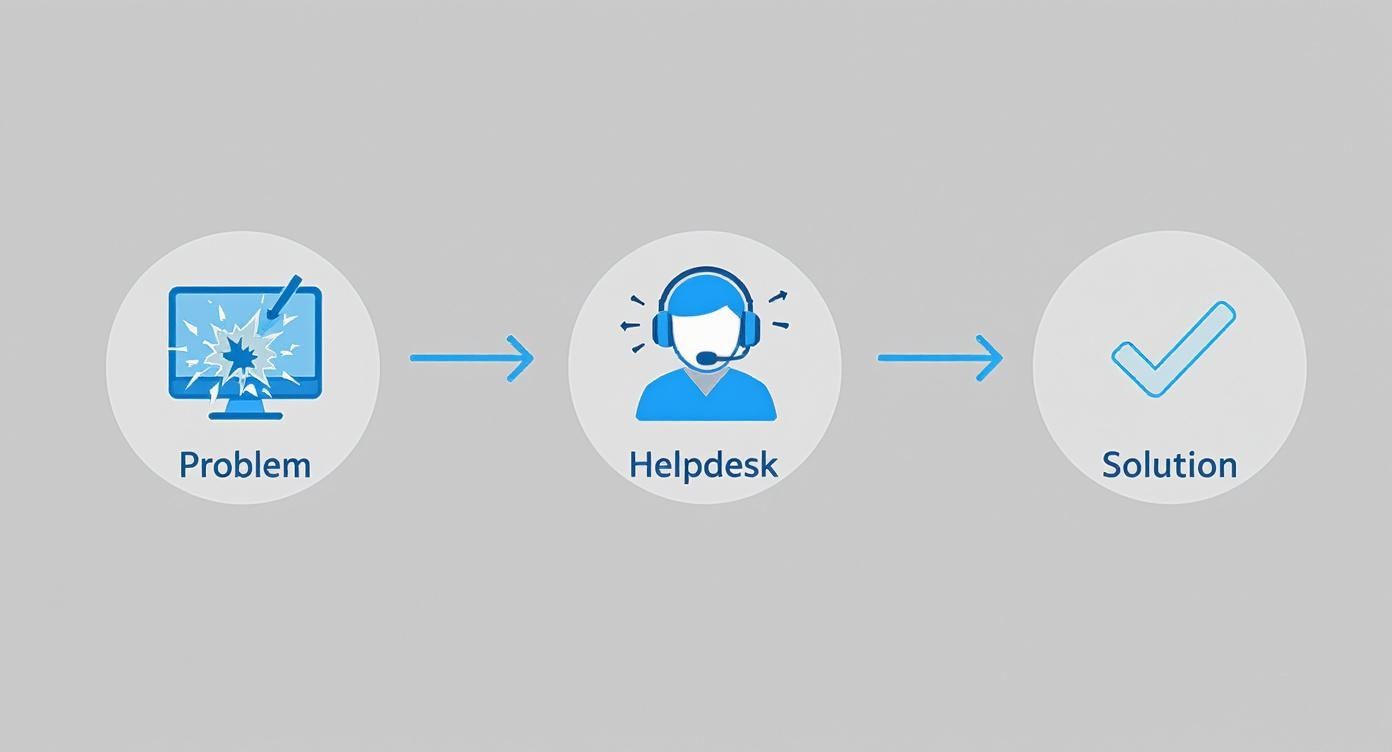
As you can see, a formal helpdesk takes a chaotic user issue and funnels it into a managed process, guaranteeing a documented and successful outcome every time.
Once a ticket is created, it's immediately triaged—just like a nurse assesses a new patient in the ER. The helpdesk team figures out the urgency and impact to prioritize it correctly. A company-wide server outage, for instance, is going to jump to the front of the line, well ahead of a request for a new mouse.
Next, the ticket gets categorized and assigned to a technician with the right skills for the job. A networking guru will tackle a connectivity problem, while a software specialist will dig into an application bug. Modern helpdesks are fantastic at integrating multiple communication channels into a single system, so it doesn’t matter how your employee reaches out—the process is always consistent and efficient.
Service Level Agreements: The Promise of Timely Support
One of the most important parts of professional helpdesk support is the Service Level Agreement (SLA). This is a formal contract that clearly defines the level of service you can expect, including specific timeframes for responses and fixes. It's the promise your IT partner makes to you.
An SLA transforms your IT support from a vague "we'll get to it when we can" into a predictable, guaranteed service. They are built around a few core promises:
- Response Time: This is the absolute maximum time it should take for a technician to acknowledge your request and start working on it.
- Resolution Time: This is the target for getting the issue completely fixed and the ticket closed. These times often change based on how critical the problem is.
An SLA isn't just technical jargon; it's a commitment. It ensures that when your business faces a critical tech failure, you know exactly how quickly you can expect a response and a solution, allowing you to manage expectations and plan accordingly.
This structured process also creates a goldmine of data. By tracking ticket types and how long they take to resolve, a good IT partner can spot recurring problems. For example, if the same software glitch keeps popping up, it signals a deeper issue that needs a permanent fix, like a critical update. This proactive mindset is a key part of smart IT management, much like the process we detailed in our guide on what is patch management.
From there, the technician diagnoses the root cause, applies the solution, and always confirms with the user that everything is back to normal before closing the ticket. This complete lifecycle ensures every problem is handled professionally from beginning to end.
In-House IT vs. Outsourced Helpdesk Support
When it comes to handling your business's technology problems, you're standing at a crossroads. Do you build your own internal IT department, or do you partner with an outside expert? This isn't just a small operational choice—it's a major strategic decision that will directly impact your budget, your team's day-to-day productivity, and how well your company can scale in the future.
On one hand, building an in-house team feels like the most direct route. You get a dedicated employee (or a few) who's right there on-site, familiar with your people and your specific way of doing things. But for a growing business, this path is loaded with heavy, often underestimated, burdens.
This decision isn’t just about who fixes the computers. It's about laying a technology foundation that can actually support your business goals, both today and five years from now.
The Realities of an In-House Team
The first thing everyone thinks about with an in-house team is the salary, but that's just the tip of the iceberg. The true expense runs much deeper. Once you factor in benefits, payroll taxes, ongoing training, and professional certifications, a single experienced IT pro can easily cost a business over $100,000 per year.
But the financial hit is only part of the story. You also have to wrestle with some critical operational challenges:
- Limited Expertise: Technology is vast. It's simply impossible for one person to be an expert in everything—from networking and cloud services to software development and, most importantly, cybersecurity. Your "IT guy" might be a wizard at fixing printers, but does he have the specialized skills to fend off a sophisticated ransomware attack?
- Coverage Gaps: What happens when your one IT person takes a well-deserved vacation, calls in sick, or decides to leave the company? Your business is left completely exposed. Critical issues don't care about anyone's schedule.
- Reactive Focus: A small internal team almost always gets stuck in "firefighter" mode. Their days are consumed by resetting passwords and fixing minor glitches, which leaves zero time for proactive, strategic projects like bolstering security or planning for future growth.
This model often creates a dangerous single point of failure that can put a growing business in a very precarious position.
The Advantages of an Outsourced Partner
This is where outsourcing your helpdesk support to a Managed Service Provider (MSP) comes in as a powerful alternative. Instead of hiring one person, you get access to an entire team of certified specialists for a predictable, flat monthly fee. It's an approach that immediately solves many of the headaches that come with the in-house model.
Outsourcing isn't about giving up control; it's about gaining access to a deeper pool of resources and expertise than an SMB could ever afford to build on its own. It transforms your IT from a cost center into a strategic asset.
Partnering with an MSP means you benefit from a wide bench of talent. When a networking problem pops up, a network engineer handles it. When a security concern arises, a cybersecurity expert steps in. You get the right specialist for every issue, every single time. This is a core advantage of working with a provider of professional managed IT services.
In-House IT vs Outsourced Helpdesk: A Strategic Comparison for SMBs
To really see the difference, it helps to put the two models side-by-side. This table breaks down the financial, operational, and strategic implications of your choice, giving you a clear view of what each path entails.
| Factor | In-House Helpdesk | Outsourced MSP Helpdesk |
|---|---|---|
| Cost Structure | High fixed costs (salary, benefits, training); often unpredictable. | Predictable, fixed monthly fee; scalable based on your needs. |
| Expertise | Limited to the knowledge of one or two individuals. | Access to a diverse team of certified specialists (cybersecurity, cloud, etc.). |
| Availability | Typically 9-to-5 with significant gaps for vacation, illness, or after-hours emergencies. | 24/7/35 support ensures you are always covered. |
| Strategic Focus | Overwhelmed with daily tasks, little time for proactive planning or improvement. | Manages daily tasks while also providing strategic guidance (vCIO) and proactive maintenance. |
| Scalability | Difficult and expensive to scale; hiring is a slow and costly process. | Easily scales up or down as your business grows or your needs change. |
For most SMBs here in Western Pennsylvania and Eastern Ohio, the outsourced model delivers a level of security, efficiency, and strategic insight that's simply out of reach with a small in-house team. It frees you up to focus on what you do best—running your business—with the confidence that your technology is in the hands of dedicated experts.
The Real-World Benefits of Expert Helpdesk Support
So, what does professional helpdesk support really do for your bottom line, besides fixing a grumpy printer or resetting a forgotten password? The answer is simple: it connects technical fixes to real, measurable business results. It’s about turning IT support from a cost center into a driver for better productivity, tighter security, and predictable operational costs.
For any small or midsize business, every minute of an employee's time and every dollar in the budget is precious. When technology decides to take a day off, the costs pile up fast. It's not just the repair bill; it's the lost sales, the missed deadlines, and the sheer frustration that grinds your operations to a halt. A proper helpdesk is your front line of defense against all of it, transforming technology from a potential headache into a reliable tool.

From Downtime to Uptime
Every single moment an employee can't work because of a tech issue is a direct hit to your revenue. Just think about it. A salesperson can't access your CRM right before a huge client call. An accountant is locked out of their software in the middle of a payroll run. Those minutes—and dollars—add up quicker than you'd think.
A professional helpdesk is built to squash this costly downtime. With a structured ticketing system and clear Service Level Agreements (SLAs), problems get logged, addressed, and solved within a predictable window. That kind of reliability keeps your team focused on their jobs and your business running like a well-oiled machine.
Boosting Employee Productivity and Morale
Let's be honest, when your team members are constantly battling their technology, they aren't doing the jobs you hired them for. They become frustrated, amateur IT technicians, and that's a recipe for disaster. It doesn’t just kill productivity; it tanks morale across the entire company.
The primary goal of a helpdesk is to remove technology as a barrier. It allows your employees to do what they do best by ensuring their tools work reliably, day in and day out.
A responsive helpdesk gives your team one single, trusted place to turn for help, getting them back to work faster. This isn't just a nice-to-have; improving the employee experience is now a top priority for tech investments, cited by 71% of decision-makers. But there's a catch: support teams are drowning in record ticket volumes, and 45% of them report struggling to keep pace. This is precisely why professional, efficient support has never been more critical. You can discover more insights on the state of tech support and see the trends for yourself.
Understanding Key Performance Indicators (KPIs)
To make sure a helpdesk is actually delivering value, we track specific metrics called Key Performance Indicators (KPIs). These aren't just empty numbers; they are direct measurements of efficiency that tell a story about how well your IT support is performing.
Here are a few of the most important ones we watch:
- First Contact Resolution (FCR): This is the holy grail. It tracks the percentage of issues solved during the very first call or email. A high FCR is a massive win for productivity—it means your employee makes one call, gets a fix, and gets right back to work. No endless follow-ups.
- Average Resolution Time: This is the clock. It measures how long it takes, on average, to completely resolve a problem from the moment it’s reported. A lower number here means less disruption and less waiting around for your team.
- Ticket Volume Trends: We don't just solve tickets; we analyze them. By looking at the number and types of issues over time, we can spot patterns and identify recurring headaches. This allows us to make proactive changes to stop those problems from ever happening again, saving countless hours down the road.
Ultimately, tracking these KPIs gives you clear, undeniable proof of your IT support's performance, ensuring it’s delivering the speed and efficiency your business needs to grow.
How to Choose the Right IT Partner
Picking an IT partner is easily one of the most important decisions you'll make for your company. It's not about finding someone to fix computers when they break; it's about building a relationship founded on trust. The right partner becomes a true strategic asset, while the wrong one can turn into a constant source of frustration and risk.
For small and midsize businesses right here in Western Pennsylvania and Eastern Ohio, this decision hits close to home. You need a partner who gets the tech, sure, but also understands the unique challenges and opportunities brewing in our regional market. Price is always part of the conversation, but it shouldn't be the deciding factor. Value and trust are where the real conversation begins.
Look for Deep Expertise and Proactive Strategies
Let's be honest—any IT company can react to a problem after it happens. A real partner, however, works proactively to stop those problems from ever derailing your day. When you're talking to potential providers, their expertise in modern security, cloud services, and business continuity should be front and center.
They shouldn’t just be talking about fixing things; they should be talking about optimizing them. This proactive mindset is everything. It's also about cost efficiency. With the average cost to handle a single support ticket hovering around $15.56, a partner focused on proactive maintenance and smart automation will absolutely lower that cost and reduce disruptions. You can read the full analysis on help desk efficiency to see just how quickly those savings add up.
Key Questions to Ask Potential Providers
To cut through the sales pitches and get to the heart of what matters, you have to ask the right questions. This isn't about trying to stump them with technical jargon. It's about understanding their process, their philosophy, and how committed they are to your success.
Here’s a practical checklist to guide those conversations:
- How do you proactively prevent issues instead of just reacting to them? Listen for answers that include things like regular system patching, 24/7 monitoring, and strategic technology planning.
- Can you provide references from local businesses similar to mine? There's no better way to gauge real-world performance than by talking to other business owners in our region.
- What does your client onboarding process look like? A detailed, structured plan is the sign of a mature, organized provider. A chaotic start almost always signals a chaotic partnership down the road.
- How do you handle cybersecurity and data protection? They need to be able to clearly explain their layered security approach, from firewalls and endpoint protection to employee security training.
- What are your guaranteed response times in your Service Level Agreement (SLA)? Ask to see their SLA in writing. That document is their formal promise for service delivery and accountability.
Transparency and Cultural Fit Are Non-Negotiable
Beyond the technical skills, you need a partner whose values actually align with yours. Do they communicate clearly and transparently, especially when it comes to billing and project updates? A great partnership thrives on open communication. Managing this relationship well is crucial, which is why understanding IT vendor management best practices is so important for long-term success.
Your IT partner should feel like an extension of your own team. They need to be invested in your business goals, understand your operational pressures, and provide guidance that helps you grow—not just maintain the status quo.
Ultimately, the goal is to find a provider who doesn't just close today's technical tickets. You need a partner who can provide the strategic guidance to help you navigate whatever comes next.
Your Next Steps: Putting Smarter IT Support into Action
Hopefully, it's clear by now that modern helpdesk support is much more than a simple ‘fix-it’ line you call when something breaks. It's a strategic part of your business, a proactive force that keeps things running smoothly and securely. You now have a solid picture of how this function can shift your daily operations from tech chaos to predictable productivity.
The biggest takeaway here is this: taking control of your IT isn't just a nice idea—it's essential if you want to grow. You don't have to put up with constant glitches and downtime as the cost of doing business. A professional helpdesk brings structure and expertise, giving you a process that protects your team's time and your company's bottom line.
Practical Tip: A 5-Minute IT Pain Point Audit
Before you do anything else, take a minute to think about where you are right now. Getting honest about your current situation is the first real step toward finding a better solution. Run through this quick checklist to pinpoint your biggest technology headaches.
- Downtime Frequency: How many times per week do tech issues stop your team from working? (0-1, 2-4, 5+)
- Resolution Speed: When a problem hits, is it fixed in minutes, hours, or days?
- Recurring Problems: Are you seeing the same frustrating glitches pop up over and over again? (Yes/No)
- Team Morale: On a scale of 1-5, how frustrated is your team with their daily tech tools?
- Strategic Plan: Do you have a clear technology roadmap for the next 12-24 months? (Yes/No)
Answering these questions honestly will shine a light on the real business cost of your current IT support—or the lack of it.
For business owners in Western Pennsylvania and Eastern Ohio who are ready to see how professional, local support can tackle these challenges head-on, we invite you to schedule a no-obligation consultation. Let's talk about your specific goals and map out a smarter path forward for your technology.
Your Questions About Helpdesk Support, Answered
Deciding to bring in an IT partner is a big move, and even with a solid grasp of what helpdesk support is, business owners always have real-world questions. I get it. To help you make a more confident choice, I’ve pulled together the most common questions we hear from SMB owners right here in Western Pennsylvania and Eastern Ohio.
How Much Does Outsourced Helpdesk Support Cost?
This is usually the first thing people ask, and the honest answer is: it depends on what you need. Most Managed Service Providers (MSPs) base their pricing on the number of users or devices you have. This gives you a predictable, fixed monthly fee that covers all your day-to-day tech support, turning a chaotic IT budget into a stable, predictable line item.
For most small to midsize businesses, this model is a financial no-brainer compared to hiring a full-time IT person. When you add up the salary, benefits, training, and tools, a single in-house technician can easily cost you well over $100,000 a year. With an outsourced plan, you get access to an entire team of seasoned experts for a fraction of that.
What Kinds of Problems Does a Helpdesk Actually Handle?
Think of a professional helpdesk as your single go-to for pretty much any tech headache, from the minor annoyances to the major showstoppers. It’s your first line of defense.
Here’s a taste of what that covers:
- Routine Service Requests: Things like password resets, setting up new user accounts, and installing software. The everyday stuff.
- Application & Software Support: Troubleshooting glitches in common business tools like Microsoft 365 or even your niche, industry-specific applications.
- Hardware & Device Issues: Diagnosing problems with desktops, laptops, printers, and all the other gadgets your team relies on.
- Connectivity Problems: Tackling the dreaded "the internet is down" issues that grind productivity to a halt.
- Security Incidents: Acting fast when someone clicks a suspicious link in a phishing email or spots potential malware.
The whole point is to knock down any technical barrier that’s keeping your employees from doing their best work.
The core function of a helpdesk is to centralize and solve problems quickly. Instead of your team wasting time trying to fix things themselves, they have a direct line to an expert who can deliver a fast, effective solution.
Is My Business Too Small for Professional IT Support?
This is a misconception I hear all the time. The reality is, no business that depends on technology is "too small" for professional support. In fact, I'd argue smaller businesses often have the most to gain because they’re far more vulnerable to the devastating financial impact of downtime or a cyberattack.
Without dedicated support, one server failure or a single ransomware attack can become a business-ending event. Partnering with an MSP gives even the smallest companies access to enterprise-grade tools, deep security expertise, and proactive maintenance they could never build on their own. It truly levels the playing field, giving you the stability and security you need to focus on growing your business.
How Long Does It Take to Switch to a New IT Provider?
A good IT partner has this down to a science. They’ll have a structured, efficient onboarding process designed to make the switch feel as smooth as possible. While the exact timeline varies based on how complex your current setup is, a well-managed transition can usually be wrapped up in just a few weeks.
The process kicks off with a deep dive to understand your entire IT environment, followed by deploying essential monitoring and security tools. Communication is everything here. Your provider should hand you a detailed project plan with clear milestones so you know exactly what’s happening every step of the way, ensuring there’s almost no disruption to your day-to-day operations.
Ready to stop reacting to IT problems and start preventing them? The team at Eagle Point Technology Solutions provides proactive, reliable helpdesk support for businesses across Western Pennsylvania and Eastern Ohio. Schedule a free consultation today to learn how we can keep your team productive and your data secure.