Imagine having a full-time, expert IT department on call, proactively solving problems before they can ever disrupt your business—all without the staggering cost of hiring an in-house team. For small and medium-sized businesses (SMBs), this isn't a fantasy. It's the reality of partnering with a provider of remote IT managed services. This model flips the script on your technology, turning it from a reactive, unpredictable expense into a strategic, fixed-cost asset.
For a business owner in Western Pennsylvania or Eastern Ohio, technology should be a tool that drives growth, not a constant source of headaches and surprise bills. Let's break down how a remote IT partnership can make that happen.
What Are Remote IT Managed Services?

Think of remote IT managed services as having a dedicated crew of technology specialists who are deeply invested in your business's IT health. Instead of you waiting for something to break and then scrambling to call for a fix, this team works tirelessly behind the scenes to keep issues from ever happening in the first place.
This proactive approach is what truly separates modern managed services from the old, frustrating way of doing things. It's about constant vigilance, not just showing up for emergency repairs. For an SMB in manufacturing, healthcare, or professional services, this means fewer headaches, less downtime, and IT spending you can actually plan for.
Shifting from Reactive to Proactive IT
The old "break-fix" model was a recipe for disaster. A server would crash, a critical piece of software would fail, and your entire team would be stuck, waiting for a technician to show up. Every hour spent waiting was an hour of lost productivity and revenue. This reactive approach is inefficient and costly, especially for SMBs where every dollar counts.
Remote managed services turn this entire model on its head. The provider's goal isn't to profit from your problems; it's to prevent them. Their success is tied directly to your stability and uptime.
This strategic partnership is built on a few core promises that directly address SMB pain points:
- Continuous Monitoring: Your provider is the digital night watchman, keeping an eye on your network, servers, and computers 24/7. They spot the warning signs—like a failing hard drive or suspicious network activity—long before it can escalate into a full-blown crisis that halts your operations.
- Proactive Maintenance: Forget about remembering to run updates. Routine tasks like software updates, security patching, and system tune-ups are handled automatically in the background. This keeps your technology secure, stable, and running at peak performance without you or your limited staff lifting a finger.
- Predictable Budgeting: Gone are the days of shocking, five-figure repair bills that blow up your budget. You pay a simple, flat monthly fee. This transforms your IT from a volatile operational expense into a stable, predictable investment in your company's growth.
Ultimately, partnering with a remote IT managed services provider gives your business access to an entire bench of specialists—from cybersecurity gurus to cloud architects and AI integration experts—for a fraction of what it would cost to build a comparable team in-house. It’s enterprise-level expertise, made accessible for the SMBs that power our local economy.
The Pillars of a Strong Remote IT Partnership
A great remote IT partnership is so much more than just a phone number to call when a computer acts up. It’s a proactive, multi-layered approach to technology management that keeps your business secure, productive, and ready for whatever comes next. Think of these core services as the essential pillars holding up your entire technology infrastructure.
When you have a provider that integrates all of them seamlessly, your IT stops being a source of constant headaches and transforms into a stable, strategic asset.
Proactive 24/7 Monitoring and Management
The foundation of any solid managed services plan is proactive 24/7 monitoring. Your IT partner acts as a round-the-clock guardian for your entire tech environment—your servers, workstations, and network gear. They use sophisticated tools to spot the early warning signs of trouble long before they can turn into major downtime.
Honestly, it’s the difference between your doctor scheduling a routine checkup versus you rushing to the emergency room. Instead of waiting for a server to go offline and disrupt your entire workday, monitoring software alerts technicians to things like critically low disk space, unusual processor spikes, or a piece of hardware that’s about to fail. This gives them the chance to fix the problem quietly in the background, often before you or your team even notice something was amiss.
Responsive Helpdesk and User Support
Even with the best proactive care in the world, your team is going to need a hand from time to time. A responsive, friendly helpdesk is the pillar that ensures your employees get fast, effective support exactly when they need it.
Whether it’s a simple password reset, a quirky software glitch, or trouble connecting to the network from a hotel, your team gets a direct line to an expert who understands your setup. No more waiting for hours, no more frustration trying to solve it themselves. This immediate access to professional support is what keeps your staff focused on their actual jobs and maintains productivity.
A strong remote IT partnership means your employees aren't left struggling with tech issues on their own. They have a dedicated team of experts ready to help, allowing them to stay focused on their core responsibilities.
Automated Security Patching and Updates
If there's one thing cybercriminals love, it's outdated software. It's one of the most common ways they sneak into a network. The pillar of automated security patching is all about slamming that door shut across your entire organization. Your IT partner makes sure all your operating systems and critical applications—like Microsoft 365—are consistently updated with the latest security fixes.
This isn't a manual, once-a-month task that someone might forget. It runs automatically behind the scenes, protecting your business from known vulnerabilities without interrupting your workday. It’s a simple concept, but it's an incredibly powerful layer of defense that is absolutely non-negotiable for modern cybersecurity.
Layered Cybersecurity and Backup Solutions
Finally, a truly comprehensive partnership must include robust, multi-layered cybersecurity and an ironclad backup plan. This is where we move far beyond basic antivirus software. It’s a strategic defense that combines modern firewalls, anti-malware, and advanced endpoint security management to protect against today's biggest threats, like ransomware and sophisticated phishing schemes.
Just as critical is a reliable backup and disaster recovery system. If the worst happens—a server dies, a fire breaks out, or a ransomware attack gets through—your provider needs to be able to restore your critical data and systems quickly. This combination of proactive defense and rapid recovery is what makes your technology, and your business, truly resilient.
Core Remote IT Managed Services and Their Business Impact
To put it all together, here’s a breakdown of these core services and the tangible value they bring to a small or midsize business.
| Core Service Component | Primary Function | Direct Business Benefit |
|---|---|---|
| 24/7 Proactive Monitoring | Continuously watches servers, workstations, and network for health issues. | Prevents costly downtime by catching problems before they impact your team. |
| Responsive Helpdesk | Provides direct, expert technical support for all employees. | Minimizes employee frustration and keeps your entire team productive. |
| Automated Patching | Keeps all software and operating systems updated with security patches. | Closes known security holes, drastically reducing vulnerability to cyberattacks. |
| Layered Cybersecurity | Deploys firewalls, endpoint protection, and other advanced security tools. | Protects against ransomware, business email compromise, and other costly threats. |
| Backup & Disaster Recovery | Regularly backs up critical data and creates a plan for rapid restoration. | Ensures business continuity by getting you back online quickly after any disaster. |
Ultimately, these pillars work together to create a technology environment that doesn't just work—it works for you, supporting your business goals instead of holding you back.
Choosing Your Support Model: Remote, On-Site, or Hybrid
So, how do you decide between a fully remote IT team, a classic on-site technician, or something in between? For an SMB, this isn't just a tech question—it's a strategic one that directly impacts your budget, your team's productivity, and your ability to grow.
Each model brings something different to the table, and the right choice depends entirely on how your business operates day-to-day. Forget the one-size-fits-all approach. Instead, think about how your team works, what kind of specialized hardware you rely on, and your long-term goals. This decision tree can help you visualize that initial thought process when a new IT issue pops up.
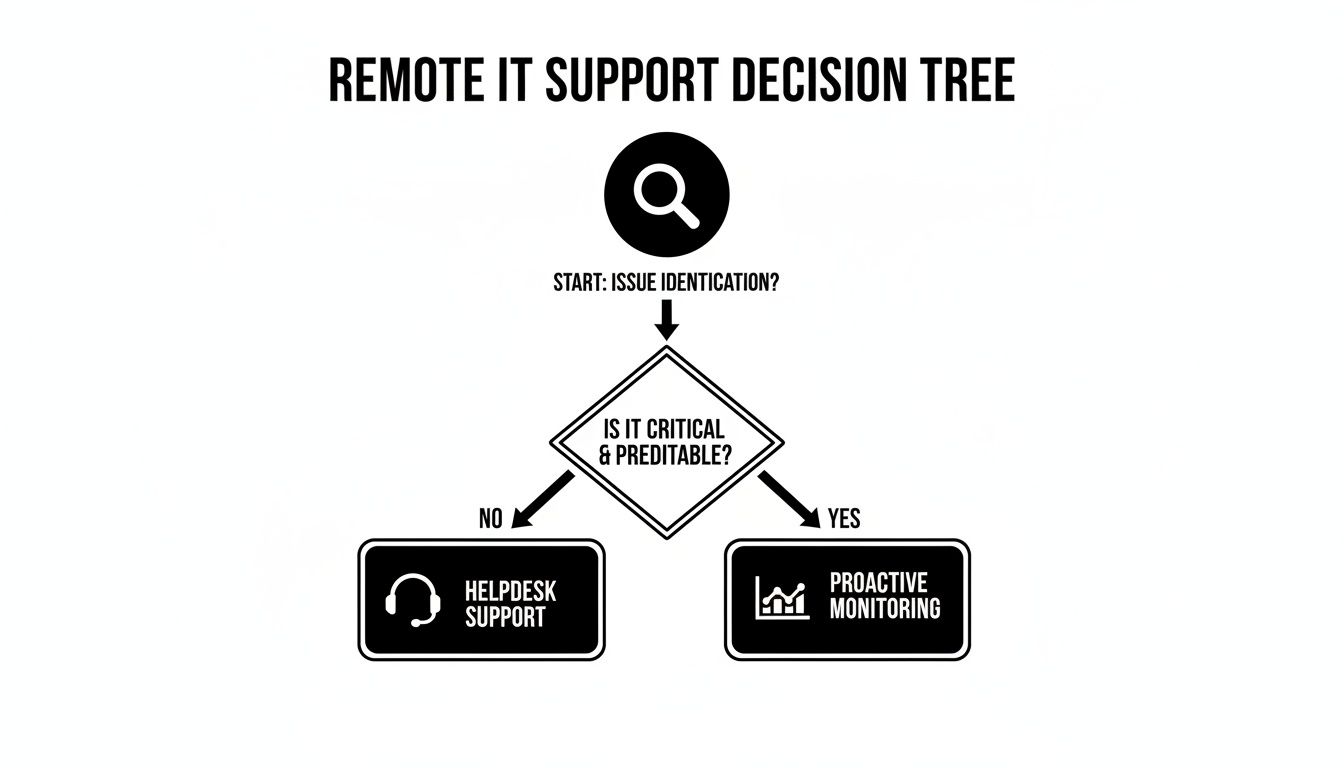
As the flowchart shows, problems get identified and then routed down two main paths: immediate helpdesk support for issues your users are actively dealing with, or proactive monitoring for system-level alerts that need attention behind the scenes.
Fully Remote IT Support
The fully remote IT managed services model is all about speed, efficiency, and smart spending. With this setup, just about everything—from fixing software glitches and managing cloud services to monitoring for cybersecurity threats—is handled right over the internet.
For most SMBs, this is the most practical and cost-effective choice. The truth is, the vast majority of IT issues today are related to software, user error, or the network. These problems can be solved much, much faster remotely than waiting for a technician to drive to your office. It gives you instant access to a deep bench of experts without the cost and overhead of having someone physically on site.
Traditional On-Site Support
The on-site model means having an IT technician physically at your location, either as a full-time employee or on a scheduled visit. This is absolutely necessary for businesses with heavy manufacturing machinery, specialized healthcare equipment, or frequent physical IT tasks like setting up new workstations or managing complex server racks.
But here's the catch for most SMBs: relying only on on-site support can be painfully slow and expensive for everyday problems. A user who needs a password reset or a simple software permission change doesn't need someone to show up in person. Making them wait just creates unnecessary downtime. Plus, a purely on-site model often lacks the crucial 24/7 monitoring that catches problems before they can disrupt your business.
The best model for your business aligns your IT support with your actual day-to-day operational needs, not just perceived ones. Balancing rapid remote response with on-demand physical support is often the key.
The Hybrid Model: The Best of Both Worlds
For many businesses here in Western Pennsylvania and Eastern Ohio, the hybrid model hits that perfect sweet spot. It combines the lightning-fast response and cost savings of remote IT managed services with the peace of mind that a technician can be sent out for on-site help when it's genuinely needed.
This flexible approach ensures you're covered no matter what. Your team gets instant help for 95% of their daily IT hiccups, while you still have the ability to call in hands-on support for critical hardware failures, office moves, or complex new installations. It's the most strategic, efficient, and resilient way to manage your technology today.
How to Choose the Right IT Managed Services Partner
Picking a remote IT managed services provider is one of those big decisions that can really shape your company’s future. It impacts your security, day-to-day productivity, and even your ability to compete and grow. This goes way beyond just comparing a few monthly quotes. You're not just buying a service; you're bringing a strategic partner into your business.
Making the right call means looking past a slick sales pitch. As a trusted advisor, we encourage you to focus on tangible proof of their expertise, their reliability, and whether they genuinely understand what a business like yours needs. It’s time to dig into the details that truly matter.
Decoding the Service Level Agreement
The Service Level Agreement (SLA) is the contract that spells out your entire relationship with a Managed Service Provider (MSP). It's where promises get put into writing, and it absolutely deserves your full attention. If an SLA is vague or confusing, that’s a huge red flag.
You want to see specific, measurable commitments. A solid SLA should clearly outline:
- Guaranteed Response Times: How quickly will they acknowledge a new support ticket? Look for different times for critical vs. low-priority issues.
- Resolution Times: What’s their target for fully fixing problems, from minor glitches to major outages?
- System Uptime: What percentage of uptime do they guarantee for the critical systems they manage (like 99.9%)?
- Penalties for Non-Compliance: What happens if they don’t hold up their end of the bargain? This shows they stand behind their service.
A strong SLA creates clarity and holds your partner accountable. Think of it as the official rulebook for your partnership—make sure it’s written to protect your business's interests.
Verifying Technical Expertise and Certifications
You have to be sure the team managing your IT infrastructure is actually qualified for the job. Don't be shy about asking what certifications their technicians hold. Look for credentials from major players like Microsoft (for cloud services like Azure and Microsoft 365), Cisco (for networking), or CompTIA (for foundational and security skills), which show a real commitment to professional standards and staying current.
This is especially critical when it comes to cybersecurity and compliance. If you're a manufacturer in the defense supply chain needing to meet CMMC requirements, or a healthcare provider in Ohio who has to meet HIPAA regulations, your MSP absolutely must have proven experience in those specific areas.
Choosing a partner is an exercise in trust. Verifying their certifications, checking references, and looking at case studies isn’t about being difficult—it’s about doing the necessary due diligence to protect your business.
Assessing Local Presence and Industry Focus
For businesses here in Western Pennsylvania, having a partner who understands the local economic landscape can be a game-changer. While most support happens remotely, knowing they can dispatch a technician from a nearby location for a critical on-site emergency provides priceless peace of mind.
On top of that, ask about their experience in your specific industry. An MSP that’s already worked with other manufacturing firms, professional services companies, or healthcare practices will already know your common challenges, key software applications, and the compliance pressures you face. That experience shortens the learning curve and means you get more effective, relevant support from day one. Proper evaluation is a core part of effective IT vendor management best practices.
When you're sizing up potential partners, it’s also important to think about the level of management your infrastructure needs. The decision is a lot like understanding the distinction between Managed vs Unmanaged VPS Hosting; you have to figure out just how hands-on you need your provider to be. Finding a partner whose service model clicks with your operational style is the key to a great long-term relationship.
What to Expect During the Onboarding Process

Making the switch to a new remote IT managed services provider shouldn't feel like you're jumping out of a plane and hoping the parachute opens. A professional partner won't just flip a switch and wish you luck. Instead, they'll guide you through a structured, transparent onboarding process designed to cause as little disruption to your business as possible.
Think of it as a well-managed project, complete with a clear roadmap and constant communication. Your new provider’s goal is to become a genuine extension of your team, and that relationship has to start with a deep understanding of your business from day one.
Phase 1: Initial Discovery and Audit
The first step is always a thorough discovery and audit. This is where your new IT partner really rolls up their sleeves to learn your existing infrastructure inside and out. They're not just counting computers; they are mapping your entire network, identifying what software is critical to your operations, and getting a clear picture of your current security posture.
This phase is absolutely crucial for creating a support plan that actually works for you. It allows the provider to document everything, spot potential vulnerabilities you might not even know about (like missing security patches), and, most importantly, understand how your team uses technology to get their jobs done every day.
Phase 2: Strategic Planning and Integration
Once they have a complete picture of your IT environment, the next phase is all about strategic planning. Your provider will sit down with you to hammer out a technology roadmap that aligns with your actual business goals. This is also when they deploy their remote monitoring and management (RMM) tools onto your systems.
These lightweight software agents are the heart of proactive IT support. They make it possible for your provider to handle:
- Automated System Monitoring: Keeping an eye on performance issues or hardware warnings 24/7.
- Secure Remote Access: Letting technicians resolve problems quickly without ever needing to come on-site.
- Streamlined Patch Management: Ensuring all your systems are consistently updated to protect against the latest security threats.
Onboarding is a collaborative effort. The provider brings the technical expertise, but your input on business priorities and operational workflows is essential to ensure the technology serves your company's strategic objectives.
During this phase, credentials are securely transferred, and your team gets introduced to the helpdesk ticketing system. Clear communication is key here, making sure everyone knows exactly how to ask for help from the moment the new service goes live. This prevents confusion and keeps your team productive. The final "go-live" is a carefully coordinated event, not a sudden surprise.
Gaining Strategic Advantages Beyond Daily IT Fixes

The true power of a great remote IT partner isn't found in fixing a stubborn printer or resetting a forgotten password. Of course, those day-to-day fixes are essential. But the game-changing value comes when you elevate your technology from a necessary cost into a genuine strategic asset for your business.
This shift happens when your Managed Service Provider (MSP) stops feeling like an outside vendor and starts acting like an extension of your own leadership team. They help you look past the immediate, nagging problems and start planning for long-term growth, ironclad security, and real operational efficiency. This is where a partnership truly pays dividends, freeing up your team to innovate instead of constantly fighting tech fires.
The Role of a Virtual CIO (vCIO)
Imagine having a C-level technology executive shaping your IT strategy, but without the six-figure salary that comes with it. That’s the core benefit of a Virtual Chief Information Officer, or vCIO. This is a high-level guidance service often bundled with comprehensive remote IT managed services, designed specifically to give SMBs an executive edge.
A vCIO helps you tackle the big-picture questions that drive your business forward:
- Technology Roadmapping: They work with you to ensure every dollar you spend on tech—from new cloud services to AI tools—is directly tied to your future business goals.
- IT Budgeting and Planning: A vCIO helps create a predictable, strategic budget that puts an end to unexpected, costly IT surprises.
- Compliance and Governance: They ensure your technology stack meets critical industry regulations, whether it's HIPAA for healthcare or CMMC for defense contracting.
This kind of strategic oversight is what transforms your IT from a reactive expense into a proactive engine for growth and stability.
Focusing on Your Core Business Goals
At the end of the day, every minute your team spends wrestling with an IT headache is a minute they aren't spending on sales, customer service, or developing your next great product. Outsourcing IT management lets you reclaim that lost focus and time, which is a major reason why so many SMBs turn to partners for support.
If you’re curious about the financial impact, you can calculate the ROI of a help desk solution to see how the numbers stack up for your business.
A proactive approach also shields your bottom line and your reputation. This goes beyond just preventing threats; it involves building robust strategies for business continuity so you can keep operating no matter what. Our guide on how to prevent data loss offers a deeper dive into building that kind of resilience. The right partner becomes deeply invested in your success, making sure your technology is always working for you, not against you.
Have Questions About Remote IT Services? We've Got Answers.
When you're exploring IT support for your business in Western Pennsylvania or Eastern Ohio, it's natural to have a few questions. As trusted advisors, we believe in being transparent. Let's tackle some of the most common ones we hear from local business owners just like you.
Are Remote IT Managed Services Actually Secure?
Yes, and in most cases, they're far more secure than what a small business can manage alone. A professional remote IT provider isn't just using off-the-shelf antivirus. We deploy enterprise-grade security tools, encrypted connections for remote access, and follow strict protocols that often make your business more secure than it would be with a small in-house team trying to keep up with the latest threats.
Think of it this way: you're getting a dedicated team of cybersecurity specialists whose entire job is to stay ahead of threats like ransomware and business email compromise. That's a level of expertise most SMBs simply can't afford to hire directly.
What’s the Real Cost of Remote IT Services?
Most reputable providers operate on a predictable, flat-rate monthly fee. This is usually priced per user or per device, which completely eliminates those surprise, budget-breaking repair bills that come with the old break-fix model.
This approach transforms your IT spending from a chaotic, variable expense into a stable, manageable line item in your budget. In the long run, when you factor in the prevention of costly downtime and security breaches, it's almost always more cost-effective than the salary, benefits, training, and overhead of hiring an internal IT staff with the same breadth of skills.
What If We Need Someone to Physically Come to Our Office?
That’s a great question and a critical piece of the puzzle for many businesses. While an incredible 95% of IT issues can be solved quickly and efficiently over the phone or with a secure remote connection, some problems just need a hands-on approach.
This is where a hybrid model comes in. Many providers—including those with a strong local presence like us—can dispatch a technician right to your door when a physical task is necessary. Whether it's setting up new hardware, troubleshooting a tricky network failure, or just needing a physical presence for an office move, you get the best of both worlds: the lightning-fast response of remote support backed by the peace of mind of local, on-site help.
Ready to see how proactive IT support can become a strategic advantage instead of a constant headache? For over a decade, the team at Eagle Point Technology Solutions has been helping businesses across Western Pennsylvania and Eastern Ohio leverage technology to grow. We understand the challenges you face because we're part of your community. Schedule a free, no-obligation consultation and let's talk about how our approach can secure your operations and help your business thrive.